Skip to content
    • About
    • Contact

/root

OpenZFS
  • Power optimizations in a Laptop running FreeBSD

    March 5th, 2026

    An annoying problem that I always had while running FreeBSD on my Dell Inspiron 15 5510 is the high temperature and fan speed. Doesn’t matter if it’s a live medium or post-installation — the average CPU temp is over 60 degrees Celsius.

    With FreeBSD 15.0 (released December 2025) and the FreeBSD Foundation’s laptop project, things have improved significantly. Here’s what works.

    Checking CPU Temperature

    First, load the Intel Core temperature sensor driver:

    kldload -v coretemp

    Then check the temperature with:

    sysctl dev.cpu | grep temperature

    To load this automatically at boot, add to /boot/loader.conf:

    coretemp_load="YES"

    Power Management with powerd

    FreeBSD ships with powerd, a daemon that dynamically adjusts CPU frequency based on load. Enable it in /etc/rc.conf:

    powerd_enable="YES"
    powerd_flags="-a hiadaptive -b adaptive"

    This sets the CPU to hiadaptive mode on AC power (favors performance but still scales) and adaptive on battery (favors power saving).

    C-States and Power Saving

    Enable deeper CPU sleep states by adding to /etc/sysctl.conf:

    hw.acpi.cpu.cx_lowest=Cmax

    New in FreeBSD 15: Modern Sleep States

    FreeBSD 15 brings new power management features from the Foundation’s laptop initiative:

    • s2idle (suspend-to-idle) support for modern standby
    • New SPMC (System Power Management Controller) driver for s0ix sleep states
    • Work-in-progress CPPC (Collaborative Processor Performance Control) for AMD processors — enabling finer-grained performance/efficiency control

    Suspend and Resume

    For laptops, suspend/resume support can be tested with:

    acpiconf -s 3

    If it works, you can bind it to your laptop lid by adding to /etc/sysctl.conf:

    hw.acpi.lid_switch_state=S3

    Results

    After applying these changes, my Dell Inspiron dropped from a constant 60+ degrees down to around 40-45 degrees at idle, and the fan became much quieter. The combination of powerd with proper C-state configuration makes a noticeable difference on FreeBSD laptops.

    More details: coretemp(4), powerd(8), FreeBSD Wiki: Tuning Power Consumption

  • ankiR mirrored by Washington State University!!

    March 5th, 2026
  • Tip of the day – ntp – big offset mitigation

    March 3rd, 2026

    If you’ve ever rebooted a machine and NTP refused to sync because the clock drifted too far, you’ve hit the panic threshold. By default, ntpd will exit if the offset exceeds 1000 seconds.

    The Fix

    Add this to /etc/ntp.conf:

    tinker panic 0

    Setting panic 0 disables the panic threshold entirely, allowing ntpd to correct any offset regardless of size.

    When Is This Useful?

    • Machines that have been powered off for a long time (e.g., home servers, lab equipment)
    • VMs that resume from a suspended state with a stale clock
    • Systems without a working RTC battery
    • FreeBSD jails or containers that inherit a drifted host clock

    Alternative: One-Time Force Sync

    If you don’t want to permanently disable the panic threshold, you can do a one-time force sync with:

    ntpd -gq

    The -g flag allows the first adjustment to be any size, and -q makes ntpd set the time and exit.

  • Proxmox Backup Server

    March 2nd, 2026
  • Proxmox Backup Server for Near ZERO Downtime

    March 1st, 2026
  • PostgreSQL 18: What’s New and Where It Stands in 2026

    March 1st, 2026

    PostgreSQL 18 was released in September 2025, and it’s packed with major improvements across the board. As of February 2026, the latest point release is PostgreSQL 18.3 — an out-of-cycle release on February 26th that fixes several regressions from the last update. Here are the highlights of the 18.x series.

    Performance

    • New asynchronous I/O subsystem (AIO) delivers up to 3x faster data reads
    • Better index usage and parallel GIN index builds
    • Skip scans on multicolumn indexes
    • Improved OR condition optimization
    • Faster hash/merge joins

    Upgrades

    • Planner statistics preserved across major upgrades — faster recovery of query performance
    • pg_upgrade improvements: parallel checks, --swap option

    Developer Features

    • Virtual generated columns (now the default)
    • UUIDv7 function — timestamp-ordered UUIDs
    • Access to OLD/NEW values in RETURNING
    • Temporal constraints (WITHOUT OVERLAPS, PERIOD)

    Text Processing

    • Faster Unicode collation (PG_UNICODE_FAST)
    • Nondeterministic LIKE support
    • Improved full text search behavior

    Security & Authentication

    • OAuth 2.0 authentication support
    • FIPS mode validation
    • TLS v1.3 ciphers now configurable
    • MD5 auth deprecated — SCRAM recommended

    Replication

    • Default parallel streaming for subscriptions
    • Conflict reporting
    • Auto-drop idle replication slots

    Maintenance & Observability

    • Smarter vacuum freezing
    • EXPLAIN now shows buffer, index, CPU, and WAL stats
    • Expanded monitoring views

    Other Notable Changes

    • Page checksums enabled by default in new clusters
    • New wire protocol version 3.2 — the first update since 2003!

    Point Releases

    • 18.1 (Nov 2025) — first maintenance release
    • 18.2 (Feb 2026) — regular update cycle
    • 18.3 (Feb 26, 2026) — out-of-cycle fix for regressions in 18.2

    The AIO subsystem alone makes the upgrade worthwhile for anyone running read-heavy workloads. If you’re still on 17.x, now is a great time to plan the migration — 18.3 is stable and battle-tested. More details at postgresql.org.

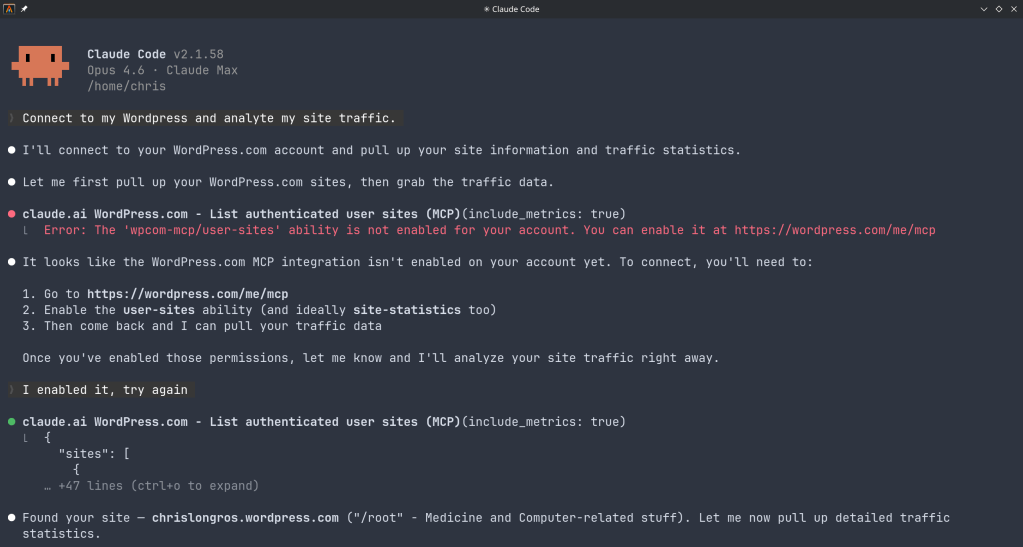
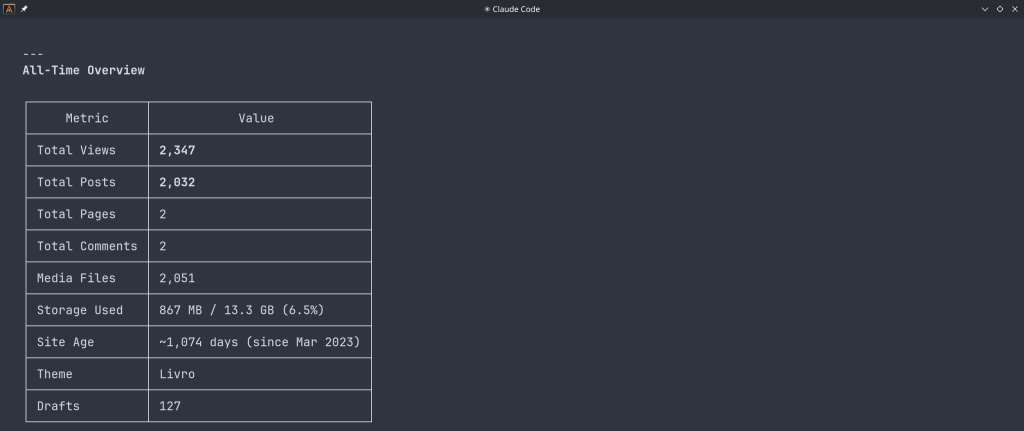
  • Claude’s Connector for WordPress

    February 28th, 2026

    “The WordPress.com MCP server allows AI assistants to securely interact with your WordPress.com sites. It exposes tools for listing, searching, and viewing posts, pages, and comments, managing users and site settings, and retrieving statistics. By leveraging OAuth 2.1, it ensures that agents only access resources you’ve approved, making it easy to integrate AI-driven workflows into your publishing experience.”

    You can use WordPress.com to:

    Manage Content:
    “Show me my latest blog posts” or “Search for posts about technology”

    View Analytics:
    “What are my site statistics for this month?”

    Manage Users:
    “List all users on my WordPress site”

    Site Administration:
    “Check my site settings and installed plugins”

    https://claude.com/connectors/wordpress-com

  • FreeBSD 14.4 RC1

    February 28th, 2026
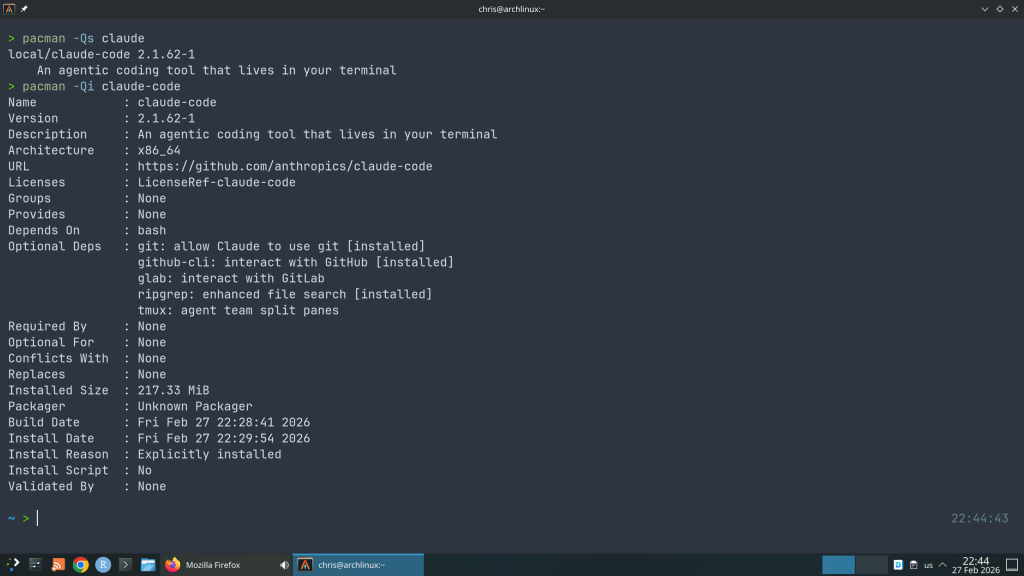
  • Claude Code Security Vulnerabilities !!

    February 27th, 2026

    And I wondered why so many AUR package updates for the claude-code …

    “Cybersecurity researchers have disclosed multiple security vulnerabilities in Anthropic’s Claude Code, an artificial intelligence (AI)-powered coding assistant, that could result in remote code execution and theft of API credentials.”

    “The vulnerabilities exploit various configuration mechanisms, including Hooks, Model Context Protocol (MCP) servers, and environment variables – executing arbitrary shell commands and exfiltrating Anthropic API keys when users clone and open untrusted repositories”

    https://thehackernews.com/2026/02/claude-code-flaws-allow-remote-code.html

  • February 27th, 2026
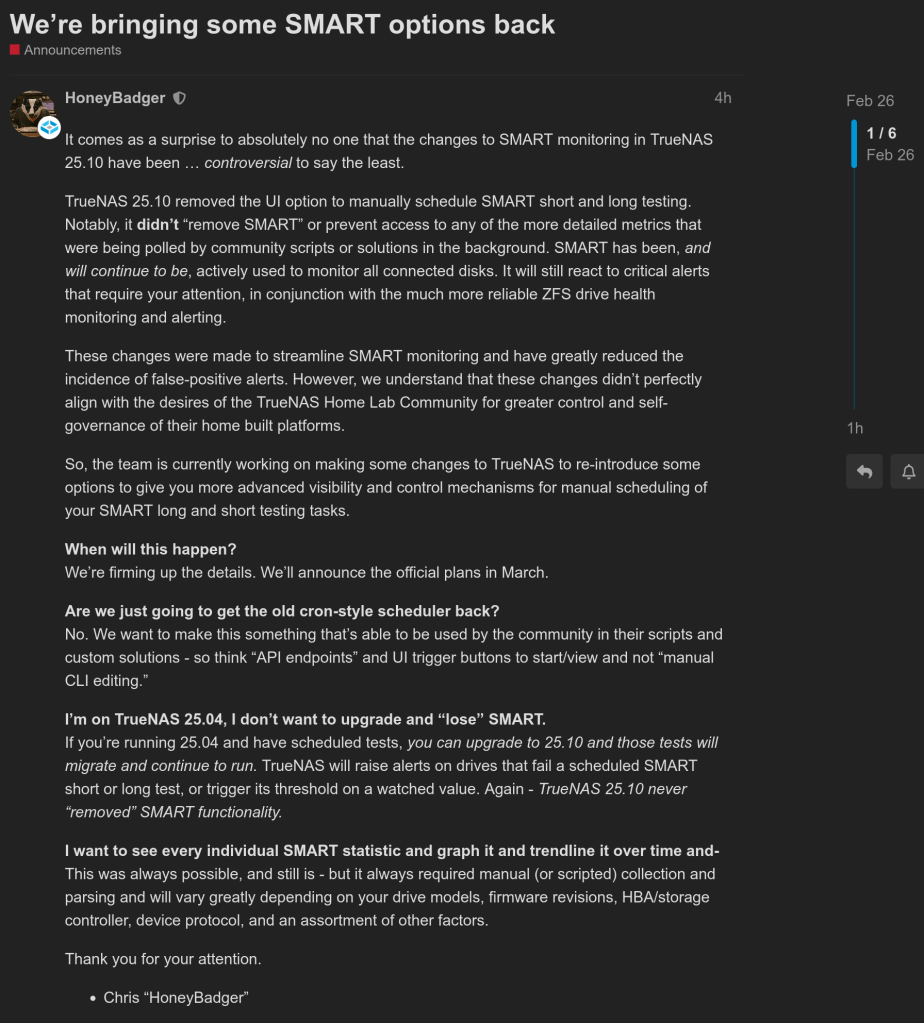
  • iXsystems brings back SMART to TrueNAS

    February 26th, 2026

    https://forums.truenas.com/t/we-re-bringing-some-smart-options-back/64029

  • Officially member of BioArchLinux

    February 25th, 2026

    I recently added my AUR package ankiR to the BioArchLinux repository, a repo that contains the majority of R Language related packages such as r-tidyverse etc.

    https://github.com/BioArchLinux/Packages/pull/305

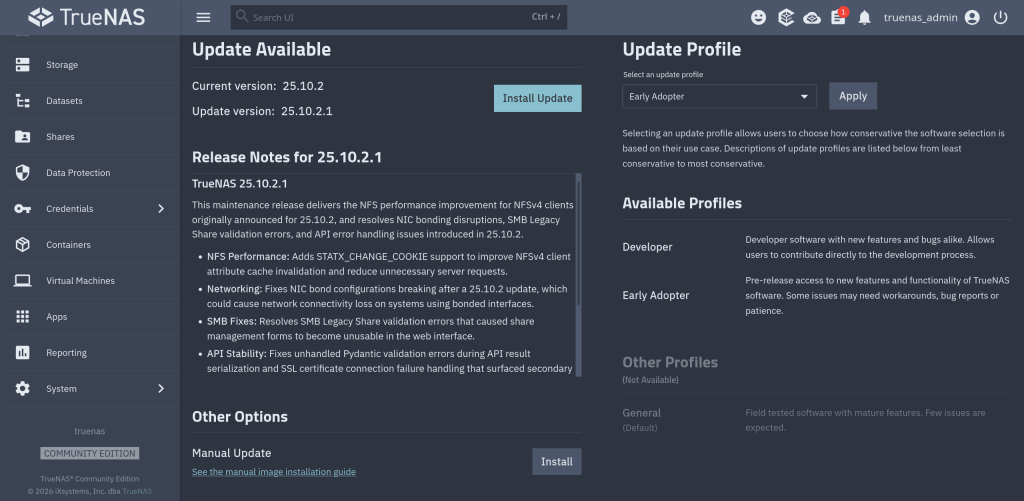
  • TrueNAS 25.10.2.1 available

    February 25th, 2026

    Notable changes:

    • Improves NFS performance for NFSv4 clients (NAS-139128). Adds support for STATX_CHANGE_COOKIE to properly surface ZFS sequence numbers to NFS clients via knfsd. The NFS change_info4 structure now accurately tracks directory and file changes, which reduces unnecessary server requests. Client attribute cache invalidation is also improved. Previously, the system synthesized change IDs based on ctime, which could fail to increment consistently due to kernel timer coarseness.
    • Fixes NIC bonding configuration disrupted after a system update (NAS-139889). Resolves an issue where network interface bond configurations could break after a TrueNAS 25.10.2 update. Affected systems could lose network connectivity on bonded interfaces.
    • Fixes SMB Legacy Share validation errors that broke share management UI forms (NAS-139892). Resolves an issue where SMB shares using the Legacy Share preset with certain path_suffix variable substitutions failed middleware validation. The SMB share configuration forms became unusable in the web interface as a result.
    • Fixes API result serialization failures caused by unhandled validation errors (NAS-139896). Resolves an issue where certain Pydantic validation errors were not caught during API result serialization. This caused unexpected errors to appear in the web interface instead of proper error messages.
    • Fixes SSL certificate connection failure error handling (NAS-139938). Resolves an AttributeError that occurred when an HTTPS connection failed due to a certificate error. Cloud sync tasks, replication, or other SSL-dependent network operations could surface a secondary AttributeError instead of the original connection failure message.

    https://forums.truenas.com/t/truenas-25-10-2-1-is-now-available/63998

  • Anki’s MCP Interface

    February 24th, 2026

    There’s an Anki addon called anki-mcp-server that exposes your Anki collection over MCP (Model Context Protocol). If you haven’t come across MCP yet — it’s basically a standardized way for AI assistants to interact with external tools. Connect this addon and suddenly Claude (or whatever you’re using) can search your cards, create notes, browse your decks, etc.

    Pretty cool, but there was a big gap: zero FSRS support. The assistant could see your cards but had no idea how they were being scheduled. It couldn’t read your FSRS parameters, couldn’t check a card’s memory state, couldn’t run the optimizer. For anyone who’s moved past SM-2 (which should be everyone at this point), that’s a significant blind spot.

    So I wrote a PR that adds four tools and a resource to fill that gap.

    get_fsrs_params reads the FSRS weights, desired retention, and max interval — either for all presets at once or filtered to a specific deck. get_card_memory_state pulls the per-card memory state (stability, difficulty, retrievability) for a given card ID. set_fsrs_params lets you update retention or weights on a preset. And optimize_fsrs_params runs Anki’s built-in optimizer — with a dry-run mode so you can preview the optimized weights before committing.

    There’s also an anki://fsrs/config resource that gives a quick overview of your FSRS setup without needing a tool call.

    The annoying part was version compatibility. FSRS has been through several iterations and Anki stores the parameters under different protobuf field names depending on which version you’re on. I ended up writing a fallback chain that tries fsrsParams6 first, then fsrsParams5, then fsrsParams4, and finally the old fsrsWeights field. The optimizer tool also needs to adjust its kwargs depending on the Anki point version (25.02 and 25.07 changed the interface). All of that version-detection logic lives in a shared _fsrs_helpers.py so the individual tools stay clean.

    One gotcha that took me a bit to track down: per-deck desired retention overrides are stored as 0–100 on the deck config dictionary, but the preset stores them as 0–1. Easy to miss, and you’d get nonsensical results if you didn’t normalize between the two.

    What I’m most excited about is what this enables in practice. You can now ask an AI assistant things like “run the optimizer on my medical deck in dry-run mode and tell me how the new weights compare” or “which of my presets has the lowest desired retention?” — and it can actually do it, pulling real data from your collection instead of just guessing. For someone who spends a lot of time tweaking FSRS settings across different decks, having that accessible through natural language is a nice quality-of-life improvement.

    The PR was recently merged. I tested everything locally — built the .ankiaddon, installed it in Anki, ran through all the tools against a live collection. If you’re into the Anki + AI workflow, take a look and let me know what you think.

    PR: ankimcp/anki-mcp-server-addon#14

  • Fixing a 7-Year-Old UX Bug in OpenZFS

    February 23rd, 2026

    Here’s a scenario most ZFS users have run into at least once. You reboot your server, maybe a drive didn’t spin up in time, or mdadm grabbed a partition before ZFS could — and zpool import hits you with this:

    The pool metadata is corrupted.
    Action: Destroy and re-create the pool.

    Your stomach drops. Corrupted? You start mentally cataloging your backups. Maybe you even reach for zpool destroy.

    Except… the metadata isn’t corrupted. ZFS just couldn’t see all the disks. The data is fine. The pool is fine. The error message is the problem.

    I’ve hit this myself on my TrueNAS box when a drive temporarily disappeared after a reboot. The first time I saw it I genuinely panicked. After digging into the source code, I realized that ZPOOL_STATUS_CORRUPT_POOL is basically a catch-all. Anytime the root vdev gets tagged with VDEV_AUX_CORRUPT_DATA — whether from actual corruption or simply missing devices — you get the same scary message. No distinction whatsoever.

    This has been a known issue since 2018. Seven years. Plenty of people complained about it, but nobody got around to fixing it.

    So I did. The PR is pretty straightforward — it touches four user-facing strings across the import and status display code paths. The core change:

    Before
    “The pool metadata is corrupted.”
    → Destroy and re-create the pool.
    After
    “The pool metadata is incomplete or corrupted.”
    → Check that all devices are present first.

    The recovery message also changed. Instead of jumping straight to “destroy the pool”, it now tells you to make sure your devices aren’t claimed by another subsystem (mdadm, LVM, etc.) and try the import again. You know, the thing you should actually try first before nuking your data.

    Brian Behlendorf reviewed it, said it should’ve been cleaned up ages ago, and merged it into master today. Not a glamorous contribution — no new features, no performance gains, just four strings. But if it saves even one person from destroying a perfectly healthy pool because of a misleading error message, that’s a win.

    PR: openzfs/zfs#18251 — closes #8236

←Previous Page
1 … 15 16 17 18 19 … 152
Next Page→

Blog at WordPress.com.

Privacy & Cookies: This site uses cookies. By continuing to use this website, you agree to their use.
To find out more, including how to control cookies, see here: Cookie Policy
Loading Comments...
  • Subscribe Subscribed
    /root

    Have a WordPress.com account? Log in now.

  • /root
    View site in Reader
    Manage subscriptionsSign upLog in
    Report this content
    Collapse this bar