




This is a guide of the steps I followed to downgrade from TrueNAS 26 MASTER to TrueNAS 26 BETA1. (specifically from 26.0.0-MASTER+20260405-020459 to 26.0.0-BETA.1)
TrueNAS considers MASTER a higher train than BETA. Attempting a manual update from MASTER to BETA.1 gives:
Unable to downgrade from 26.0.0-MASTER+20260405-020459 to 26.0.0-BETA.1
Step 1: Bypass the Downgrade Check
- SSH into TrueNAS and remount /usr read-write:
- sudo mount -o remount,rw /usr
- Edit the middleware update file:
- sudo nano /usr/lib/python3/dist-packages/middlewared/plugins/update_/install_linux.py
- Find and remove these two lines (around line 64-65):
- if not can_update(old_version, new_version): raise CallError(f’Unable to downgrade from {old_version} to {new_version}’)
- Restart the middleware:
- sudo systemctl restart middlewared
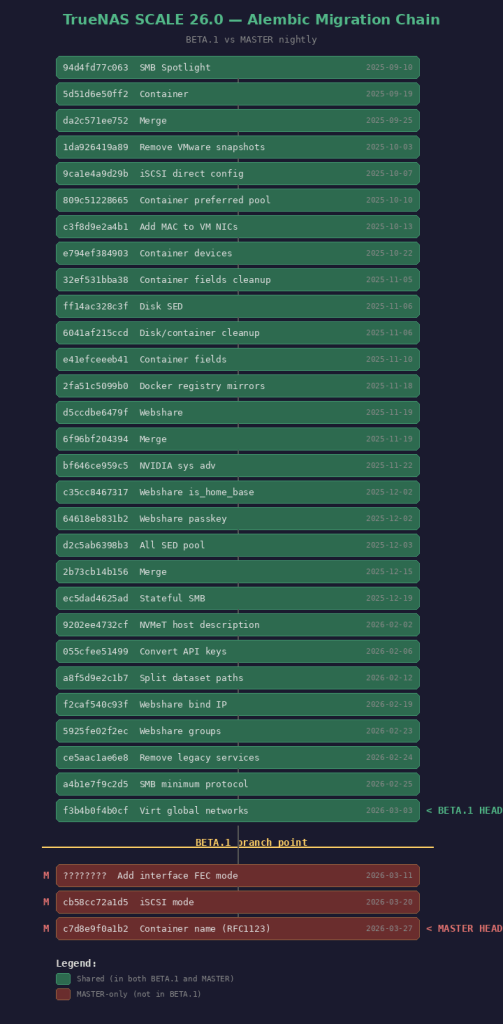
Step 2: Fix the Alembic Migration Mismatch
You need to find BETA.1’s head migration revision. Mount the .update file on another Linux machine:
sudo mkdir -p /tmp/truenas-beta
sudo mount -t squashfs -o ro,loop TrueNAS-26.0.0-BETA.1.update /tmp/truenas-beta
sudo mkdir -p /tmp/truenas-rootfs
sudo mount -t squashfs -o ro,loop /tmp/truenas-beta/rootfs.squashfs /tmp/truenas-rootfs
Find the last migration file and its revision ID:
ls /tmp/truenas-rootfs/usr/lib/python3/dist-packages/middlewared/alembic/versions/26.0/
grep “^revision” /tmp/truenas-rootfs/…/last_migration_file.py
Then on TrueNAS, stamp the database with that revision:
sudo sqlite3 /data/freenas-v1.db “UPDATE alembic_version SET version_num=”;”
Step 3: Apply the Update
DISCLAIMER: Keep a backup of your settings!!!!
 /root
/root 