Mullvad will discontinue its free public DNS-over-HTTPS (DoH) service on November 2, 2026, redirecting its resources toward financially supporting Quad9.
Why Mullvad Is Discontinuing the Service
Mullvad has operated public encrypted DNS servers since 2022.
Mullvad VPN users do not need these servers because the VPN already encrypts traffic and provides internal DNS resolution.
Outside the VPN, public DoH protects DNS queries from ISP visibility.
Mullvad considers Quad9 better equipped to operate a specialized, privacy-focused public DNS service and will support it financially instead.
Required Migration Actions
User / Configuration
Required Action
Mullvad VPN users
No changes necessary.
Manually configured Mullvad DoH
Switch to Quad9 before November 2, 2026.
Mullvad Browser (default DoH or included ad-blocking setting)
Automatic migration to Quad9.
Mullvad Browser (custom DoH)
Settings remain unchanged; manually configured Mullvad DoH variants must be switched back to the default.
Shared people management: People can be shared between users, including people you don’t own, so they appear in shared assets. With permission, you can edit another user’s person. Sharing is limited to users in the same cluster group.
Birthday memories: A special memory featuring previous birthdays appears on the birthday of a person in your library.
Auto-stack edits (mobile): Edits made in other apps are stacked on the original on upload, keeping the timeline uncluttered.
OAuth claim sync on every login: Storage quota, user role, and preferred username were previously synced only at registration; they can now be synced on each login, enabling user management through the IDP.
GeoNames reverse geocoding: Place names now come from GeoNames, giving more politically neutral country names.
Image and ML: Linear-light resampling gives more accurate lighting on re-scaled images; ML model loading and inference are improved, and TRT-RTX support is added.
Other enhancements
Albums: Editors can update title and description; a “leave album” action is added on web.
Web: Better non-Latin text rendering on the map; the activity log defaults to latest.
Server: .jfif file support; manufacturer and device extraction for Samsung videos.
On 29 September 2026 the FreeBSD Security Team published six security advisories covering nine CVEs. Five fix bugs in the kernel and one fixes OpenSSL in the base system. The most serious are three local privilege-escalation bugs (sysvsem, kqueue) and a set of jail filesystem escapes. There is also a remote kernel panic that affects hosts using receive-side kernel TLS.
Fixed releases are 15.1-RELEASE-p4, 15.0-RELEASE-p14, 14.5-RELEASE-p1 and 14.4-RELEASE-p10. Every kernel fix needs a reboot.
When semop(2) blocks, it drops the set lock and sleeps. On waking, it checks a sequence number in the IPC identifier to detect whether the set was removed in the meantime. That number is only 15 bits wide. If enough sets are created and destroyed in the same slot while a caller sleeps, it wraps around and semop(2) can touch a semaphore out of bounds. An unprivileged local user can use this to corrupt kernel heap memory and potentially escalate privileges. There is no workaround. Credit: Reo Shiseki and Andrew Griffiths.
SA-26:65.kqueue: races in copy-on-fork
This advisory affects only FreeBSD 15.1, which introduced the KQUEUE_CPONFORK mode that copies knotes into a child on fork(2). It covers two bugs. The copy code did not skip internal marker knotes before dropping the kqueue lock, so a concurrent free led to a use-after-free (CVE-2026-58099). It also indexed the child’s descriptor table without a bounds check, so a parent thread growing its table mid-fork caused an out-of-bounds read (CVE-2026-58100). Both can give local privilege escalation, and there is no workaround. Credit: Reo Shiseki and Mark Johnston.
SA-26:66.jail: three jail root escapes
If a directory descriptor is passed into a jail over SCM_RIGHTS, it carries FD_RESOLVE_BENEATH so lookups stay inside that directory. Three flaws let a jailed process drop that restriction:
fdescfs(4) mounted with nodup returned /dev/fd/N descriptors without the flag or their Capsicum rights (CVE-2026-101304).
renameat(2) ignored the flag, so a directory could be renamed and then escaped via fchdir(2) (CVE-2026-101305).
SCM_RIGHTS passing did not preserve the flag, so a process could clear it by sending the descriptor to itself (CVE-2026-101306).
The result is an escape from the jail’s filesystem root. Systems that never pass directory descriptors into jails are not affected. Credit: Jan Bramkamp and firk.
SA-26:67.ktls: remote panic via receive-side KTLS
TLS 1.3 hides the real record type in the last non-zero byte of the decrypted payload. The kernel’s search for that byte had an off-by-one error. A crafted record causes an underflow and then a NULL pointer dereference, which panics the kernel. Any remote TLS 1.3 peer can trigger it against an application that enables receive-side KTLS. If kern.ipc.tls.enable is 0, you are not affected. Credit: Mark Johnston.
Classic (non-VNET) jails rewrite traffic sent to loopback so that it goes to the jail’s own IP instead. The IPv6 UDP send path for unconnected sockets skipped that rewrite. A jailed process could therefore send datagrams to services listening on the host’s ::1. VNET-only setups and classic jails without an IPv6 address are not affected. Credit: Yuxiang Yang, Yizhou Zhao, Ao Wang, Xuewei Feng, Qi Li and Ke Xu (Tsinghua University). They used GLM-5.1 from Z.ai to find the bug.
A DTLS handshake write can be suspended part-way through while the transport is busy. If the retransmission timer fired during that pause, OpenSSL resent the message from the stale buffer offset and could read past the end of the allocation. The peer may receive heap memory as plaintext handshake data. If the read reaches unmapped memory, the application crashes. Only applications that use DTLS are affected. Credit: Laurent Gaffie (secorizon.com).
The upstream OpenSSL advisory lists more issues than this. Its Moderate issue, CVE-2026-84783, affects only OpenSSL 4.0 and not FreeBSD. The Low-severity issues are not being fixed in base. One reason is that OpenSSL 3.0, which FreeBSD 14.x ships, reached end of upstream support in September 2026. After updating, restart any daemons that use libssl, or reboot.
How to update
Upgrade to a patched branch and reboot. Only the kqueue fix is limited to 15.1. Every other fix is available on all supported branches.
Branch
Fixed in
releng/15.1
15.1-RELEASE-p4
releng/15.0
15.0-RELEASE-p14
releng/14.5
14.5-RELEASE-p1
releng/14.4
14.4-RELEASE-p10
stable/15, stable/14
Commits dated 28–29 Sep 2026
For 15.0 or later on amd64/arm64, installed with base system packages (pkgbase):
# pkg upgrade -r FreeBSD-base
# shutdown -r +10min "Rebooting for a security update"
For RELEASE systems installed from distribution sets:
# freebsd-update fetch
# freebsd-update install
# shutdown -r +10min "Rebooting for a security update"
If you build from source, fetch each signed patch from https://security.FreeBSD.org/patches/SA-26:NN/, verify it with gpg and apply it with patch -E -p0 in /usr/src. Then rebuild the kernel. The OpenSSL fix needs buildworld/installworld instead. The jail and OpenSSL patches are per-version, so pick the file that matches your branch.
Also released: errata notices
Three non-security errata notices came out at the same time and ship in the same patch levels:
EN-26:22.usb (14.5 only): an xhci(4) change stopped drivers from resetting the USB data toggle. As a result, some umass(4) drives fail to attach with CAM status 0x444.
EN-26:23.syslogd (15.1 only): with pipe (|) destinations, syslogd(8) leaked child processes on each SIGHUP reload. That left zombies behind and could crash syslogd. Restart syslogd after updating.
EN-26:24.tzdata (all branches): the base system is updated to tzdata 2026d. Run tzsetup(8) if your local zone changed. Language runtimes with their own zoneinfo need updating separately.
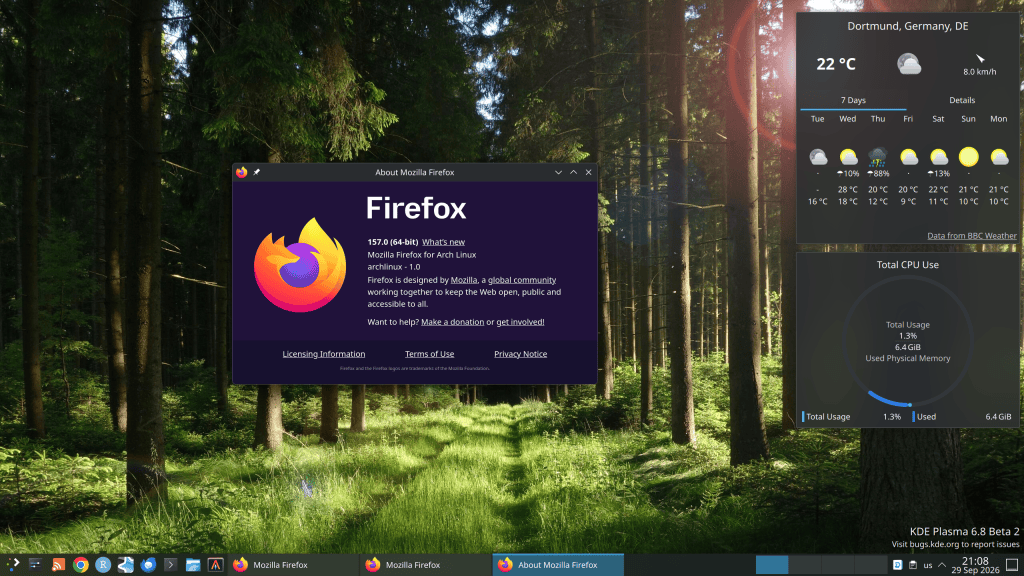
Final beta: Plasma 6.8 Beta 2 is the second and last beta before the stable release.
Union theming: The new Union theme engine enters the latter half of its public tech preview and now supports QtWidgets applications, including Dolphin and Kate.
KWin memory leak fix: KWin now depends on Plasma-Wayland-Protocols 1.23, addressing a Wayland resource leak that could cause RAM usage to grow dramatically over long uptimes.
Wayland improvements: Adds dwell-click support, commit-timing protocol support, improved remote desktop functionality, and server-side drop shadows.
Performance: Includes VRAM usage optimizations and additional KWin/desktop efficiency improvements.
Multi-GPU & displays: Improves multi-GPU handling and multi-monitor behavior.
New tool: Introduces kscreenctl for managing display configurations.
General polish: Numerous additional fixes and refinements are included across Plasma.
Release date:Plasma 6.8.0 is scheduled for 14 October 2026, coinciding with KDE’s 30th anniversary.
A very interesting article from Terence Tao. The most important key note or take away message is the following:
“The advance of AI will overwhelm us with so many control points to watch that there aren’t enough people to control them all. Those are jobs. Highly skilled jobs.“
Session option posit-assistant-installation-enabled and env var RSTUDIO_DISABLE_POSIT_ASSISTANT_INSTALLATION: block users from installing/updating/uninstalling Posit Assistant; RStudio uses only the admin install with no update checks.
Session option posit-assistant-path: point RStudio at an admin-managed Assistant install outside the system config directory.
“Posit AI service” renamed “Posit AI Pass” in the UI.
Queries Package Manager for supported Linux distros, extending binary R package installs beyond the built-in list (falls back if unreachable).
Posit Assistant for RStudio bundled with Workbench (works air-gapped).
New profile settings: assistant-installation-enabled, assistant-settings-enforced/-default, ai-providers-default (alongside existing ai-providers-enforced, which now also covers RStudio Pro).
native-oauth option for Azure Databricks workspaces in databricks.conf.
Available Credentials view (VS Code/Positron Pro) supports Databricks and Snowflake advanced integrations, incl. Snowflake role switching.
Positron Pro logs record version as single-line JSON.
Environment inspection tool enumerates installed R/Python packages per library.
Launcher: Kubernetes plugin supports AWS ECR image registries; Slurm plugin skips jobs without the [RStudio Launcher] prefix.
Fixed — RStudio (highlights)
Default CRAN repo on Ubuntu resolute / Debian trixie now uses Posit Public Package Manager (no more source builds).
Visual editor: Find seeds with selection (incl. inside chunks); Find and Add Next / Find All now work; fixed a null-property error after Reload Now.
Data Viewer: last row no longer hidden by scrollbar; faster search/filter/scroll/Summary; search refines rather than rescans; memory leak fixed.
Windows: locale drift corrupting non-ASCII Console input; env var changes visible to R; untrusted dirs no longer read user .Renviron; high-contrast dark theme checkboxes; spurious crash reports on session close.
Posit Assistant: install prompt decline restores prior assistant; honors system-wide installs; clearer DNS/proxy/TLS and download errors; no stuck “update in progress” after R restart.
Debugging: S7 method breakpoints (incl. pre-R 4.3.0 and package-scoped classes).
RStudio Server: no duplicate orphaned sessions on relaunch; no spurious “Error Listing Objects”; localhost proxy streams responses and restricts to requested IP family; sign-in page backs off polling when hidden.
Editor: stale Markdown/YAML highlighting; raw strings breaking folds; #-decorated section header folding; C++ chunk indentation and Quarto #| formatting; rainbow fenced-div nesting; Expand All after Collapse All in R Markdown; snippet errors across language modes; math-preview Escape leak.
Misc: pane zoom/layout state; console line navigation on wrapped commands; Plots pane activation after busy commands; popped-out window focus; macOS file-monitor overload; slow remote user/group lookups on Linux; What’s New shown once per release; crash reporting/thread safety at startup.
Fixed — Posit Workbench (highlights)
Blank RS_SERVER_URL in RStudio Pro sessions.
Subprocess status messages mislogged as ERROR.
Homepage “Last-used” image tag now updates and is tracked per workbench.
extensions.autoUpdate default type for VS Code/Positron sessions.
Environment inspection: finds R with no search paths configured; correct package names and library paths with spaces in audited job summaries.
Non-RFC 1341 HTTP POST parsing.
Launcher: stuck plugin restarts no longer freeze other clusters; heartbeat race causing spurious restarts; hung Kubernetes requests no longer exhaust queue slots; clearer errors for missing Slurm CLI and rsandbox validation failures; unparsable third-party Kubernetes Jobs logged as warnings.
Deprecated
RPubs and ShinyApps.io publishing destinations marked deprecated ahead of sunset.
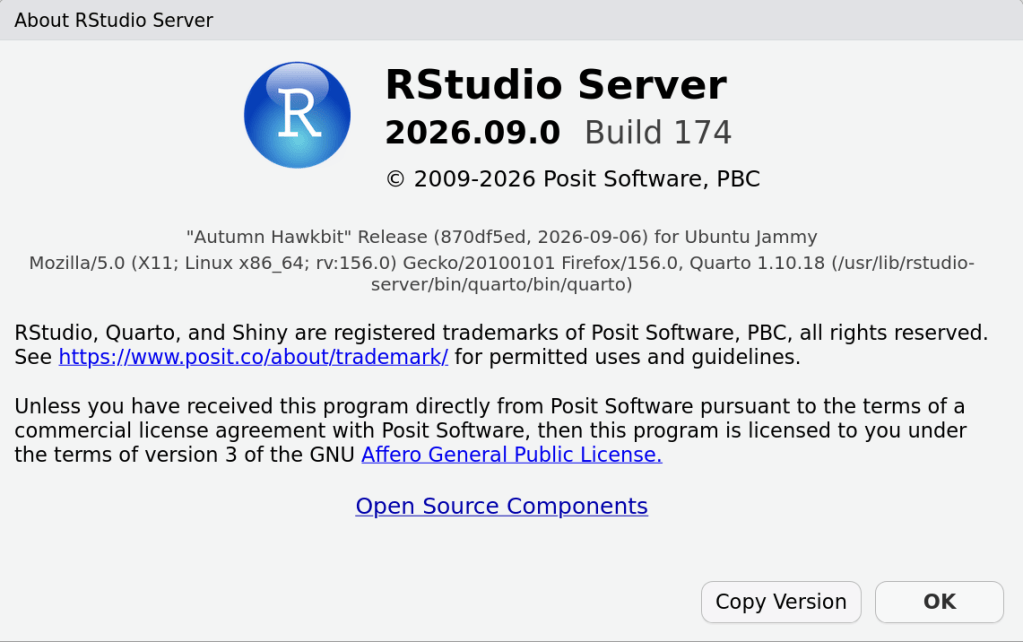
RStudio 2026.09.0+174 "Autumn Hawkbit" Release (870df5ed7859c758db7aed6f510a3edca3c74bd7, 2026-09-06) for Ubuntu Jammy
Mozilla/5.0 (X11; Linux x86_64; rv:156.0) Gecko/20100101 Firefox/156.0, Quarto 1.10.18 (/usr/lib/rstudio-server/bin/quarto/bin/quarto)
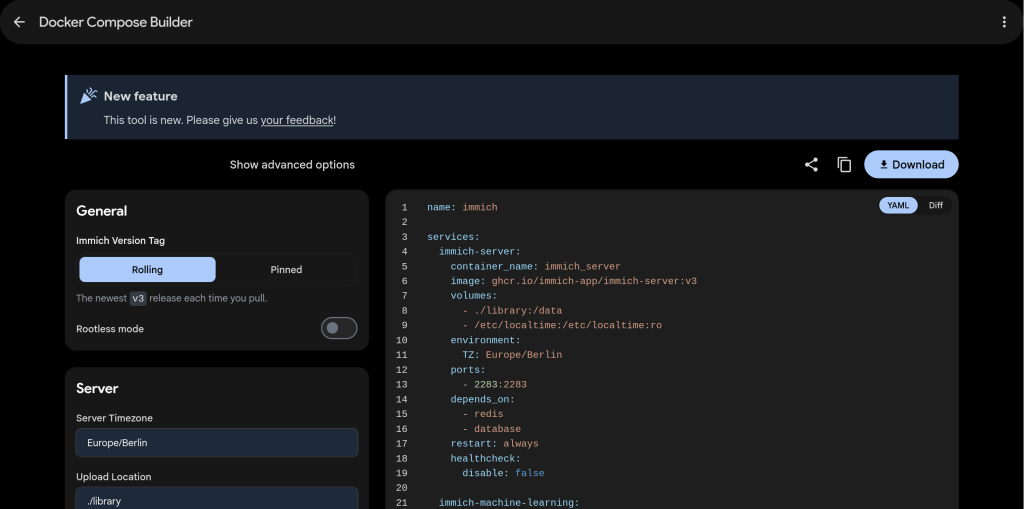
The reason we built this is to try and simplify the process of installing Immich, especially when needing customizations beyond the default compose file that we include in the repository. Using features like hardware acceleration and external libraries, or customizing the installation in various other ways, has always required manual edits based on snippets that are scattered throughout the docs. Along with the separate .env file which has proven unfamiliar to many self-hosters, this has caused plenty of confusion and trouble. The new tool aims to codify these nuances in a way that’s easy to use, giving you a single file that’s ready to go.”
Baptiste Daroussin has used FreeBSD since 1998 and became a committer in 2010.
His involvement grew from desktop use and experimenting with large ports such as OpenOffice.
He began developing pkgng, which later became FreeBSD’s modern pkg package manager.
Initially inspired by NetBSD’s pkgin, he and Julien Laffaye created a new package manager after encountering limitations in the existing tooling.
Poudriere was developed alongside pkg to rapidly build packages and test the package manager.
pkg: 15 Years Later
Daroussin did not expect to still be working on pkg 15 years later.
He says many of his original ideas remain unfinished.
Package management has become much more complex than simply extracting files:
Upgrades and dependency handling require sophisticated logic.
pkg uses a SAT solver for dependency resolution.
This complexity makes it difficult for new developers to contribute.
Security Improvements
Daroussin is particularly focused on reducing the security risks of package installation scripts.
Traditional packages can contain scripts that execute as root.
Newer mechanisms include centrally reviewable triggers.
Lua-based package scripts can run sandboxed using Capsicum.
His long-term goal is to prevent package-provided scripts from executing unrestricted as root altogether.
Challenges Attracting Contributors
Although eight people can merge changes into pkg, relatively few actively do so.
The codebase is more complicated than it initially appears.
Another obstacle is the absence of a clearly documented long-term roadmap.
Contributors may hesitate to make architectural changes because they are unsure whether those changes align with Daroussin’s plans.
Despite this, he says pkg still attracts more contributors than some other FreeBSD subsystems.
PkgBase: A Decade-Long Project
PkgBase aims to distribute and manage parts of the FreeBSD base system using packages rather than the traditional monolithic update/install model.
Daroussin was already advocating PkgBase around BSDCan 2015.
The main obstacle was not package-manager technology but a lack of sustained effort and motivation.
Momentum increased more recently because:
OCI developers wanted small FreeBSD container images.
Developers including Ed Maste, Kyle Evans, Mark Johnston, Lexi, and manu@ contributed significant work.
Commercial requirements also provided funding and practical motivation.
Why Large FreeBSD Changes Take So Long
Daroussin sees FreeBSD’s predominantly volunteer structure as the fundamental difficulty for major system-wide projects.
Large changes require coordination across many parts of FreeBSD.
Companies have previously developed PkgBase-like systems for their own requirements, but often lacked the resources to complete full upstream integration.
Commercial sponsorship can provide initial momentum, but business priorities can change before the work is finished.
Major infrastructure projects therefore often depend on a small number of highly motivated individuals carrying them through.
Key takeaway
The evolution of pkg and PkgBase illustrates a broader FreeBSD challenge: the technical solution may exist years before enough sustained developer effort, coordination, and commercial motivation align to deploy it across the entire operating system.
Ubuntu 26.10 “Stonking Stingray” will ship with Linux 7.3, replacing the previously planned Linux 7.2 kernel.
Canonical revised its target because the upstream Linux 7.1 and 7.2 development cycles had no delays, making Linux 7.3 feasible within Ubuntu’s schedule.
The main motivation is to provide newer upstream features and improved support for the latest hardware.
Development Status
Canonical is enabling Ubuntu-specific features on top of Linux 7.3.
Linux 7.3 has moved from Ubuntu’s -proposed archive toward the regular Ubuntu 26.10 archive.
It is being integrated ahead of the Ubuntu 26.10 beta.
Release-Timing Issue
Ubuntu 26.10 release: October 15, 2026
Kernel freeze: October 1
Expected Linux 7.3 stable release: October 18, or October 25 if another release candidate is required.
Therefore, Ubuntu 26.10’s initial ISO is expected to use a pre-release Linux 7.3 kernel snapshot, with stable updates following afterward.
Why Canonical Is Doing This
Because Ubuntu 26.10 is not an LTS release, Canonical is taking a more aggressive approach to tracking the newest upstream kernel, prioritizing new features, hardware enablement, and recent kernel improvements over the more conservative kernel selection typical of LTS releases.