




Immich, the popular open-source, self-hosted photo and video management solution, has launched a community-driven initiative to improve its metadata handling capabilities. Through the new EXIF Dataset project, users can contribute their photos to help train and improve Immich’s EXIF parsing and metadata extraction features.
I recently contributed some of my own photos to the project, and I want to share how easy and straightforward the process is. If you’re an Immich user (or simply an open-source enthusiast), this is a fantastic way to give back to the community.
What is the EXIF Dataset Project?
EXIF (Exchangeable Image File Format) data is the metadata embedded in your photos by your camera or smartphone. This includes information like the camera make and model, date and time, GPS coordinates, lens information, and much more. Immich uses this data extensively to organize your photo library, enable timeline views, power location-based features, and facilitate powerful search capabilities.
The EXIF Dataset project at datasets.immich.app/projects/exif allows community members to contribute photos along with their intact EXIF metadata. This crowdsourced dataset helps the Immich team understand how different cameras and devices encode their metadata, ultimately improving compatibility and parsing accuracy for everyone.
🔗 Contribute Now: Visit datasets.immich.app/projects/exif to start contributing your photos to the EXIF Dataset.
My Contribution Experience
The contribution process is remarkably simple and well-designed. Here’s how it works:
Step 1: Upload Your Photos
After navigating to the EXIF Dataset project page, you’re greeted with a clean upload interface. I uploaded a couple of photos taken with my Samsung Galaxy A55 5G – a beach landscape shot and a photo from a beachside restaurant.

The clean upload interface showing my first selected photo with its EXIF metadata displayed
The interface immediately displays the extracted EXIF information on the right side, including the capture type (Single), camera brand (Samsung), and camera model (Galaxy A55 5G). This lets you verify that your photos contain the metadata you want to contribute.
Step 2: Select Photos for Submission
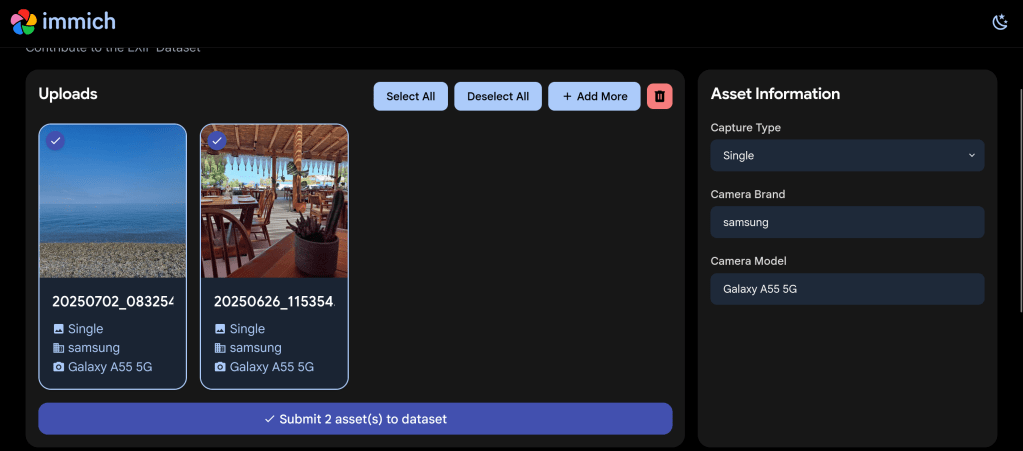
You can upload multiple photos at once using the “+ Add More” button. I selected both of my photos for contribution – each showing clearly with a checkmark indicating selection.

Two photos selected and ready to submit to the EXIF Dataset
The interface provides convenient “Select All” and “Deselect All” buttons, as well as a delete option if you change your mind about any uploads.
Step 3: Agree to the CC0 License
When you click “Submit asset(s) to dataset”, a Dataset Agreement dialog appears. This is where the legal side of your contribution is handled transparently.

The Dataset Agreement confirms your photos will be released under the CC0 public domain license
ℹ️ About CC0: The CC0 (Creative Commons Zero) license means you’re releasing your contributed photos into the public domain. This allows the Immich project (and anyone else) to use the images freely for any purpose. Make sure you only upload photos you own the rights to and are comfortable sharing publicly.
The agreement requires you to confirm two things:
- You agree to release the uploaded assets under the CC0 license into the public domain
- The files have not been modified in any way that would alter their original content or metadata
You also provide a contact email in case the Immich team has any questions about your upload.
Why Should You Contribute?
Contributing to the EXIF Dataset helps improve Immich in several ways:
- Better Device Support: By collecting EXIF samples from many different cameras and phones, Immich can improve its parsing for devices that may have quirks or non-standard metadata encoding
- Improved Metadata Extraction: The dataset helps identify edge cases and unusual metadata formats that might otherwise go unnoticed
- Community-Driven Development: Your contribution directly influences the quality of an open-source project used by thousands of self-hosters worldwide
- Supporting Privacy-Focused Software: Immich is a privacy-respecting alternative to cloud-based photo services like Google Photos – your contribution helps make it even better
Tips for Contributing
To make your contribution as valuable as possible:
- Contribute from different devices: If you have photos from older cameras, different smartphone brands, or professional equipment, these are especially valuable
- Keep metadata intact: Don’t strip or modify the EXIF data before uploading – the original metadata is exactly what’s needed
- Consider variety: Photos taken in different conditions (indoor, outdoor, various lighting) may contain different metadata values
- Check your ownership: Only contribute photos you’ve taken yourself or have explicit rights to share
About Immich
For those unfamiliar with Immich, it’s a high-performance, self-hosted photo and video management solution that offers features comparable to Google Photos – but with full control over your data. Key features include automatic backup from mobile devices, facial recognition, smart search, timeline views, shared albums, and much more.
Immich is developed under the AGPL-3.0 license and is backed by FUTO, an organization dedicated to developing privacy-preserving technology. The project has grown tremendously, with over 77,000 stars on GitHub, making it one of the most popular self-hosted applications available.
🏠 Self-Host Immich: Get started with Immich at immich.app – available for Docker, TrueNAS, Unraid, and other platforms.
Conclusion
Contributing to the Immich EXIF Dataset is a simple yet meaningful way to support open-source software development. The process takes just a few minutes, and your contribution will help improve photo management for the entire Immich community.
Head over to datasets.immich.app/projects/exif today and share some of your photos. Every contribution counts!
 /root
/root 