




Tag: TrueNAS
-
I recently ran into a performance issue on my TrueNAS SCALE 25.10.1 system where the server felt sluggish despite low CPU usage. The system was running Docker-based applications, and at first glance nothing obvious looked wrong. The real problem turned out to be high iowait.
What iowait actually means
In Linux,
iowaitrepresents the percentage of time the CPU is idle while waiting for I/O operations (usually disk). High iowait doesn’t mean the CPU is busy — it means the CPU is stuck waiting on storage.In
top, this appears aswa:%Cpu(s): 1.8 us, 1.7 sy, 0.0 ni, 95.5 id, 0.2 wa, 0.0 hi, 0.8 si, 0.0 stUnder normal conditions, iowait should stay very low (usually under 1–2%). When it starts climbing higher, the system can feel slow even if CPU usage looks fine.
Confirming the issue with iostat
To get a clearer picture, I used
iostat, which shows per-disk activity and latency:iostat -x 1This immediately showed the problem. One or more disks had:
- Very high
%util(near or at 100%) - Elevated
awaittimes - Consistent read/write pressure
At that point it was clear the bottleneck was storage I/O, not CPU or memory.
Tracking it down to Docker services
This system runs several Docker-based services. Using
topalongsideiostat, I noticed disk activity drop immediately when certain services were stopped.In particular, high I/O was coming from applications that:
- Continuously read/write large files
- Perform frequent metadata operations
- Maintain large active datasets
Examples included downloaders, media managers, and backup-related containers.
Stopping services to confirm
To confirm the cause, I stopped Docker services one at a time and watched disk metrics:
iostat -x 1Each time a heavy I/O service was stopped, iowait dropped immediately. Once the worst offender was stopped, iowait returned to normal levels and the system became responsive again.
Why the system looked “fine” at first
This was tricky because:
- CPU usage was low
- Memory usage looked reasonable
- The web UI was responsive but sluggish
Without checking
iostat, it would have been easy to misdiagnose this as a CPU or RAM issue.Lessons learned
- High iowait can cripple performance even when CPU is idle
topalone is not enough — useiostat -x- Docker workloads can silently saturate disks
- Stopping services one by one is an effective diagnostic technique
Final takeaway
On TrueNAS SCALE 25.10.1 with Docker, high iowait was the real cause of my performance issues. The fix wasn’t a reboot, more CPU, or more RAM — it was identifying and controlling disk-heavy services.
If your TrueNAS server feels slow but CPU usage looks fine, check iowait and run
iostat. The disk may be the real bottleneck. - Very high
-
New version that is “battlefield tested” on my home server !!
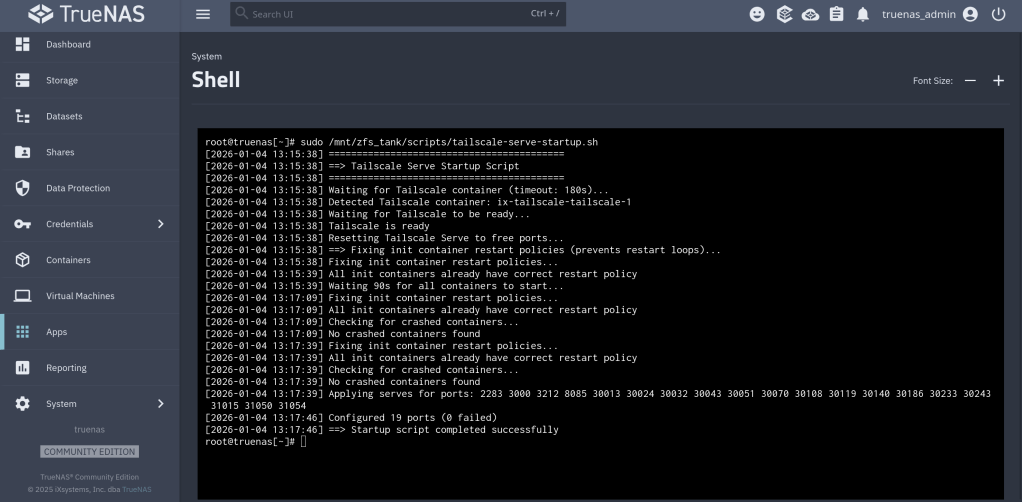
https://github.com/chrislongros/docker-tailscale-serve-preserve/releases/tag/v1.1.0
https://github.com/chrislongros/docker-tailscale-serve-preserve/tree/main
-
I would like to share an AI generated script that I successfully used to automate my TrueNAS certificates with Tailscale.
This guide shows how to automatically use a Tailscale HTTPS certificate for the TrueNAS SCALE Web UI, when Tailscale runs inside a Docker container.
Overview
What this does
- Runs
tailscale certinside a Docker container - Writes the cert/key to a host bind-mount
- Imports the cert into TrueNAS
- Applies it to the Web UI
- Restarts the UI
- Runs automatically via cron
Requirements
- TrueNAS SCALE
- Docker
- A running Tailscale container (
tailscaled) - A host directory bind-mounted into the container at
/certs
Step 1 – Create a cert directory on the host
Create a dataset or folder on your pool (example):
mkdir -p /mnt//Applications/tailscale-certs
chmod 700 /mnt//Applications/tailscale-certsStep 2 – Bind-mount it into the Tailscale container
Your Tailscale container must mount the host directory to
/certs.Example (conceptually):
Host path: /mnt//Applications/tailscale-certs
Container: /certsThis is required for
tailscale certto write files that TrueNAS can read.Step 3 – Create the automation script (generic)
Save this as:
/mnt/<pool>/scripts/import_tailscale_cert.sh
Script:
#!/bin/bash
set -euo pipefail=========================
USER CONFIG (REQUIRED)
=========================
CONTAINER_NAME=“TAILSCALE_CONTAINER_NAME”
TS_HOSTNAME=“TAILSCALE_DNS_NAME”
HOST_CERT_DIR=“HOST_CERT_DIR”
LOG_FILE=“LOG_FILE”
TRUENAS_CERT_NAME=“TRUENAS_CERT_NAME”=========================
CRT=“${HOST_CERT_DIR}/ts.crt”
KEY=“${HOST_CERT_DIR}/ts.key”export PATH=“/usr/local/sbin:/usr/local/bin:/usr/sbin:/usr/bin:/sbin:/bin”
mkdir -p “$(dirname “$LOG_FILE”)”
touch “$LOG_FILE”
exec >>“$LOG_FILE” 2>&1
echo “—– $(date -Is) starting Tailscale cert import —–”command -v docker >/dev/null || { echo “ERROR: docker not found”; exit 2; }
command -v jq >/dev/null || { echo “ERROR: jq not found”; exit 2; }
command -v midclt >/dev/null || { echo “ERROR: midclt not found”; exit 2; }docker ps –format ‘{{.Names}}’ | grep -qx “$CONTAINER_NAME” || {
echo “ERROR: container not running: $CONTAINER_NAME”
exit 2
}docker exec “$CONTAINER_NAME” sh -lc ‘test -d /certs’ || {
echo “ERROR: /certs not mounted in container”
exit 2
}docker exec “$CONTAINER_NAME” sh -lc
“tailscale cert –cert-file /certs/ts.crt –key-file /certs/ts.key “$TS_HOSTNAME””[[ -s “$CRT” && -s “$KEY” ]] || {
echo “ERROR: certificate files missing”
exit 2
}midclt call certificate.create “$(jq -n
–arg n “$TRUENAS_CERT_NAME”
–rawfile c “$CRT”
–rawfile k “$KEY”
‘{name:$n, create_type:“CERTIFICATE_CREATE_IMPORTED”, certificate:$c, privatekey:$k}’)” >/dev/null || trueCERT_ID=“$(midclt call certificate.query | jq -r
–arg n “$TRUENAS_CERT_NAME” ‘. | select(.name==$n) | .id’ | tail -n 1)”[[ -n “$CERT_ID” ]] || {
echo “ERROR: failed to locate imported certificate”
exit 2
}midclt call system.general.update “$(jq -n –argjson id “$CERT_ID”
‘{ui_certificate:$id, ui_restart_delay:1}’)” >/dev/null
midclt call system.general.ui_restart >/dev/nullecho “SUCCESS: Web UI certificate updated”
Step 4 – Make it executable
chmod 700 /mnt//scripts/import_tailscale_cert.sh
Step 5 – Run once manually
/usr/bin/bash /mnt//scripts/import_tailscale_cert.sh
You will briefly disconnect from the Web UI — this is expected.
Step 6 – Verify certificate in UI
Go to:
System Settings → Certificates
Confirm the new certificate exists and uses your Tailscale hostname.
Also check:
System Settings → General → GUI
→ Web Interface HTTPS CertificateStep 7 – Create the cron job
TrueNAS UI → System Settings → Advanced → Cron Jobs → Add
/usr/bin/bash /mnt//scripts/import_tailscale_cert.sh
You can find the script on my Github repository:
https://github.com/chrislongros/truenas-tailscale-cert-automation
- Runs
-
I use Watchtower to automatically update my Docker applications on TrueNAS SCALE. At the same time, I use Tailscale Serve as a reverse proxy to provide secure HTTPS access to my home lab services.
This setup works well most of the time — except during updates.
The problem
When Watchtower updates a container, it stops and recreates it.
If the container exposes ports such as 80 or 443, the restart can fail because Tailscale Serve is already bound to those ports.The result is:
- failed container restarts,
- services going offline,
- and manual intervention required.
The solution
The solution is to temporarily disable Tailscale Serve, run Watchtower once, and then restore Tailscale Serve afterward.
On TrueNAS SCALE, Tailscale runs inside its own Docker container (for example:
ix-tailscale-tailscale-1). This makes it possible to control Serve usingdocker exec.The script below does exactly that:
- Backs up the current Tailscale Serve configuration
- Stops all Tailscale Serve listeners (freeing ports)
- Runs Watchtower in
--run-oncemode - Restores Tailscale Serve safely
Public Script: Pause Tailscale Serve During Watchtower Updates
Save as
/mnt/zfs_tank/scripts/watchtower-with-tailscale-serve.sh
(Adjust the pool name if yours is not
zfs_tank.)#!/usr/bin/env bash set -euo pipefail # ------------------------------------------------------------------------------ # watchtower-with-tailscale-serve.sh # # Purpose: # Prevent port conflicts between Watchtower and Tailscale Serve by: # 1. Backing up the current Tailscale Serve configuration # 2. Temporarily disabling Tailscale Serve # 3. Running Watchtower once # 4. Restoring Tailscale Serve # # Designed for: # - TrueNAS SCALE # - Tailscale running in a Docker container (TrueNAS app) # ------------------------------------------------------------------------------ # ========================= # CONFIGURATION # ========================= # Name of the Tailscale container (TrueNAS default shown here) TS_CONTAINER_NAME="ix-tailscale-tailscale-1" # Persistent directory for backups (must survive reboots/updates) STATE_DIR="/mnt/zfs_tank/scripts/state" # Watchtower image WATCHTOWER_IMAGE="nickfedor/watchtower" # Watchtower environment variables WATCHTOWER_ENV=( "-e" "TZ=Europe/Berlin" "-e" "WATCHTOWER_CLEANUP=true" "-e" "WATCHTOWER_INCLUDE_STOPPED=true" ) mkdir -p "$STATE_DIR" SERVE_JSON="${STATE_DIR}/tailscale-serve.json" # ========================= # FUNCTIONS # ========================= ts() { docker exec "$TS_CONTAINER_NAME" tailscale "$@" } # ========================= # MAIN # ========================= echo "==> Using Tailscale container: $TS_CONTAINER_NAME" # Ensure Tailscale container exists docker inspect "$TS_CONTAINER_NAME" >/dev/null # 1) Backup current Serve configuration (CLI-managed Serve) echo "==> Backing up Tailscale Serve configuration" if ts serve status --json > "${SERVE_JSON}.tmp" 2>/dev/null; then mv "${SERVE_JSON}.tmp" "$SERVE_JSON" else rm -f "${SERVE_JSON}.tmp" || true echo "WARN: No Serve configuration exported (may be file-managed or empty)." fi # 2) Stop all Serve listeners echo "==> Stopping Tailscale Serve" ts serve reset || true # 3) Run Watchtower once echo "==> Running Watchtower" docker run --rm \ -v /var/run/docker.sock:/var/run/docker.sock \ "${WATCHTOWER_ENV[@]}" \ "$WATCHTOWER_IMAGE" --run-once # 4) Restore Serve configuration (if present and non-empty) echo "==> Restoring Tailscale Serve" if [[ -s "$SERVE_JSON" ]] && [[ "$(cat "$SERVE_JSON")" != "{}" ]]; then docker exec -i "$TS_CONTAINER_NAME" tailscale serve set-raw < "$SERVE_JSON" || true else echo "INFO: No Serve configuration to restore." fi echo "==> Done"
Make the script executable
chmod +x /mnt/zfs_tank/scripts/watchtower-with-tailscale-serve.sh
How to run it manually
sudo /mnt/zfs_tank/scripts/watchtower-with-tailscale-serve.sh
Scheduling (recommended)
In the TrueNAS UI:
- Go to System Settings → Advanced → Cron Jobs
- Command:
/mnt/zfs_tank/scripts/watchtower-with-tailscale-serve.sh
User:
rootSchedule: daily (for example, 03:00)
Disable Watchtower’s internal schedule (
WATCHTOWER_SCHEDULE) to avoid conflicts
The repository containing the code:
https://github.com/chrislongros/watchtower-with-tailscale-serve
-
It is quite annoying getting notifications for unencrypted http connections on my home servers. One solution for Synology is to set a scheduled task with the following command:
tailscale configure synology-cert
This command issues a Let’s Encrypt certificate with 90 day expiration that get’s automatically renewed depending on the task frequency.
For my TrueNAS I use tailscale serve to securely expose my services and apps (immich etc) through a HTTPS website in my tailnet. Enabling HTTPS via tailscale admin panel is required.
The next step it to execute: tailscale serve –https=port_number localhost:port_number
You can execute the command in the background with –bg or in foreground and interrupt it with Ctrl+C.

-
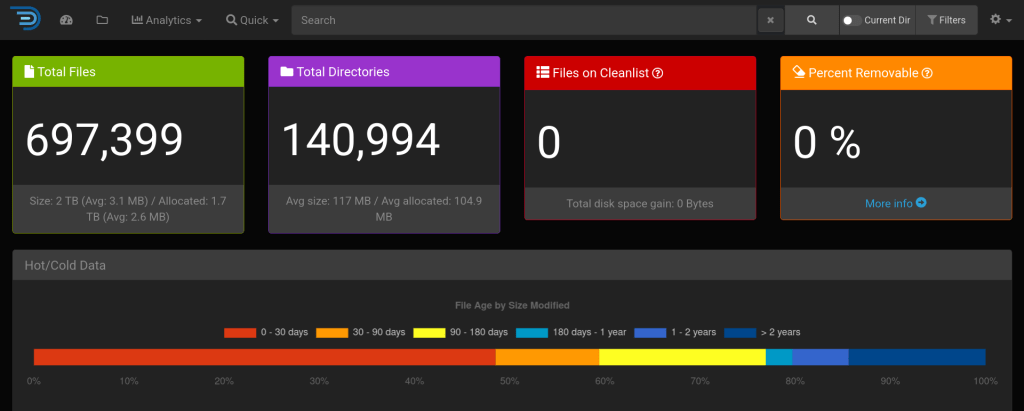
It is important to note that diskover indexes file metadata and does not access file contents ! sist2 is another solution that provides elasticsearch while also accessing file contents.
My docker compose file configuration I uses in my TrueNAS server in Portainer:
version: ‘2’
services:
diskover:
image: lscr.io/linuxserver/diskover
container_name: diskover
environment:
– PUID=1000
– PGID=1000
– TZ=Europe/Berlin
– ES_HOST=elasticsearch
– ES_PORT=9200
volumes:
– /mnt/zfs_tank/Applications/diskover/config/:/config
– /mnt/zfs_tank/:/data
ports:
– 8085:80
mem_limit: 4096m
restart: unless-stopped
depends_on:
– elasticsearch
elasticsearch:
container_name: elasticsearch
image: docker.elastic.co/elasticsearch/elasticsearch:7.17.22
environment:
– discovery.type=single-node
– xpack.security.enabled=false
– bootstrap.memory_lock=true
– “ES_JAVA_OPTS=-Xms1g -Xmx1g”
ulimits:
memlock:
soft: -1
hard: -1
volumes:
– /mnt/zfs_tank/Applications/diskover/data/:/usr/share/elasticsearch/data
ports:
– 9200:9200
depends_on:
– elasticsearch-helper
restart: unless-stopped
elasticsearch-helper:
image: alpine
command: sh -c “sysctl -w vm.max_map_count=262144”
privileged: true



 /root
/root 