Tag: OpenZFS
-
Tutorial · February 2026 · 15 min read
QEMU on Arch Linux: A Practical Guide to Virtual Machine Testing
From cloud images and package building to kernel module debugging and cross-platform validation — all from the command line.
Contents
01 Why QEMU?
02 Spinning Up Arch Linux Cloud Images
03 Running FreeBSD in QEMU
04 Testing OpenZFS with QEMU
05 Sharing Files Between Host and Guest
06 Networking Options
07 Testing Real Hardware Drivers
08 Quick Reference
Why QEMU?
QEMU combined with KVM turns your Linux host into a bare-metal hypervisor. Unlike VirtualBox or VMware, QEMU offers direct access to hardware emulation options, PCI passthrough, and granular control over every aspect of the virtual machine. On Arch Linux, setup is minimal.
$ sudo pacman -S qemu-full # Verify KVM support $ lsmod | grep kvm kvm_amd 200704 0 kvm 1302528 1 kvm_amdYou should see
kvm_amdorkvm_intelloaded. That’s it — you’re ready to run VMs at near-native performance.Spinning Up Arch Linux Cloud Images
The fastest path to a working Arch Linux VM is the official cloud image — a pre-built qcow2 disk designed for automated provisioning with cloud-init.
Download and Prepare
$ curl -LO https://geo.mirror.pkgbuild.com/images/latest/Arch-Linux-x86_64-cloudimg.qcow2 $ qemu-img resize Arch-Linux-x86_64-cloudimg.qcow2 20GThe image ships at a minimal size. Resizing to 20G gives room for package building, compilation, and development work.
Cloud-Init Configuration
Cloud images expect a cloud-init seed to configure users, packages, and system settings on first boot. Install
cloud-utilson your host:$ sudo pacman -S cloud-utilsCreate a
user-datafile. Note the unquoted heredoc — this ensures shell variables expand correctly:SSH_KEY=$(cat ~/.ssh/id_ed25519.pub 2>/dev/null || cat ~/.ssh/id_rsa.pub) cat > user-data <<EOF #cloud-config users: - name: chris sudo: ALL=(ALL) NOPASSWD:ALL shell: /bin/bash lock_passwd: false plain_text_passwd: changeme ssh_authorized_keys: - ${SSH_KEY} packages: - base-devel - git - vim - devtools - namcap growpart: mode: auto devices: ['/'] EOF⚠ Common Pitfall
Using
'EOF'(single-quoted) prevents variable expansion, so${SSH_KEY}becomes a literal string. Always use unquotedEOFwhen you need variable substitution.Generate the seed ISO and launch:
$ cloud-localds seed.iso user-data $ qemu-system-x86_64 \ -enable-kvm \ -m 4G \ -smp 4 \ -drive file=Arch-Linux-x86_64-cloudimg.qcow2,if=virtio \ -drive file=seed.iso,format=raw,if=virtio \ -nographicCloud-Init Runs Once
Cloud-init marks itself as complete after the first boot. If you modify
user-dataand rebuildseed.iso, the existing image ignores it. You must download a fresh qcow2 image before applying new configuration.Use
Ctrl+A, Xto kill the VM.Running FreeBSD in QEMU
FreeBSD provides pre-built VM images in qcow2 format. FreeBSD 15.0-RELEASE (December 2025) is the latest stable release, while 16.0-CURRENT snapshots are available for testing bleeding-edge features.
Download
# FreeBSD 15.0 stable $ curl -LO https://download.freebsd.org/releases/VM-IMAGES/15.0-RELEASE/amd64/Latest/FreeBSD-15.0-RELEASE-amd64-ufs.qcow2.xz $ xz -d FreeBSD-15.0-RELEASE-amd64-ufs.qcow2.xz # FreeBSD 16.0-CURRENT (development snapshot) $ curl -LO https://download.freebsd.org/snapshots/VM-IMAGES/16.0-CURRENT/amd64/Latest/FreeBSD-16.0-CURRENT-amd64-ufs.qcow2.xz $ xz -d FreeBSD-16.0-CURRENT-amd64-ufs.qcow2.xz $ qemu-img resize FreeBSD-15.0-RELEASE-amd64-ufs.qcow2 20GThe Serial Console Challenge
Unlike Linux cloud images, FreeBSD VM images default to VGA console output. Launching with
-nographicappears to hang — the system is actually booting, but sending output to the emulated display.Boot with VGA first to configure serial:
$ qemu-system-x86_64 \ -enable-kvm \ -m 4G \ -smp 4 \ -hda FreeBSD-15.0-RELEASE-amd64-ufs.qcow2 \ -vga stdLogin as
root(no password), then enable serial console permanently:# echo 'console="comconsole"' >> /boot/loader.conf # poweroffAll subsequent boots work with
-nographic. Alternatively, at the FreeBSD boot menu, press 3 to escape to the loader prompt and typeset console=comconsolethenboot.Disk Interface Note
If FreeBSD fails to boot with
if=virtio, fall back to IDE emulation using-hdainstead. IDE is universally supported.Testing OpenZFS with QEMU
One of the most powerful uses of QEMU on Arch Linux is building and testing OpenZFS against new kernels. Arch’s rolling release model means kernel updates arrive frequently, and out-of-tree modules like ZFS need validation after every update.
Build Environment
$ git clone https://github.com/openzfs/zfs.git $ cd zfs $ ./autogen.sh $ ./configure --enable-debug $ make -j$(nproc) $ sudo make install $ sudo ldconfig $ sudo modprobe zfsRunning the ZFS Test Suite
Before running the test suite, a critical and often-missed step — install the test helpers:
$ sudo ~/zfs/scripts/zfs-helpers.sh -i # Create loop devices for virtual disks for i in $(seq 0 15); do sudo mknod -m 0660 /dev/loop$i b 7 $i 2>/dev/null done # Run sanity tests $ ~/zfs/scripts/zfs-tests.sh -v -r sanityReal-World Debugging: From 18% to 97.6%
Testing OpenZFS 2.4.99 on kernel 6.18.8-arch2-1 revealed two cascading issues that dropped the pass rate dramatically. Here’s what happened and how to fix it.
Problem 1: Permission denied for ephemeral users. The test suite creates temporary users (
staff1,staff2) for permission testing. If your ZFS source directory is under a home directory with restrictive permissions, these users can’t traverse the path:err: env: 'ksh': Permission denied staff2 doesn't have permissions on /home/arch/zfs/tests/zfs-tests/bin$ chmod o+x /home/arch $ chmod -R o+rx /home/arch/zfs $ sudo chmod o+rw /dev/zfsProblem 2: Leftover test pools cascade failures. If a previous test run left a ZFS pool mounted, every subsequent setup script fails with “Device or resource busy”:
$ sudo zfs destroy -r testpool/testfs $ sudo zpool destroy testpool $ rm -rf /var/tmp/testdir✓ Result
After fixing both issues, the sanity suite completed in 15 minutes: 808 PASS, 6 FAIL, 14 SKIP. The remaining 6 failures were all environment-related (missing packages) — zero kernel compatibility regressions.
Sharing Files Between Host and Guest
QEMU’s 9p virtfs protocol allows sharing a host directory with the guest without network configuration — ideal for an edit-on-host, build-in-guest workflow:
$ qemu-system-x86_64 \ -enable-kvm \ -m 4G \ -smp 4 \ -drive file=Arch-Linux-x86_64-cloudimg.qcow2,if=virtio \ -virtfs local,path=/home/chris/shared,mount_tag=host_share,security_model=mapped-xattr,id=host_share \ -nographicInside the guest:
$ sudo mount -t 9p -o trans=virtio host_share /mnt/sharedNetworking Options
QEMU’s user-mode networking (
-nic user) is the simplest setup — it provides NAT-based internet access and port forwarding without any host configuration:# Forward host port 2222 to guest SSH -nic user,hostfwd=tcp::2222-:22This is sufficient for most development and testing workflows. For bridged or TAP networking, consult the QEMU documentation.
Testing Real Hardware Drivers
QEMU emulates standard hardware (e1000 NICs, emulated VGA), not your actual devices. If you need to test drivers against real hardware — such as a Realtek Ethernet controller or an AMD GPU — you have two options:
PCI Passthrough (VFIO): Bind a real PCI device to the
vfio-pcidriver and pass it directly to the VM. This requires IOMMU support (amd_iommu=onin the kernel command line) and removes the device from the host for the duration.Native Boot from USB: Write a live image to a USB stick and boot your physical machine directly. For driver testing, this is almost always the better choice:
$ sudo dd if=FreeBSD-16.0-CURRENT-amd64-memstick.img of=/dev/sdX bs=4M status=progressQuick Reference
Task Command Start Arch VM qemu-system-x86_64 -enable-kvm -m 4G -smp 4 -drive file=arch.qcow2,if=virtio -drive file=seed.iso,format=raw,if=virtio -nographicStart FreeBSD (VGA) qemu-system-x86_64 -enable-kvm -m 4G -smp 4 -hda freebsd.qcow2 -vga stdStart FreeBSD (serial) qemu-system-x86_64 -enable-kvm -m 4G -smp 4 -hda freebsd.qcow2 -nographicKill VM Ctrl+A, XResize disk qemu-img resize image.qcow2 20GCreate seed ISO cloud-localds seed.iso user-data
QEMU Arch Linux FreeBSD OpenZFS KVM
Written from real-world testing on AMD Ryzen 9 9900X · Arch Linux · Kernel 6.18.8

-
How to set up a disposable VM for running the ZFS test suite on bleeding-edge kernels
Why This Matters
OpenZFS supports a wide range of Linux kernels, but regressions can slip through on newer ones. Arch Linux ships the latest stable kernels (6.18+ at the time of writing), making it an ideal platform for catching issues before they hit other distributions.
The ZFS test suite is the project’s primary quality gate — it exercises thousands of scenarios across pool creation, send/receive, snapshots, encryption, scrub, and more. Running it on your kernel version and reporting results is one of the most valuable contributions you can make, even without writing any code.
Why a VM, Not Docker?
This is the key architectural decision. ZFS is a kernel module — the test suite needs to:
- Load and unload
spl.koandzfs.kokernel modules - Create and destroy loopback block devices for test zpools
- Exercise kernel-level filesystem operations (mount, unmount, I/O)
- Potentially crash the kernel if a bug is triggered
Docker containers share the host kernel. If you load ZFS modules inside a container, they affect your entire host system. A crashing test could take down your workstation. With a QEMU/KVM virtual machine, you get a fully isolated kernel — crashes stay inside the VM, and you can just reboot it.
┌─────────────────────────────────────────────────┐│ HOST (your workstation) ││ Arch Linux · Kernel 6.18.8 · Your ZFS pools ││ ││ ┌───────────────────────────────────────────┐ ││ │ QEMU/KVM VM │ ││ │ Arch Linux · Kernel 6.18.7 │ ││ │ │ ││ │ ┌─────────────┐ ┌───────────────────┐ │ ││ │ │ spl.ko │ │ ZFS Test Suite │ │ ││ │ │ zfs.ko │ │ (file-backed │ │ ││ │ │ (from src) │ │ loopback vdevs) │ │ ││ │ └─────────────┘ └───────────────────┘ │ ││ │ │ ││ │ If something crashes → only VM affected │ ││ └──────────────────────────────────┬────────┘ ││ SSH :2222 ←┘ │└─────────────────────────────────────────────────┘What Is the Arch Linux Cloud Image?
We use the official Arch Linux cloud image — a minimal, pre-built qcow2 disk image maintained by the Arch Linux project. It’s designed for cloud/VM environments and includes:
- A minimal Arch Linux installation (no GUI, no bloat)
- cloud-init support for automated provisioning (user creation, SSH keys, hostname)
- A growable root filesystem (we resize it to 40G)
- systemd-networkd for automatic DHCP networking
This is NOT the “archzfs” project (archzfs.com provides prebuilt ZFS packages). We named our VM hostname “archzfs” for convenience, but we build ZFS entirely from source.
The cloud-init seed image is a tiny ISO that tells cloud-init how to configure the VM on first boot — what user to create, what password to set, what hostname to use. On a real cloud provider, this comes from the metadata service; for local QEMU, we create it manually.
Step-by-Step Setup
Prerequisites (Host)
# Install QEMU and toolssudo pacman -S qemu-full cdrtools# Optional: virt-manager for GUI managementsudo pacman -S virt-manager libvirt dnsmasqsudo systemctl enable --now libvirtdsudo usermod -aG libvirt $USER1. Download and Prepare the Cloud Image
mkdir ~/zfs-testvm && cd ~/zfs-testvm# Download the latest Arch Linux cloud imagewget https://geo.mirror.pkgbuild.com/images/latest/Arch-Linux-x86_64-cloudimg.qcow2# Resize to 40G (ZFS tests need space for file-backed vdevs)qemu-img resize Arch-Linux-x86_64-cloudimg.qcow2 40G2. Create the Cloud-Init Seed
mkdir -p /tmp/seed# User configurationcat > /tmp/seed/user-data << 'EOF'#cloud-confighostname: archzfsusers:- name: archshell: /bin/bashsudo: ALL=(ALL) NOPASSWD:ALLlock_passwd: falseplain_text_passwd: test123ssh_pwauth: trueEOF# Instance metadatacat > /tmp/seed/meta-data << 'EOF'instance-id: archzfs-001local-hostname: archzfsEOF# Build the seed ISOmkisofs -output seed.img -volid cidata -joliet -rock /tmp/seed/3. Boot the VM
qemu-system-x86_64 \-enable-kvm \-m 8G \-smp 8 \-drive file=Arch-Linux-x86_64-cloudimg.qcow2,if=virtio \-drive file=seed.img,if=virtio,format=raw \-nic user,hostfwd=tcp::2222-:22 \-nographicWhat each flag does:
Flag Purpose -enable-kvmUse hardware virtualization (huge performance gain) -m 8G8GB RAM (ZFS ARC cache benefits from more) -smp 88 virtual CPUs (adjust to your host) -drive ...qcow2,if=virtioBoot disk with virtio for best I/O -drive ...seed.imgCloud-init configuration -nic user,hostfwd=...User-mode networking with SSH port forward -nographicSerial console (no GUI window needed) Login will appear on the serial console. Credentials:
arch/test123.You can also SSH from another terminal:
ssh -p 2222 arch@localhost4. Install Build Dependencies (Inside VM)
sudo pacman -Syu --noconfirm \base-devel git autoconf automake libtool python \linux-headers libelf libaio openssl zlib \ksh bc cpio fio inetutils sysstat jq pax rsync \nfs-utils lsscsi xfsprogs parted perf5. Clone and Build ZFS
# Clone YOUR fork (replace with your GitHub username)git clone https://github.com/YOUR_USERNAME/zfs.gitcd zfs# Build everything./autogen.sh./configure --enable-debugmake -j$(nproc)The build compiles:
- Kernel modules (
spl.ko,zfs.ko) against the running kernel headers - Userspace tools (
zpool,zfs,zdb, etc.) - Test binaries and test scripts
Build time: ~5-10 minutes with 8 vCPUs.
Note: You’ll see many
objtoolwarnings aboutspl_panic()andluaD_throw()missing__noreturn. These are known issues on newer kernels and don’t affect functionality.6. Load Modules and Run Tests
# Load the ZFS kernel modulessudo scripts/zfs.sh# Verify modules are loadedlsmod | grep zfs# Run the FULL test suite (4-8 hours)scripts/zfs-tests.sh -v 2>&1 | tee /tmp/zts-full.txt# Or run a single test (for quick validation)scripts/zfs-tests.sh -v \-t /home/arch/zfs/tests/zfs-tests/tests/functional/cli_root/zpool_create/zpool_create_001_pos.kshImportant notes on
zfs-tests.sh:- Do NOT run as root — the script uses sudo internally
- The
-tflag requires absolute paths to individual.kshtest files - Missing utilities
netandpamtesterare okay — only NFS/PAM tests will skip - The “Permission denied” warning at startup is harmless
7. Extract and Analyze Results
From your host machine:
# Copy the summary logscp -P 2222 arch@localhost:/tmp/zts-full.txt ~/zts-full.txt# Copy detailed per-test logsscp -r -P 2222 arch@localhost:/var/tmp/test_results/ ~/zfs-test-results/Understanding the Results
The test results summary looks like:
Results SummaryPASS 2847FAIL 12SKIP 43Running Time: 05:23:17What to look for:
- Compare against known failures — check the ZFS Test Suite Failures wiki
- Identify NEW failures — any FAIL not on the known list for your kernel version
- Check the detailed logs — in
/var/tmp/test_results/<timestamp>/each test has stdout/stderr output
Reporting Results
If you find new failures, file a GitHub issue at openzfs/zfs with:
Title: Test failure: <test_name> on Linux 6.18.7 (Arch Linux)**Environment:**- OS: Arch Linux (cloud image)- Kernel: 6.18.7-arch1-1- ZFS: built from master (commit <hash>)- VM: QEMU/KVM, 8 vCPU, 8GB RAM**Failed test:**<test name and path>**Test output:**<paste relevant log output>**Expected behavior:**Test should PASS (passes on kernel X.Y.Z / other distro)Tips and Tricks
Snapshot the VM after setup to avoid repeating the build:
# On host, after VM is set up and ZFS is builtqemu-img snapshot -c "zfs-built" Arch-Linux-x86_64-cloudimg.qcow2# Restore laterqemu-img snapshot -a "zfs-built" Arch-Linux-x86_64-cloudimg.qcow2Run a subset of tests by test group:
# All zpool testsfor t in /home/arch/zfs/tests/zfs-tests/tests/functional/cli_root/zpool_*/*.ksh; doecho "$t"done# Run tests matching a patternfind /home/arch/zfs/tests/zfs-tests/tests/functional -name "*.ksh" | grep snapshot | head -5Increase disk space if tests fail with ENOSPC:
# On host (VM must be stopped)qemu-img resize Arch-Linux-x86_64-cloudimg.qcow2 +20G# Inside VM after rebootsudo growpart /dev/vda 3 # or whichever partitionsudo resize2fs /dev/vda3Suppress floppy drive errors (the harmless
I/O error, dev fd0messages):# Add to QEMU command line:-fda none
This guide was written while setting up an OpenZFS test environment for kernel 6.18.7 on Arch Linux. The same approach works for any Linux distribution that provides cloud images — just swap the base image and package manager commands.
OpenZFS Test VM Architecture
QEMU/KVM + Arch Linux Cloud Image + ZFS from Source
Host MachineHardware Arch Linux · Kernel 6.18.8 · 24 coresHypervisor QEMU 9.x + KVM (hardware virtualization)VM Disk Arch-Linux-x86_64-cloudimg.qcow2 (resized 40G)Cloud-Init Seed seed.img (ISO9660) → user, password, hostnameNetwork User-mode networking · hostfwd :2222→:22Get Results scp -P 2222 arch@localhost:/var/tmp/test_results/ .SSH
:2222 ⇄ serial
ttyS0QEMU VM (archzfs)Guest OS Arch Linux · Kernel 6.18.7 · 8 vCPU · 8GB RAMCloud-Init User: arch · Pass: test123 · NOPASSWD sudoZFS Source (from fork) git clone github.com/YOUR_USER/zfs
./autogen.sh → ./configure –enable-debug → make -j8ZFS Kernel Modules scripts/zfs.sh → loads spl.ko + zfs.koZFS Test Suite scripts/zfs-tests.sh -v
Uses loopback devices (file-vdev0..2)Test Results /var/tmp/test_results/YYYYMMDDTHHMMSS/
Per-test logs with pass/fail/skip⚠ Why a VM instead of Docker?
ZFS tests need to load and unload kernel modules (spl.ko, zfs.ko). Docker containers share the host kernel — loading ZFS modules in a container affects your host system and could crash it. A QEMU/KVM VM has its own isolated kernel, so module crashes stay contained. The VM also provides loopback block devices for creating test zpools, which Docker can’t safely offer.
Setup Flow
1Get Cloud Image
Download official Arch cloud image. Resize qcow2 to 40G with
qemu-img resize.2Create Cloud-Init
Write user-data + meta-data YAML. Build ISO seed with
mkisofs.3Boot VM
qemu-system-x86_64 -enable-kvm -m 8G -smp 8with SSH forward on 2222.4Install Deps
pacman -S base-devel git ksh bc fio linux-headersand test dependencies.5Build ZFS
Clone fork →
autogen.sh→configure→make -j86Load & Test
scripts/zfs.shloads modules.zfs-tests.sh -vruns the suite (4-8h).7Extract Results
SCP results to host. Compare against known failures. Report regressions on GitHub.
- Load and unload
-
Most important OpenZFS announcement: AnyRaid
This is a new vdev type based on mirror or Raid-Zn to build a vdev from disks of any size where datablocks are striped in tiles (1/64 of smallest disk or 16G). Largest disk can be 1024x of smallest with maximum of 256 disks per vdev. AnyRaid Vdevs can expand, shrink and auto rebalance on shrink or expand.Basically the way Raid-Z should have be from the beginning and propably the most superiour flexible raid concept on the market.
Large Sector/ Labels
Large format NVMe require them
Improve S3 backed pools efficiencyBlockpointer V2
More uberblocks to improve recoverability of poolsAmazon FSx
fully managed OpenZFS storage as a serviceZettalane storage
with HA in mind, based on S3 object storage
This is nice as they use Illumos as baseStorage grow (be prepared)
no end in sight (AI needs)
cost: hd=1x, SSD=6xDiscussions:
mainly around realtime replication, cluster options with ZFS, HA and multipath and object storage integration -
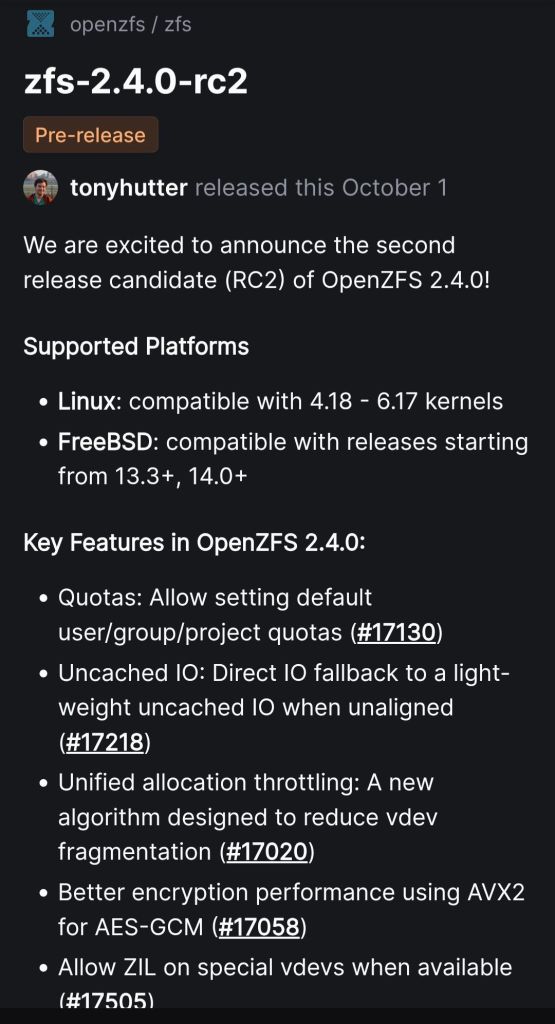
Key Features in OpenZFS 2.4.0:
- Quotas: Allow setting default user/group/project quotas (#17130)
- Uncached IO: Direct IO fallback to a light-weight uncached IO when unaligned (#17218)
- Unified allocation throttling: A new algorithm designed to reduce vdev fragmentation (#17020)
- Better encryption performance using AVX2 for AES-GCM (#17058)
- Allow ZIL on special vdevs when available (#17505)
- Extend
special_small_blocksto land ZVOL writes on special vdevs (#14876), and allow non-power of two values (#17497) - Add
zfs rewrite -Pwhich preserves logical birth time when possible to minimize incremental stream size (#17565) - Add
-a|--alloption which scrubs, trims, or initializes all imported pools (#17524) - Add
zpool scrub -S -Eto scrub specific time ranges (#16853) - Release topology restrictions on special/dedup vdevs (#17496)
- Multiple gang blocks improvements and fixes (#17111, #17004, #17587, #17484, #17123, #17073)
- New dedup optimizations and fixes (#17038, #17123, #17435, #17391)

-
The second Release Candidate of the upcoming version.

-
OpenZFS continues to evolve as a robust filesystem for everything from IoT devices to supercomputing clusters. The upcoming OpenZFS 2.4 release (Nov 2025) focuses on stability, usability, and performance.
Key Features in 2.4
- Fast dedup log pacing
- Fix for Encryption + ZFS send
- Skip slow RAID-Z children
- Improved allocation under fragmentation
- Scrub only changed blocks in a date range
- Parallel ARC eviction for large-memory systems
- Asynchronous ARC flush on pool export
- New JSON output,
zfs rewritecommand, project quotas on FreeBSD, ZVOL threading, and more
In-Development Features
- Label Redesign: Larger (256 MiB) labels, more uberblocks, support for larger sector sizes, better rewind and diagnostics.
- AnyRaid-Z: Flexible RAID-Z with mixed disk sizes for higher usable capacity.
- Forced Export: Allows safe forced unmount of suspended pools to restore uptime.
- AWS Enhancements: Optimized write strategies for provisioned IOPS EBS volumes.
Potential Features
- BRT Log: Improves performance of block cloning/reflinks.
- SMR Drive Support: Optimizations to handle overlapping track designs.
Future Technologies
- NVMe-connected HDDs: Standardized interfaces for reconfigurable storage.
- CXL (Compute Express Link): Disaggregated computing and memory pooling to scale ZFS without distributed FS complexity.
https://klarasystems.com/articles/zfs-new-features-roadmap-innovations/
-
An initiative of Klara Inc to launch a Webinar with the most experienced devs in the ZFS storage industry.

-
Major features include:
- Quotas: Allow setting default user/group/project quotas (#17130)
- Uncached IO: Direct IO fallback to a light-weight uncached IO when unaligned (#17218)
- Unified allocation throttling: A new algorithm designed to reduce vdev fragmentation (#17020)
- Better encryption performance using AVX2 for AES-GCM (#17058)
- Allow ZIL on special vdevs when available (#17505)
- Extend
special_small_blocksto land ZVOL writes on special vdevs (#14876), and allow non-power of two values (#17497) - Add
zfs rewrite -Pwhich preserves logical birth time when possible to minimize incremental stream size (#17565) - Add
-a|--alloption which scrubs, trims, or initializes all imported pools (#17524) - Add
zpool scrub -S -Eto scrub specific time ranges (#16853) - Release topology restrictions on special/dedup vdevs (#17496)
- Multiple gang blocks improvements and fixes (#17111, #17004, #17587, #17484, #17123, #17073)
- New dedup optimizations and fixes (#17038 , #17123 , #17435, #17391)
-
This feature will allow the maximal use of storage in a ZFS pool consisted by drives of different capacity.
https://hexos.com/blog/introducing-zfs-anyraid-sponsored-by-eshtek