On 29 September 2026 the FreeBSD Security Team published six security advisories covering nine CVEs. Five fix bugs in the kernel and one fixes OpenSSL in the base system. The most serious are three local privilege-escalation bugs (sysvsem, kqueue) and a set of jail filesystem escapes. There is also a remote kernel panic that affects hosts using receive-side kernel TLS.
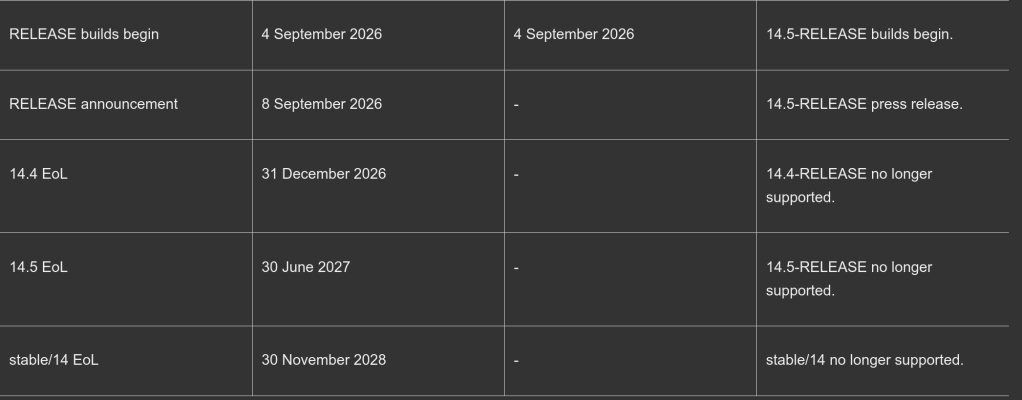
Fixed releases are 15.1-RELEASE-p4, 15.0-RELEASE-p14, 14.5-RELEASE-p1 and 14.4-RELEASE-p10. Every kernel fix needs a reboot.
| Advisory | Component | Issue | Impact | Affects | CVE |
|---|---|---|---|---|---|
| SA-26:64.sysvsem | Kernel: System V semaphores | Heap out-of-bounds access in semop(2) | Local privilege escalation | All supported | CVE-2026-58098 |
| SA-26:65.kqueue | Kernel: kqueue copy-on-fork | Use-after-free and out-of-bounds read | Local privilege escalation | 15.1 only | CVE-2026-58099, CVE-2026-58100 |
| SA-26:66.jail | Kernel: jails | Three FD_RESOLVE_BENEATH bypasses | Jail filesystem root escape | All supported | CVE-2026-101304, -101305, -101306 |
| SA-26:67.ktls | Kernel: receive-side KTLS | Off-by-one in TLS 1.3 record parsing | Remote kernel panic (DoS) | All supported | CVE-2026-101302 |
| SA-26:68.openssl | Base OpenSSL | Out-of-bounds read in DTLS retransmission | Heap memory disclosure, DoS | All supported | CVE-2026-84782 |
| SA-26:69.udp | Kernel: IPv6 UDP | Jail loopback rewrite missing on sendto(2) | Jail network isolation bypass | All supported | CVE-2026-101303 |
Kernel advisories
SA-26:64.sysvsem: heap out-of-bounds in semop(2)
When semop(2) blocks, it drops the set lock and sleeps. On waking, it checks a sequence number in the IPC identifier to detect whether the set was removed in the meantime. That number is only 15 bits wide. If enough sets are created and destroyed in the same slot while a caller sleeps, it wraps around and semop(2) can touch a semaphore out of bounds. An unprivileged local user can use this to corrupt kernel heap memory and potentially escalate privileges. There is no workaround. Credit: Reo Shiseki and Andrew Griffiths.
SA-26:65.kqueue: races in copy-on-fork
This advisory affects only FreeBSD 15.1, which introduced the KQUEUE_CPONFORK mode that copies knotes into a child on fork(2). It covers two bugs. The copy code did not skip internal marker knotes before dropping the kqueue lock, so a concurrent free led to a use-after-free (CVE-2026-58099). It also indexed the child’s descriptor table without a bounds check, so a parent thread growing its table mid-fork caused an out-of-bounds read (CVE-2026-58100). Both can give local privilege escalation, and there is no workaround. Credit: Reo Shiseki and Mark Johnston.
SA-26:66.jail: three jail root escapes
If a directory descriptor is passed into a jail over SCM_RIGHTS, it carries FD_RESOLVE_BENEATH so lookups stay inside that directory. Three flaws let a jailed process drop that restriction:
- fdescfs(4) mounted with
nodupreturned /dev/fd/N descriptors without the flag or their Capsicum rights (CVE-2026-101304). - renameat(2) ignored the flag, so a directory could be renamed and then escaped via fchdir(2) (CVE-2026-101305).
- SCM_RIGHTS passing did not preserve the flag, so a process could clear it by sending the descriptor to itself (CVE-2026-101306).
The result is an escape from the jail’s filesystem root. Systems that never pass directory descriptors into jails are not affected. Credit: Jan Bramkamp and firk.
SA-26:67.ktls: remote panic via receive-side KTLS
TLS 1.3 hides the real record type in the last non-zero byte of the decrypted payload. The kernel’s search for that byte had an off-by-one error. A crafted record causes an underflow and then a NULL pointer dereference, which panics the kernel. Any remote TLS 1.3 peer can trigger it against an application that enables receive-side KTLS. If kern.ipc.tls.enable is 0, you are not affected. Credit: Mark Johnston.
SA-26:69.udp: IPv6 UDP escapes jail loopback rewrite
Classic (non-VNET) jails rewrite traffic sent to loopback so that it goes to the jail’s own IP instead. The IPv6 UDP send path for unconnected sockets skipped that rewrite. A jailed process could therefore send datagrams to services listening on the host’s ::1. VNET-only setups and classic jails without an IPv6 address are not affected. Credit: Yuxiang Yang, Yizhou Zhao, Ao Wang, Xuewei Feng, Qi Li and Ke Xu (Tsinghua University). They used GLM-5.1 from Z.ai to find the bug.
Userland advisory
SA-26:68.openssl: DTLS retransmission out-of-bounds read
A DTLS handshake write can be suspended part-way through while the transport is busy. If the retransmission timer fired during that pause, OpenSSL resent the message from the stale buffer offset and could read past the end of the allocation. The peer may receive heap memory as plaintext handshake data. If the read reaches unmapped memory, the application crashes. Only applications that use DTLS are affected. Credit: Laurent Gaffie (secorizon.com).
The upstream OpenSSL advisory lists more issues than this. Its Moderate issue, CVE-2026-84783, affects only OpenSSL 4.0 and not FreeBSD. The Low-severity issues are not being fixed in base. One reason is that OpenSSL 3.0, which FreeBSD 14.x ships, reached end of upstream support in September 2026. After updating, restart any daemons that use libssl, or reboot.
How to update
Upgrade to a patched branch and reboot. Only the kqueue fix is limited to 15.1. Every other fix is available on all supported branches.
| Branch | Fixed in |
|---|---|
| releng/15.1 | 15.1-RELEASE-p4 |
| releng/15.0 | 15.0-RELEASE-p14 |
| releng/14.5 | 14.5-RELEASE-p1 |
| releng/14.4 | 14.4-RELEASE-p10 |
| stable/15, stable/14 | Commits dated 28–29 Sep 2026 |
For 15.0 or later on amd64/arm64, installed with base system packages (pkgbase):
# pkg upgrade -r FreeBSD-base# shutdown -r +10min "Rebooting for a security update"
For RELEASE systems installed from distribution sets:
# freebsd-update fetch# freebsd-update install# shutdown -r +10min "Rebooting for a security update"
If you build from source, fetch each signed patch from https://security.FreeBSD.org/patches/SA-26:NN/, verify it with gpg and apply it with patch -E -p0 in /usr/src. Then rebuild the kernel. The OpenSSL fix needs buildworld/installworld instead. The jail and OpenSSL patches are per-version, so pick the file that matches your branch.
Also released: errata notices
Three non-security errata notices came out at the same time and ship in the same patch levels:
- EN-26:22.usb (14.5 only): an xhci(4) change stopped drivers from resetting the USB data toggle. As a result, some umass(4) drives fail to attach with CAM status 0x444.
- EN-26:23.syslogd (15.1 only): with pipe (
|) destinations, syslogd(8) leaked child processes on each SIGHUP reload. That left zombies behind and could crash syslogd. Restart syslogd after updating. - EN-26:24.tzdata (all branches): the base system is updated to tzdata 2026d. Run tzsetup(8) if your local zone changed. Language runtimes with their own zoneinfo need updating separately.
Sources
- FreeBSD Security Advisories — SA-26:64 to SA-26:69 and EN-26:22 to EN-26:24, announced 29 September 2026
- OpenSSL security advisory, 29 September 2026