




Ντροπή απλά
Τόσο καιρό χωρίς custom scheduling ή v3 support
Ντροπή απλά
Τόσο καιρό χωρίς custom scheduling ή v3 support
Ctrl-Shift-SemiColon to open the debug console Ctrl-Enter to execute the command

The new beta-untested version of the FSRS scheduling algorithm is 4.2.1 while the respective stable release is 3.26.2
https://github.com/open-spaced-repetition/fsrs4anki/releases
The original commit that produced the following error:
Exception in thread Thread-1:
Traceback (most recent call last):
File “/home/chris/ankidev/out/extracted/python/lib/python3.9/threading.py”, line 980, in _bootstrap_inner
self.run()
File “/home/chris/ankidev/qt/aqt/mediasrv.py”, line 93, in run
DevTools listening on ws://127.0.0.1:8080/devtools/browser/27d471d5-c7a4-4890-aa4a-3e6d790323b1
https://github.com/ankitects/anki/commit/d5b5b861e24fccf8248dc9786afa13faea203755
% (self.server.effective_host, self.server.effective_port) # type: ignore
AttributeError: ‘MultiSocketServer’ object has no attribute ‘effective_host

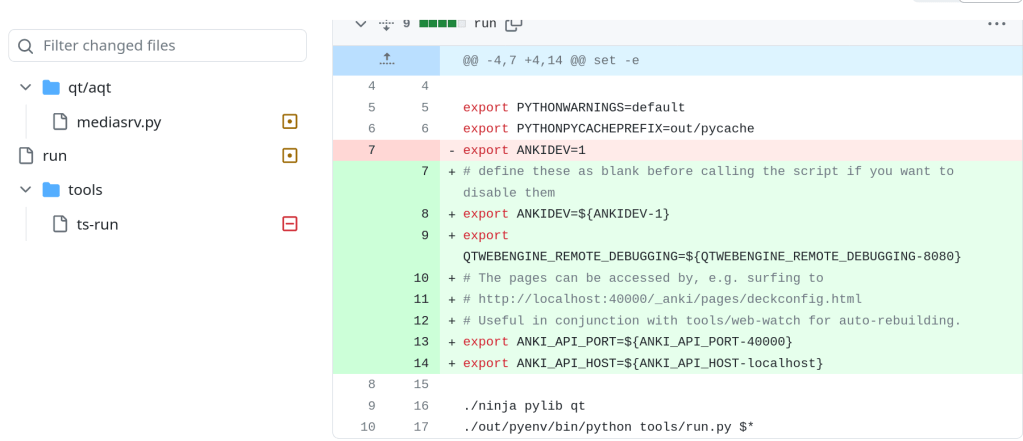
The change that fixed the issue:

For a complete changelog view the following link:
The newest v0.10.48 was released yesterday and it has been already integrated to Anki in the following commit:
https://github.com/ankitects/anki/commit/b86bf5f2043b2422a3d0133c7d31b3583b746719
https://github.com/sfackler/rust-openssl/releases/tag/openssl-v0.10.48
The following steps apply for an Arch Linux and Arch Linux based distributions such as Manjaro etc
Compiling from the source code will give you the opportunity to test newer changes instead of waiting for a beta version or a stable one. A stable version can take months to be released. Additionally, running from the main branch gives you the ability to report bugs and even propose new features to the developers.
In order to pull new changes use the following command:
cd ~/ankidev && git pull
Then you can recompile to try what has changed.
In case of a bug that you want to reverse back to previous commits you can see the changelog using: git log
If for example the newer commit is troublesome and you want to revert back to a commit with the hash 77a45365cb64284dd4a8cd2535d6cbdc2676472c
then execute: git checkout 77a45365cb64284dd4a8cd2535d6cbdc2676472c
Say for example that the developers fix the bug and you want to get back to the main branch. Then use:
git checkout main
 /root
/root 