




Introducing Claude Fable 5.2 and Claude Mythos 5.2, designed to tackle the most daunting technical challenges.
— Claude (@claudeai) November 9, 2026
They’re capable collaborators on ambitious projects in many fields, and show improvements in areas like coding, reasoning, and vision. pic.twitter.com/jP0AutLxXb
Category: AI
-
A very interesting article from Terence Tao. The most important key note or take away message is the following:
“The advance of AI will overwhelm us with so many control points to watch that there aren’t enough people to control them all. Those are jobs. Highly skilled jobs.“
-
Here is a draft proposed by Nate Graham.
LLM usage
KDE follows a “human in the loop” principle: when using an LLM, a human
must be making decisions beyond mere prompting. The output must express
the operator’s unique humanity in some way.So nobody in KDE should know you used an LLM — not because you’re
concealing it, but because the results are functionally
indistinguishable from what you could produce yourself.How can you ensure that? Here are some examples:
Acceptable LLM usage
- Create it yourself in the first place, with no LLM.
- Write text that you want other people to read yourself in English,
with no LLM. - Have an LLM make a rough draft or something, then you rewrite or
refine it yourself. - Have an LLM find a bug, and then you verify that and fix it yourself.
- Have an LLM fix a merge conflict in your patch, then you verify and
push the result yourself. - Use an LLM to debug an issue and identify a bug, then report the bug
yourself, with your own words. - Write text that you want other people to read yourself in your native
language, and then machine-translate it (with no stylistic or tonal
changes) into English. - Use an LLM to explain or teach you something you don’t understand,
then test your new knowledge in the field to verify that it was correct
and that you now have a new skill.
Prohibited
- Don’t ask an LLM to write some English text, and copy-paste that into
a chat or merge request description. - Don’t copy someone else’s response to you into an LLM, tell it to
reply, and then copy-paste the output as a response to the other person. - Don’t submit “vibe-coded” changes you don’t understand and couldn’t
make yourself. - Don’t disclose LLM usage as a way of trying to excuse the potential
errors or poor quality of a contribution. - Don’t add “Assisted-by: [some LLM]” tags to your commits; it’s just
free advertising for the LLM’s provider.
-
OpenAI claims to have solved the Navier–Stokes Millennium Prize Problem!!
-
What was released
- Two models built on the same underlying system, differing only in safeguards.
- Fable 5.1: generally available.
- Mythos 5.1: restricted to trusted access programs; its safeguards are designed to support cybersecurity and life-sciences work.
- Positioned as the leading models for coding and knowledge work, with research capabilities framed as an early sign of AI contributing to scientific progress.
Customer-facing changes
- Price: roughly 25% cheaper than Fable 5 for typical token-billed workloads, driven by lower cache-read pricing; up to ~45% cheaper for highly agentic work.
- Data retention: new Enterprise Frontier Safeguards (EFS) store data in customer-controlled cloud infrastructure, giving privacy equivalent to zero data retention while still preventing adversarial use. Rolling out to enterprise customers in phases starting later this fall; eligible customers get zero data retention with Fable 5.1 in the interim.
- Safeguards: fewer false positives — 60% fewer in cybersecurity. Fable 5.1 may now be used to discover software vulnerabilities, but not to develop exploits. A biology access program developed with the US government will open enrollment for scientists soon.
Performance
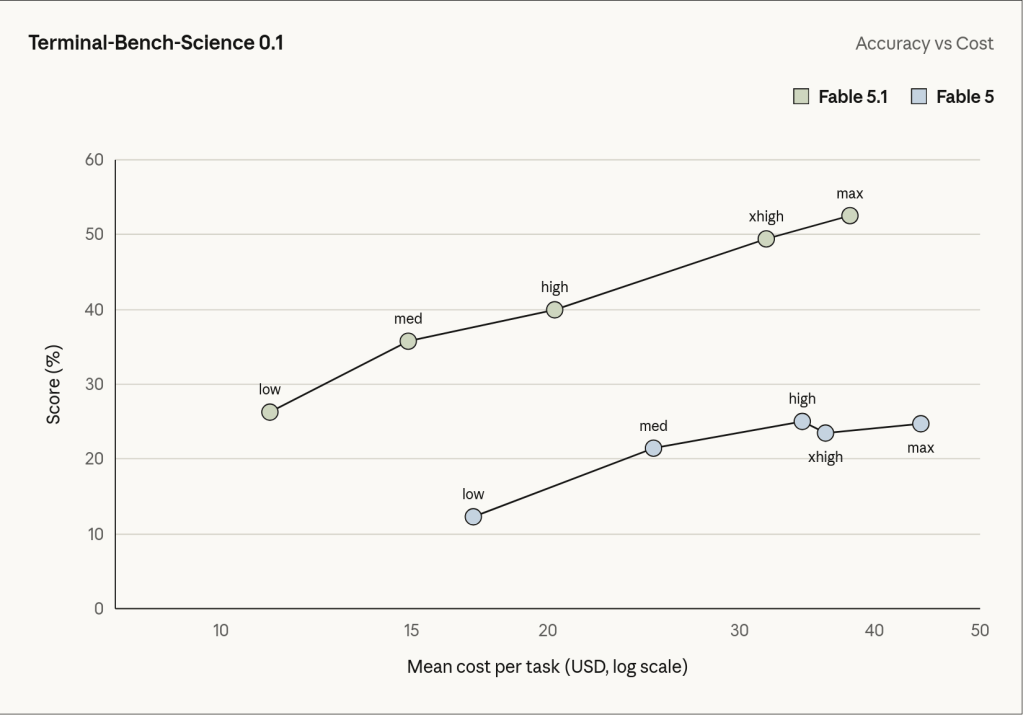
- Effort levels are configurable; Low or Medium effort matches or beats Fable 5 at much lower cost. Defaults: High in Claude Code, Medium in Claude Cowork and on Claude.ai.
- Selected benchmarks (Fable 5.1 / Fable 5 / Opus 5 / GPT-5.6 Sol):
- Terminal-Bench-Science 0.1: 52.6% / 24.7% / 29.0% / 22.4%
- Terminal-Bench 4.0: 55.8% (60.9% for Mythos 5.1) / 42.0% / 52.3% / 37.3%
- GDPval-AA v2: 1853 / 1723 / 1824 / 1711
- OSWorld 2.0 (strict): 41.7% / 36.1% / 39.6% / —
- Humanity’s Last Exam (no tools): 60.9% / 57.8% / 56.6% / —
- AutomationBench: 31.4% / 17.1% / 26.9% / 19.6%
- CursorBench 3.2.0: 73.4% / 70.5% / 70.0% / 67.2%
- Benchmarks were run with production safeguards on; safeguard interventions scored zero on some tasks, likely understating Fable 5.1 and Fable 5 results.
- Millennium reported Fable 5.1 diagnosed a rare crash in its internal systems that its engineers and other models had failed to explain over several years.
- Jane Street’s Craig Falls reported more coding problems solved than Fable 5 or Opus 5, state-of-the-art trading intuition, and better readability over long multi-step tasks.
Scientific research results
- Molecular design: given open-source protein design and folding tools, Mythos 5.1 produced binders with affinities 10× higher than the best entries in Adaptyv Bio’s competitions on three targets, and a ~50% hit rate across 12 targets (10–15% is typical).
- Venus elevation map: Fable 5.1 trained a neural network on 30-year-old NASA Magellan radar data plus an existing map of one-fifth of the planet, producing a map of one-third of Venus at 2–3 km resolution (up from 10–20 km) with heights up to 25% more accurate. Released under a Creative Commons license ahead of NASA VERITAS and ESA EnVision.
- GPU kernel optimization: Mythos 5.1 wrote custom kernels and cached intermediates to speed up seven open-source deep learning models by 1.4×–2.5× on an H100 with identical outputs, cutting estimated GPU costs 30–60%. Done in days from public source code alone; optimizations to be open-sourced.
- Related efforts: the Model Hardware Standard for safe operation of lab equipment, the AI for Science credit program, and a discounted Claude Team plan for scientists.
Safety, security, and alignment
- Chemical and biological: expert red-teaming, automated evaluations, and a tabletop exercise pairing PhD biologists with AI experts. Mythos 5.1 exceeds Mythos 5 in capability but falls short of the next Responsible Scaling Policy risk tier, so it ships with Mythos 5’s safeguards restricting research biology capabilities.
- Cyber: with safeguards off, Mythos 5.1 shows the strongest cyber capabilities of any released model but remains in the lower risk category of the Frontier Compliance Framework. Fable 5.1’s safeguards were stress-tested internally, by two commissioned external organizations, and via automated testing by Gray Swan; no critical-severity jailbreak found.
- Agentic safety: refuses malicious agentic coding and computer-use requests at rates comparable to Mythos 5, Sonnet 5, and Opus 5; most robust model to date on an external prompt-injection benchmark.
- Alignment: assessed via static and interactive behavioral evaluations, natural language autoencoder analysis of internal thinking, misalignment capability evaluations, training data review, internal pilot analysis, and external reports. Full detail is in the System Card.

-
Using AI to generate Anki flashcards has evolved rapidly over the past couple of years. Here’s a look at how it started and where we are in 2026.
The Beginning: ChatGPT Prompts (2023)
The first to provide an Anki flashcard-generating ChatGPT prompt was Jarret Lee in this Anki forums post: Casting a Spell on ChatGPT: Let it Write Anki Cards for You. The idea was simple — give ChatGPT a structured prompt and it returns properly formatted flashcards you can import.
AnkiBrain Add-on
Shortly after, the AnkiBrain add-on was developed, integrating AI directly into Anki’s interface. This made it possible to generate cards without leaving the application.
Current Landscape (2026)
The ecosystem has exploded. Here are the main tools available today:
- AnkiDecks AI — upload PDFs, PowerPoints, Word docs, or even YouTube links and get flashcards generated instantly
- Ankify — turns notes, PDFs, and slides into export-ready Anki decks with card preview and editing before export
- NovaCards — uses LLMs to generate cards from class notes, with a companion Anki plugin for in-app generation
- AnkiAIUtils — AI-powered tools to enhance existing cards with explanations, mnemonics, and illustrations
- Agentic AI approaches — tools like Claude Code can now generate batches of contextualised cards by describing the pattern you want
- MCP interfaces — AI models can now interact directly with your Anki collection through MCP connectors
My Approach
I still prefer writing my own cards for deep learning, but AI-generated cards are great for:
- Quickly converting lecture notes or documentation into reviewable material
- Generating vocabulary cards in bulk
- Creating first-pass cards that you then refine manually
The key is to always review AI-generated cards before adding them to your collection. Bad cards lead to bad learning.
-
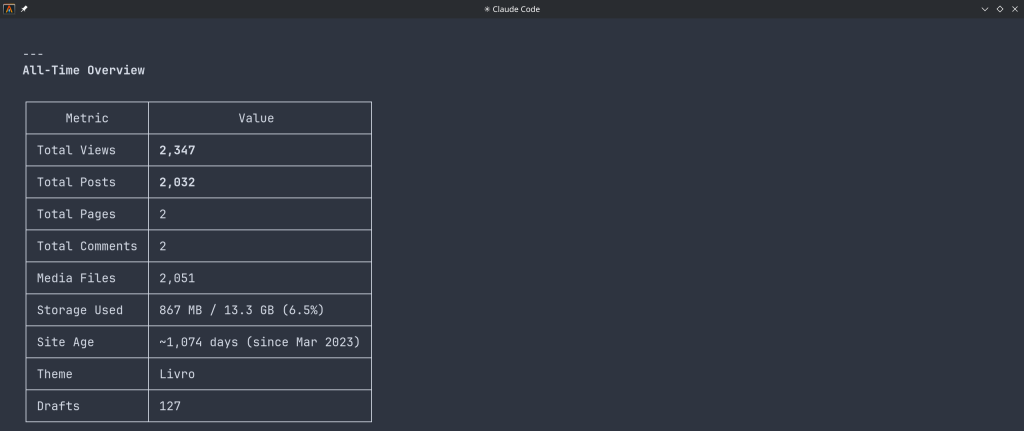
“The WordPress.com MCP server allows AI assistants to securely interact with your WordPress.com sites. It exposes tools for listing, searching, and viewing posts, pages, and comments, managing users and site settings, and retrieving statistics. By leveraging OAuth 2.1, it ensures that agents only access resources you’ve approved, making it easy to integrate AI-driven workflows into your publishing experience.”
You can use WordPress.com to:
Manage Content:
“Show me my latest blog posts” or “Search for posts about technology”View Analytics:
“What are my site statistics for this month?”Manage Users:
“List all users on my WordPress site”Site Administration:
“Check my site settings and installed plugins”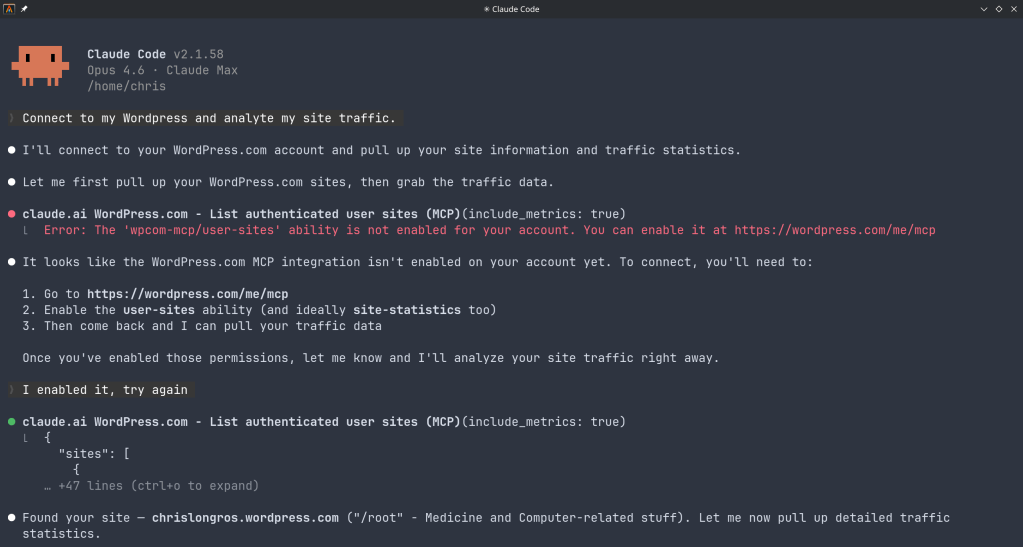
-
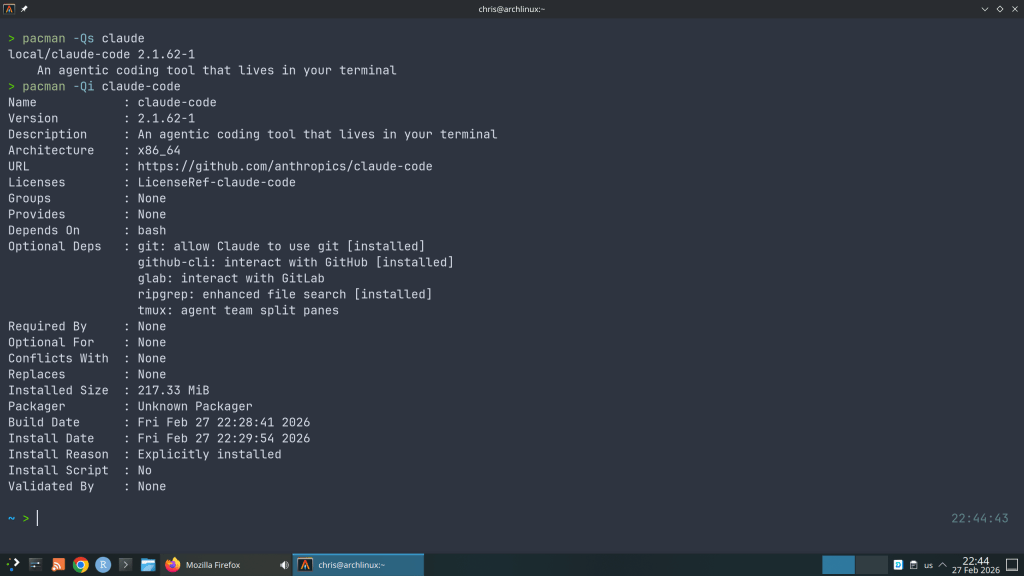
And I wondered why so many AUR package updates for the claude-code …
“Cybersecurity researchers have disclosed multiple security vulnerabilities in Anthropic’s Claude Code, an artificial intelligence (AI)-powered coding assistant, that could result in remote code execution and theft of API credentials.”
“The vulnerabilities exploit various configuration mechanisms, including Hooks, Model Context Protocol (MCP) servers, and environment variables – executing arbitrary shell commands and exfiltrating Anthropic API keys when users clone and open untrusted repositories”
https://thehackernews.com/2026/02/claude-code-flaws-allow-remote-code.html
-
AI • Model Release
Claude Opus 4.6: Anthropic’s Most Capable Model Yet
Published February 6, 2026 — 8 min read
On February 5, 2026, Anthropic released Claude Opus 4.6 — its most powerful AI model to date. Arriving just three months after Opus 4.5, this update delivers a massive expansion to the context window, a new “agent teams” paradigm for parallel task execution, and benchmark scores that surpass both OpenAI’s GPT-5.2 and Google’s Gemini 3 Pro across a range of evaluations.
Whether you’re a developer building agentic workflows, a knowledge worker producing professional documents, or a researcher wrestling with enormous datasets, Opus 4.6 marks a tangible leap in what an AI model can handle in a single session.
1M Token context window (beta)128K Max output tokens68.8% ARC AGI 2 score$5 / $25 Input / output per 1M tokensWhat’s New in Opus 4.6
While the version bump from 4.5 to 4.6 may seem incremental, the changes under the hood are substantial. Anthropic has focused on three pillars: reasoning depth, context capacity, and agentic execution.
⚡1 Million Token Context Window
A 5× increase over the previous 200K limit. Opus 4.6 scores 76% on the MRCR v2 needle-in-a-haystack benchmark at 1M tokens, compared to just 18.5% for Sonnet 4.5 — a qualitative shift in usable context.🤖Agent Teams in Claude Code
Multiple specialised agents can now split a task and work in parallel — one on the frontend, one on the API, one on a migration — coordinating autonomously. Anthropic reports a roughly 30% reduction in end-to-end task runtime.🧠Adaptive Thinking
Replaces the binary on/off extended thinking toggle. Opus 4.6 dynamically decides how much reasoning effort a prompt requires. Four effort levels (low, medium, high, max) give developers fine-grained cost–speed–quality control.♾️Context Compaction API
A new beta feature that automatically summarises older context as conversations grow, enabling effectively infinite sessions without manual truncation or sliding-window hacks.📊Claude in PowerPoint & Excel Updates
Claude now operates as a side panel inside PowerPoint, respecting your slide masters and layouts. Excel gets unstructured data support and longer workflows for paid subscribers.Benchmark Breakdown
Opus 4.6 sets new state-of-the-art scores on several major evaluations. The most striking result is on ARC AGI 2, a benchmark designed to measure novel problem-solving that is easy for humans but notoriously hard for AI. Opus 4.6 scored 68.8% — nearly double Opus 4.5’s 37.6% and well ahead of GPT-5.2 (54.2%) and Gemini 3 Pro (45.1%).
Benchmark Opus 4.6 Opus 4.5 GPT-5.2 Gemini 3 Pro Terminal Bench 2.0 65.4% 59.8% — — OSWorld (Agentic) 72.7% 66.3% < 72.7% < 72.7% ARC AGI 2 68.8% 37.6% 54.2% 45.1% MRCR v2 (1M ctx) 76% — — — Humanity’s Last Exam #1 — — — Beyond the headline numbers, Opus 4.6 also tops the GDPval-AA benchmark for economically valuable knowledge work, outperforming GPT-5.2 by approximately 144 ELO points. In life sciences, it delivers nearly twice the performance of its predecessor on computational biology, structural biology, organic chemistry, and phylogenetics tests.
Coding and Developer Impact
Coding has always been a strength of the Opus line, and 4.6 takes it further. The model plans more carefully before generating code, catches its own mistakes through improved self-review, and sustains agentic tasks for longer without losing coherence. For large codebases, Anthropic claims it can now handle autonomous code review, debugging, and refactoring across repositories that would have previously required human intervention.
“Opus 4.6 is a model that makes the shift from chatbot to genuine work partner really concrete for our users.” — Scott White, Head of Product, Anthropic
The new agent teams feature in Claude Code is particularly noteworthy. Rather than a single agent working sequentially, developers can now spin up parallel agents that own distinct parts of a task. Anthropic’s example: one agent handles the frontend, another the API layer, and a third manages database migrations — all coordinating autonomously. This is available as a research preview and represents a meaningful step towards multi-agent orchestration out of the box.
Enterprise and Knowledge Work
Anthropic has been explicit about targeting enterprise workflows with this release. Roughly 80% of the company’s business comes from enterprise customers, and Opus 4.6 is tuned for the kind of work they care about: financial analysis, legal research, document production, and multi-step research tasks.
The model now leads on the Finance Agent benchmark and TaxEval by Vals AI. Combined with the expanded context window, analysts can feed entire filings, market reports, and internal data into a single session and get coherent, cross-referenced outputs. Anthropic says Opus 4.6 produces documents, spreadsheets, and presentations that approach expert-created quality on the first pass, reducing the rework cycle significantly.
💡 Pricing Note Standard API pricing remains at $5 input / $25 output per million tokens — identical to Opus 4.5. Requests exceeding 200K input tokens are charged at a premium rate of $10 / $37.50 per MTok. The model is available via the Anthropic API, AWS Bedrock, Google Vertex AI, Microsoft Foundry, and directly on claude.ai.Availability and API Changes
Opus 4.6 is live now across all major platforms. The API model identifier is simply
claude-opus-4-6— note the simplified naming without a date suffix. It’s available on the Anthropic API, AWS Bedrock, Google Vertex AI, Microsoft Foundry, and through GitHub Copilot for Pro, Pro+, Business, and Enterprise users.Developers should be aware of a few breaking changes: assistant message prefilling now returns a 400 error (migrate to structured outputs or system prompt instructions), the
output_formatparameter has moved tooutput_config.format, and the effort parameter is now generally available without a beta header.Safety and Alignment
Anthropic reports that the intelligence gains in Opus 4.6 have not come at the cost of safety. On their automated behavioural audit, the model showed low rates of misaligned behaviours including deception, sycophancy, and encouragement of user delusions — matching Opus 4.5’s results. Six new cybersecurity probes have been added to evaluate potential misuse vectors, and the model achieves a lower rate of unnecessary refusals compared to previous releases.
The Bigger Picture
Opus 4.6 arrives at a moment of intensifying competition. OpenAI announced its new OpenAI Frontier enterprise platform just hours before Anthropic’s launch, signalling a strategic pivot towards infrastructure and agent management rather than competing purely on benchmark scores. Google’s Gemini 3 Pro and Microsoft’s deep integration of Opus 4.6 into Foundry add further complexity to the landscape.
What sets this release apart is the combination of raw capability and practical utility. The 1M context window, agent teams, adaptive thinking, and context compaction aren’t just benchmark optimisations — they address real friction points that developers and knowledge workers hit daily. If Opus 4.5 moved Claude from “chatbot” to “useful tool,” Opus 4.6 positions it as a genuine work partner that can own entire workflows end-to-end.
For those already running Opus 4.5 in production, the upgrade path is a single API version change at the same price point. For everyone else, this is a strong argument to take a serious look at what Claude can do in 2026.
-
GitHub has officially rolled out the improved “Files Changed” experience as the default for all users. After months in public preview, this redesigned pull request review interface brings significant improvements to performance, accessibility, and overall productivity when reviewing code changes.
Key Improvements Over the Classic Experience
The new interface maintains familiarity for existing users while adding several notable enhancements:
Comment on Any Line
Previously, you could only comment on lines directly surrounding a change. Now you can add review comments to any line in a changed file, making it easier to provide context or point out related code that might need attention.
View PR Description Without Switching Pages
A new Overview panel lets you view the pull request description directly from the “Files changed” page. No more jumping back and forth between tabs to remember what the PR is supposed to accomplish.
Enhanced File Tree
The file tree sidebar is now resizable and includes visual indicators showing which files have comments, errors, or warnings. This makes it much easier to track your progress when reviewing large PRs with many changed files.
Draft Comments That Persist
Comments and replies are now saved locally in your browser. If you accidentally close the tab or refresh the page, your in-progress feedback won’t be lost.
Fewer Page Reloads
Actions like refreshing to pull in new changes, switching between split and unified diff modes, and other common tasks no longer force a full page reload. The interface feels much snappier as a result.
Improved Accessibility
The new experience includes better keyboard navigation, screen reader landmarks, and increased line spacing options to make code review accessible to everyone.
Experimental Mode for Large Pull Requests
One of the most interesting additions is an experimental mode specifically designed for reviewing large pull requests. This mode uses virtualization to reduce the number of DOM elements the browser needs to manage, significantly improving memory usage and page responsiveness—especially on slower machines.
When viewing a large PR, you’ll see a banner offering to try this experimental mode. There are some trade-offs: browser find functionality, text selection across the entire page, printing, and some browser extensions may not work as expected since the full diff isn’t rendered in the DOM. You can switch back to single file mode at any time.
Bug Fixes and Polish
GitHub has also addressed numerous issues including problems with suggested changes being applied incorrectly, comment workflow bugs, interaction lag (especially on Safari), and various UI quirks like scroll positioning and sticky headers behaving unexpectedly.
Opting Out
If you prefer the classic experience, you can still opt out through your settings. However, given the improvements in this new version, it’s worth giving it a fair trial before switching back.
Providing Feedback
GitHub is actively collecting feedback on the new experience. If you encounter issues or have suggestions, you can participate in the “Files Changed” preview feedback discussion on GitHub.