2026-07-20 — A ~150 MB binary is committed to the ports tree in misc/github-copilot-cli (a routine version bump). It exceeds GitHub’s 100 MB object limit and carries an unresolved redistribution question.
Shortly after — The file is removed in a later commit, but the blob remains in history, so mirroring stays broken.
2026-07-21 (~23:00 UTC) — core@ becomes aware that mirroring to GitHub is severed and requests suspension of pushes. The ports tree is frozen.
2026-07-21 → following hours — gitadm@, clusteradm@, portmgr@, and core@ deliberate. They settle on a history rewrite, constrained to be reproducible by third parties without unreasonable downstream burden.
2026-07-22 — Initial core@ notice (Kyle Evans) explaining the freeze.
2026-07-24 — The rewrite is completed and published; main tip moves forward and commits flow again. A reproduction script (with SHA256) is released for independent verification. Formal signed announcement issued by René Ladan (portmgr@) and Kyle Evans (core@).
2026-07-24 → coming hours — Tree thaws for regular operations.
By 2026-07-26 — Cluster package builds resume.
Following week — Infrastructure repairs; server-side hooks rolled out (hard file-size ceiling, approval-gated soft limits, binary-license confirmation).
Git 2.53 has officially landed, bringing another round of performance optimizations, improved error messages, and bug fixes — all while inching closer to the anticipated Git 3.0 release, tentatively expected around the end of 2026.
What’s New in Git 2.53
This latest feature release delivers performance improvements across various Git sub-commands and operations, along with polished error messages and enhancements to several sub-commands. As with recent releases, the focus remains on refining the developer experience while laying the groundwork for the major 3.0 milestone.
Rust Is Now Default-Enabled
The most notable change in Git 2.53 is that both the Makefile and Meson build systems now enable Rust support by default. This means builds will fail out of the box if Rust isn’t available on the host — though developers can still explicitly disable it via build flags for the time being.
This follows a deliberate three-stage rollout:
Git 2.52 — Rust support was auto-detected by Meson and disabled in the Makefile, allowing the project to establish the initial infrastructure.
Git 2.53 (current) — Both build systems default-enable Rust. Builds break without it unless explicitly disabled.
Git 3.0 — Rust becomes mandatory. The opt-out build flags will be removed entirely.
Why Rust?
The push toward Rust in Git mirrors a broader trend across foundational open-source projects (the Linux kernel, Coreutils, zlib) that are adopting Rust for its memory safety guarantees and strong performance characteristics. For a tool as universally relied upon as Git, reducing the surface area for memory-related bugs is a significant long-term investment.
Looking Ahead
With Git 3.0 on the horizon, expect Rust to become a hard build requirement. If you maintain custom Git builds or packaging pipelines, now is the time to ensure your toolchains include a supported Rust compiler. The transition window is closing.
I’ve released anki-snapshot, a tool that brings proper version control to your Anki flashcard collection. Every change to your notes is tracked in git, giving you full history, searchable diffs, and the ability to see exactly what changed and when.
The Problem
Anki’s built-in backup system saves complete snapshots of your database, but it doesn’t tell you what changed. If you accidentally delete a note, modify a card incorrectly, or want to see how your deck evolved over time, you’re stuck comparing opaque database files.
The Solution
anki-snapshot exports your Anki collection to human-readable text files and commits them to a git repository. This means you get:
Full history: See every change ever made to your collection
Meaningful diffs: View exactly which notes were added, modified, or deleted
Search through time: Find when a specific term appeared or disappeared
Easy recovery: Restore individual notes from any point in history
How It Works
The tool reads your Anki SQLite database and exports notes and cards to pipe-delimited text files. These files are tracked in git, so each time you run anki-snapshot, any changes are committed with a timestamp.
~/anki-snapshot/
├── .git/
├── notes.txt      # All notes: id|model|fields...
├── cards.txt      # All cards: id|note_id|deck|type|queue|due|ivl...
└── decks.txt      # Deck information
Commands
Command
Description
anki-snapshot
Export current state and commit to git
anki-diff
Show changes since last snapshot
anki-log
Show commit history with stats
anki-search "term"
Search current notes for a term
anki-search "term" --history
Search through all git history
anki-restore <commit> <note_id>
Restore a specific note from history
Example: Tracking Changes
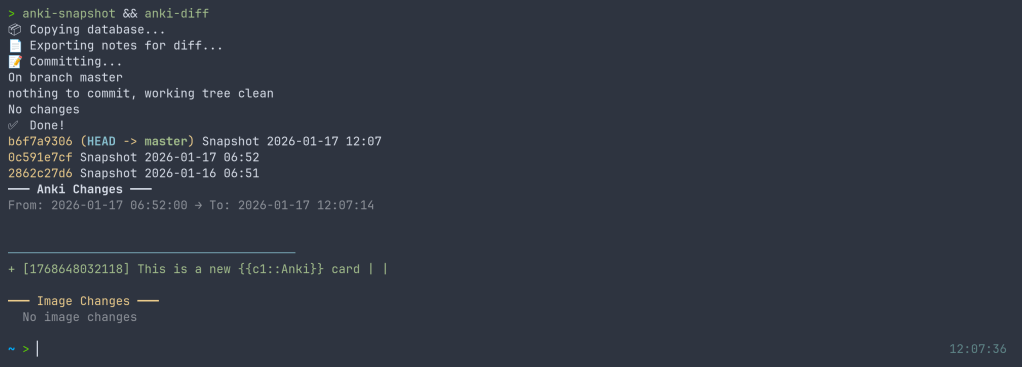
After editing some cards in Anki, run the snapshot and see what changed:
$ anki-snapshot
[main a3f2b1c] Snapshot 2026-01-14 21:30:45
 1 file changed, 3 insertions(+), 1 deletion(-)

$ anki-diff
━━━ Changes since last snapshot ━━━

Modified notes: 2
+ [1462223862805] Which antibodies are associated with Hashimoto...
− [1462223862805] Which antibodies are associated with Hashimoto...

New notes: 1
+ [1767170915030] Germline polymorphisms of the ATPase 6 gene...
Example: Searching History
Find when “mitochondria” was added or modified across your entire collection history:
$ anki-search "mitochondria" --history

commit e183cea7b3e36ad8b8faf7ca9d5eb8ca44d5bb5e
Date:   Tue Jan 13 22:43:47 2026 +0100
+ [1469146863262] If a disease has a mitochondrial inheritance pattern...
+ [1469146878242] Mitochondrial diseases often demonstrate variable expression...

commit 41c25a53471fc72a520d2683bd3defd6c0d92a88
Date:   Tue Jan 13 22:34:48 2026 +0100
− [1469146863262] If a disease has a mitochondrial inheritance pattern...
Integration with Anki
For seamless integration, you can hook the snapshot into your Anki workflow. I use a wrapper script that runs the snapshot automatically when closing Anki:
$ anki-wrapper # Opens Anki, snapshots on close
Or add it to your shell aliases to run before building/syncing your deck.
Installation
The tool is available on the AUR for Arch Linux users:
yay -S anki-snapshot
Or install manually:
git clone https://github.com/chrislongros/anki-snapshot-tool
cd anki-snapshot-tool
./install.sh
Requires: bash, git, sqlite3
Why Not Just Use Anki’s Backups?
Anki’s backups are great for disaster recovery, but they’re binary blobs. You can’t:
See what changed between two backups without restoring them
Search for when specific content was added
Selectively restore individual notes
Track your collection’s evolution over months or years
With git-based snapshots, your entire editing history becomes searchable, diffable, and recoverable.
“2.6% of the exposed secrets are revoked within the first hour, but a whopping 91.6% remain valid even after five days, which is when GitGuardian stops monitoring their status.”