Evaluation metrics for spaced-repetition schedulers in R: the sample-weighted binned RMSE (RMSE(bins)) used to rank algorithms in the open spaced repetition benchmark, together with log loss, the area under the ROC curve, and calibration curves. The metrics take plain vectors of predicted recall probabilities and observed outcomes, so they can benchmark any scheduler’s predictions.
Installation:
# install.packages("remotes")
remotes::install_github("chrislongros/srsbench")
Use:
library(srsbench)
p <- c(0.95, 0.86, 0.72, 0.60, 0.91)
y <- c(1, 1, 0, 1, 1)
elapsed_days <- c(1, 6, 20, 4, 15)
i <- c(2, 3, 4, 2, 3)
lapse <- c(0, 0, 1, 0, 0)
rmse_bins(p, y, elapsed_days, i, lapse) # calibration, lower is better
log_loss(p, y) # cross-entropy, lower is better
srs_auc(p, y) # discrimination, higher is better
calibration_bins(p, y) # predicted vs observed by bin
If a card is in a filtered deck (odid != 0), the post-sync reschedule only updates its odue and the card stays in the filtered deck — but it still updates mod/usn. The end result is that reviews on other devices get overwritten.
There’s an Anki addon called anki-mcp-server that exposes your Anki collection over MCP (Model Context Protocol). If you haven’t come across MCP yet — it’s basically a standardized way for AI assistants to interact with external tools. Connect this addon and suddenly Claude (or whatever you’re using) can search your cards, create notes, browse your decks, etc.
Pretty cool, but there was a big gap: zero FSRS support. The assistant could see your cards but had no idea how they were being scheduled. It couldn’t read your FSRS parameters, couldn’t check a card’s memory state, couldn’t run the optimizer. For anyone who’s moved past SM-2 (which should be everyone at this point), that’s a significant blind spot.
So I wrote a PR that adds four tools and a resource to fill that gap.
get_fsrs_params reads the FSRS weights, desired retention, and max interval — either for all presets at once or filtered to a specific deck. get_card_memory_state pulls the per-card memory state (stability, difficulty, retrievability) for a given card ID. set_fsrs_params lets you update retention or weights on a preset. And optimize_fsrs_params runs Anki’s built-in optimizer — with a dry-run mode so you can preview the optimized weights before committing.
There’s also an anki://fsrs/config resource that gives a quick overview of your FSRS setup without needing a tool call.
The annoying part was version compatibility. FSRS has been through several iterations and Anki stores the parameters under different protobuf field names depending on which version you’re on. I ended up writing a fallback chain that tries fsrsParams6 first, then fsrsParams5, then fsrsParams4, and finally the old fsrsWeights field. The optimizer tool also needs to adjust its kwargs depending on the Anki point version (25.02 and 25.07 changed the interface). All of that version-detection logic lives in a shared _fsrs_helpers.py so the individual tools stay clean.
One gotcha that took me a bit to track down: per-deck desired retention overrides are stored as 0–100 on the deck config dictionary, but the preset stores them as 0–1. Easy to miss, and you’d get nonsensical results if you didn’t normalize between the two.
What I’m most excited about is what this enables in practice. You can now ask an AI assistant things like “run the optimizer on my medical deck in dry-run mode and tell me how the new weights compare” or “which of my presets has the lowest desired retention?” — and it can actually do it, pulling real data from your collection instead of just guessing. For someone who spends a lot of time tweaking FSRS settings across different decks, having that accessible through natural language is a nice quality-of-life improvement.
The PR was recently merged. I tested everything locally — built the .ankiaddon, installed it in Anki, ran through all the tools against a live collection. If you’re into the Anki + AI workflow, take a look and let me know what you think.
Two major releases of rfsrs are now available, bringing custom parameter support, SM-2 migration tools, and — the big one — parameter optimization. You can now train personalized FSRS parameters directly from your Anki review history using R.
Version 0.2.0: Custom Parameters & SM-2 Migration
Critical Bug Fix
Version 0.1.0 had a critical bug: custom parameters were silently ignored. The Scheduler stored your parameters but all Rust calls used the defaults. This is now fixed — your custom parameters actually work.
New Features in 0.2.0
Preview All Rating Outcomes
fsrs_repeat() returns all four rating outcomes (Again/Hard/Good/Easy) in a single call, matching the py-fsrs API:
# See all outcomes at once
outcomes <- fsrs_repeat(
stability = 10,
difficulty = 5,
elapsed_days = 5,
desired_retention = 0.9
)
outcomes$good$stability # 15.2
outcomes$good$interval # 12 days
outcomes$again$stability # 3.1
SM-2 Migration
Migrating from Anki’s default algorithm? fsrs_from_sm2() converts your existing ease factors and intervals to FSRS memory states:
# Convert SM-2 state to FSRS
state <- fsrs_from_sm2(
ease_factor = 2.5,
interval = 30,
sm2_retention = 0.9
)
state$stability # ~30 days
state$difficulty # ~5
Compute State from Review History
fsrs_memory_state() replays a sequence of reviews to compute the current memory state:
# Replay review history
state <- fsrs_memory_state(
ratings = c(3, 3, 4, 3), # Good, Good, Easy, Good
delta_ts = c(0, 1, 3, 7) # Days since previous review
)
state$stability
state$difficulty
Vectorized Operations
fsrs_retrievability_vec() efficiently calculates recall probability for large datasets:
# Calculate retrievability for 10,000 cards
retrievability <- fsrs_retrievability_vec(
stability = cards$stability,
elapsed_days = cards$days_since_review
)
Scheduler Improvements
Scheduler$preview_card() — see all outcomes without modifying the card
Card$clone_card() — deep copy a card for simulations
fsrs_simulate() — convenience function for learning simulations
State transitions now correctly match py-fsrs/rs-fsrs behavior
Version 0.3.0: Parameter Optimizer
The most requested feature: train your own FSRS parameters from your review history.
Why Optimize?
FSRS uses 21 parameters to predict when you’ll forget a card. The defaults work well for most people, but training custom parameters on your review history can improve scheduling accuracy by 10-30%.
New Functions in 0.3.0
fsrs_optimize() — Train custom parameters from your review history
fsrs_evaluate() — Measure how well parameters predict your memory
fsrs_anki_to_reviews() — Convert Anki’s revlog format for optimization
Optimize Your Parameters
Here’s how to train parameters using your Anki collection:
The optimizer uses machine learning (via the burn framework in Rust) to find parameters that best predict your actual recall patterns. It analyzes your review history to learn:
How quickly you initially learn new cards
How your memory decays over time
How different ratings (Again/Hard/Good/Easy) affect retention
I tested it on my own collection with ~116,000 reviews across 5,800 cards — optimization took about 60 seconds.
Compare Parameters
Evaluate how well different parameters predict your memory:
Introducing ankiR Stats: The Only Anki Addon with Time Series Analytics
I’m excited to announce the release of ankiR Stats, a new Anki addon that brings advanced statistical analysis to your flashcard reviews. If you’ve ever wondered about the patterns hidden in your study data, this addon is for you.
Why Another Stats Addon?
There are several statistics addons for Anki already – Review Heatmap, More Overview Stats, True Retention. They’re great for basic numbers. But none of them answer questions like:
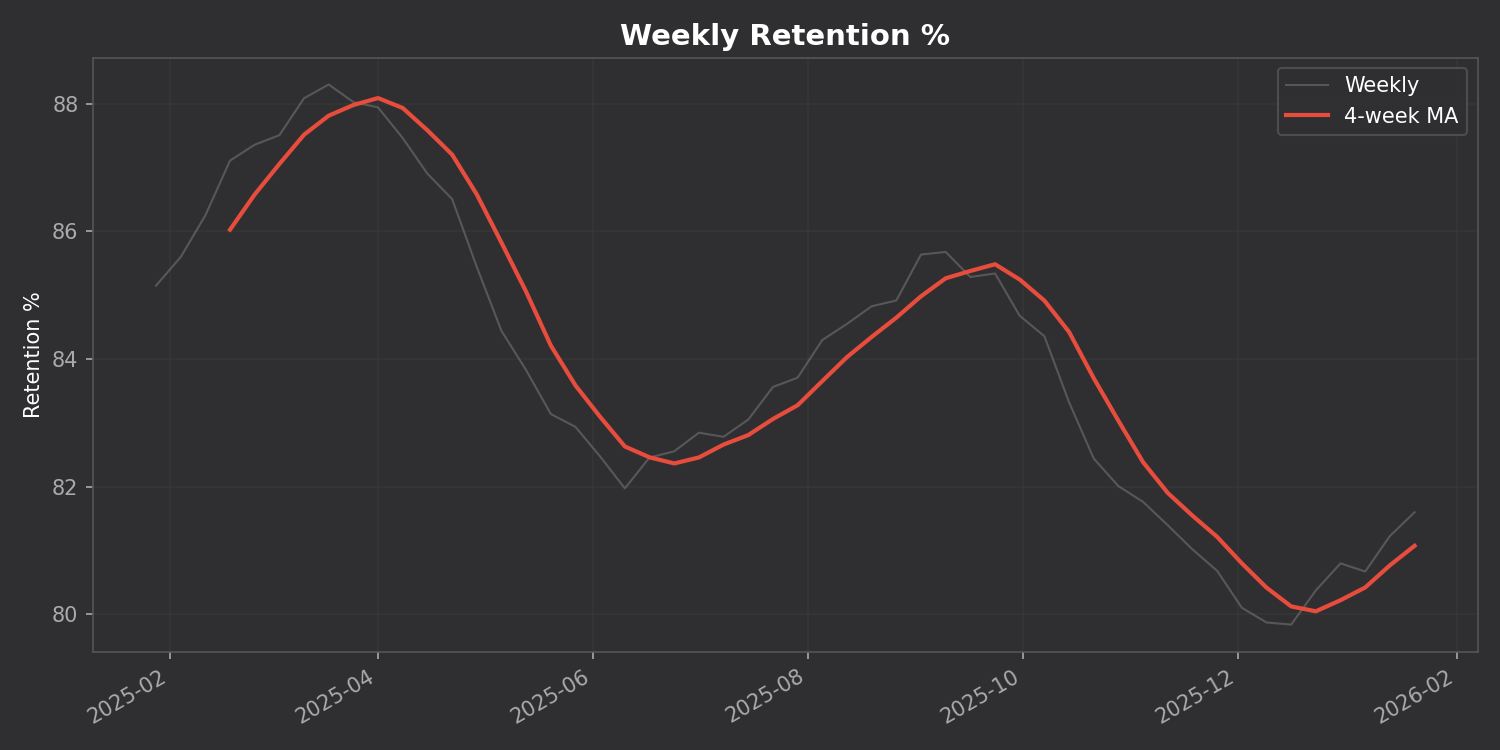
Is my retention trending up or down over time?
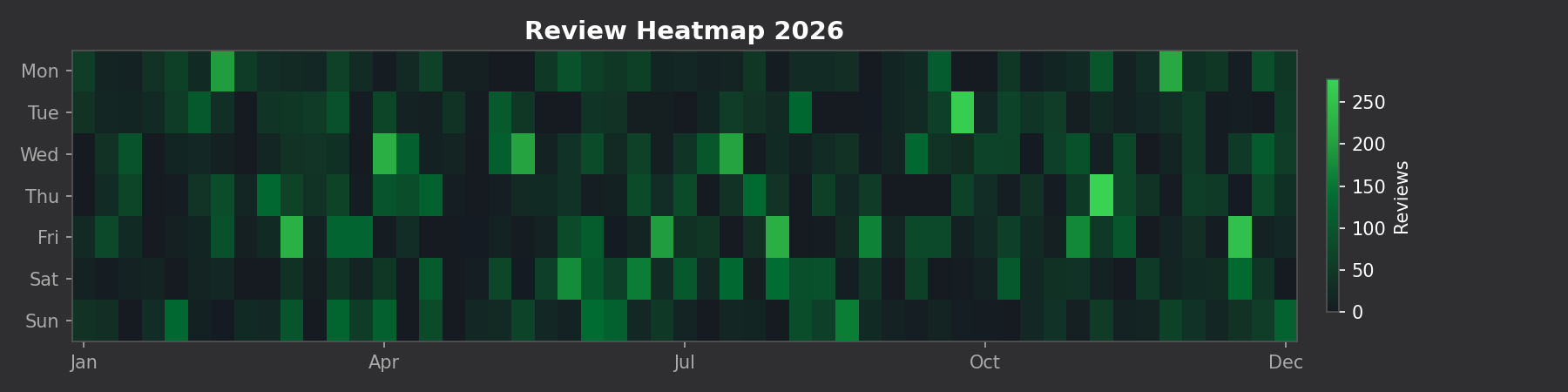
What’s my weekly study pattern? Do I study more on weekends?
Which days were unusually productive (or lazy)?
How are my card intervals growing over months?
ankiR Stats answers all of these using the same statistical techniques data scientists use.
Features
📊 Time Series Charts
Track your retention, reviews, and intervals over time with a 4-week moving average to smooth out the noise:
🗓️ GitHub-style Heatmap
See your entire year of reviews at a glance:
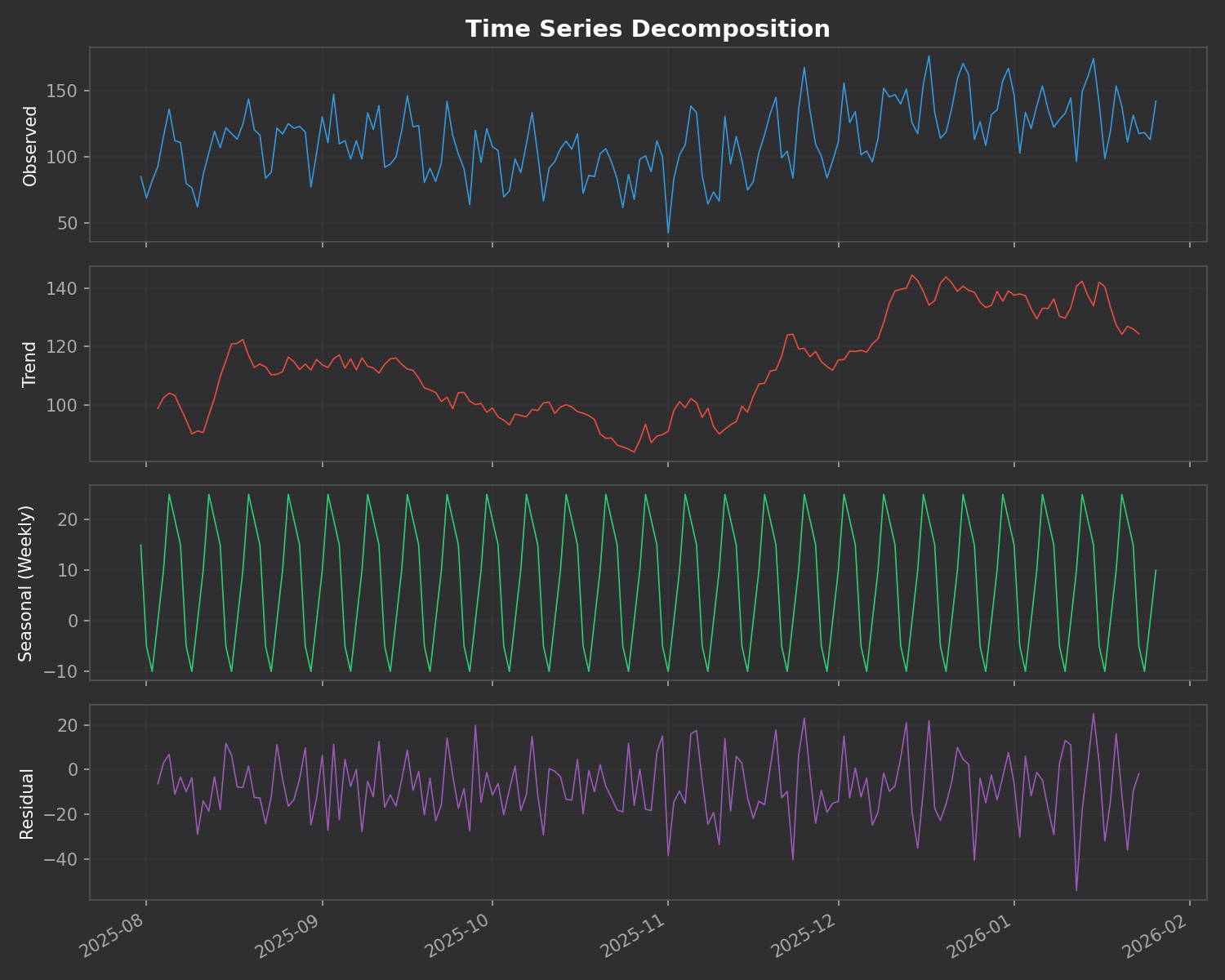
🔬 Time Series Decomposition
This is the killer feature. The addon breaks down your daily reviews into three components:
Trend – Are you studying more or less over time?
Seasonal – Your weekly pattern (which days you study most)
Residual – Random variation that doesn’t fit the pattern
⚠️ Anomaly Detection
The addon automatically finds unusual study days using z-score analysis. Days where you studied way more (or less) than normal are flagged with their statistical significance.
No Dependencies
Unlike many addons that require you to install Python packages, ankiR Stats uses web-based charts (Chart.js). It works out of the box on Windows, Mac, and Linux.
Installation
Open Anki
Go to Tools → Add-ons → Get Add-ons
Enter code: 419954163
Restart Anki
Access via Tools → ankiR Stats
Based on ankiR
This addon is a Python port of key features from ankiR, an R package I developed for comprehensive Anki analytics. The R package has 91 functions including forecasting, autocorrelation analysis, and FSRS integration – if you want even deeper analysis, check it out.
Open Source
The addon is open source and available on GitHub. Issues and contributions welcome!
Unlock insights from your spaced repetition learning journey
If you’re serious about learning, chances are you’ve encountered Anki—the powerful, open-source flashcard application that uses spaced repetition to help you remember anything. Whether you’re studying medicine, languages, programming, or any other subject, Anki has likely become an indispensable part of your learning toolkit.
But have you ever wondered what stories your flashcard data could tell? How your review patterns have evolved over time? Which decks demand the most cognitive effort? That’s exactly why I created ankiR.
What is ankiR?
ankiR is an R package that lets you read, analyze, and visualize your Anki collection data directly in R. Under the hood, Anki stores all your notes, cards, review history, and settings in a SQLite database. ankiR provides a clean, user-friendly interface to access this treasure trove of learning data.
Installation
ankiR is available on CRAN and R-universe, making installation straightforward:
Bug reports: Feel free to open issues on the package repository
Related Projects
If you’re interested in spaced repetition and R, you might also want to check out:
FSRS: The Free Spaced Repetition Scheduler algorithm, which Anki now supports natively
anki-snapshot: Git-based version control for Anki collections
Conclusion
Your Anki reviews represent countless hours of deliberate practice. With ankiR, you can finally extract meaningful insights from that data. Whether you’re a medical student tracking board exam prep, a language learner monitoring vocabulary acquisition, or a researcher studying memory, ankiR gives you the tools to understand your learning at a deeper level.
Give it a try, and let me know what insights you discover in your own data!
ankiR is open source and contributions are welcome. Happy learning!
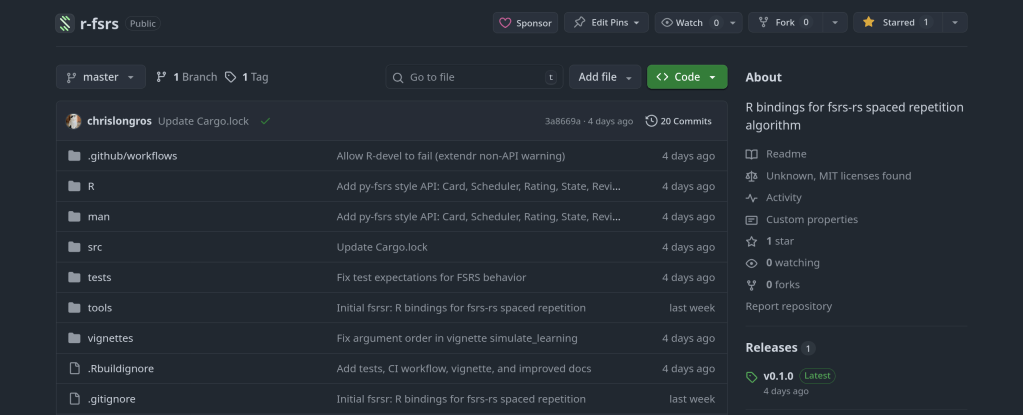
I’ve just released fsrsr, an R package that provides bindings to fsrs-rs, the Rust implementation of the Free Spaced Repetition Scheduler (FSRS) algorithm. This means you can now use the state-of-the-art spaced repetition algorithm directly in R without the maintenance burden of a native implementation.
What is FSRS?
FSRS is a modern spaced repetition algorithm that outperforms traditional algorithms like SM-2 (used in Anki’s default scheduler). It uses a model based on the DSR (Difficulty, Stability, Retrievability) framework to predict memory states and optimize review intervals for long-term retention.
Why Bindings Instead of Native R?
Writing and maintaining a native R implementation of FSRS would be challenging:
The algorithm involves complex mathematical models that evolve with research
Performance matters when scheduling thousands of cards
Keeping pace with upstream changes requires ongoing effort
Here’s a simple example showing the core workflow:
library(fsrsr)

# Initialize a new card with a "Good" rating (3)
state <- fsrs_initial_state(3)
# $stability: 3.17
# $difficulty: 5.28

# After reviewing 3 days later with "Good" rating
new_state <- fsrs_next_state(
  stability = state$stability,
  difficulty = state$difficulty,
  elapsed_days = 3,
  rating = 3
)

# Calculate next interval for 90% target retention
interval <- fsrs_next_interval(new_state$stability, 0.9)
# Returns: days until next review

# Check recall probability after 5 days
prob <- fsrs_retrievability(new_state$stability, 5)
# Returns: 0.946 (94.6% chance of recall)
Research: Analyze spaced repetition data using R’s statistical tools
Custom SRS apps: Build R Shiny applications with proper scheduling
Simulation: Model learning outcomes under different review strategies
Data analysis: Process Anki export data with accurate FSRS calculations
Technical Details
The package uses extendr to generate R bindings from Rust code. The actual FSRS calculations happen in Rust via the fsrs-rs library (v2.0.4), with results passed back to R as native types.
A journey through packaging Python libraries for spaced repetition and Anki deck generation across multiple platforms.
As someone passionate about both medical education tools and open-source software, I recently embarked on a project to make several useful Python libraries available as native packages for FreeBSD and Arch Linux. This post documents the process and shares what I learned along the way.
The Motivation
Spaced repetition software like Anki has become indispensable for medical students and lifelong learners. However, the ecosystem of tools around Anki—libraries for generating decks programmatically, analyzing study data, and implementing scheduling algorithms—often requires manual installation via pip. This creates friction for users and doesn’t integrate well with system package managers.
My goal was to package three key Python libraries:
genanki – A library for programmatically generating Anki decks
fsrs – The Free Spaced Repetition Scheduler algorithm (used in Anki and other SRS apps)
ankipandas – A library for analyzing Anki collections using pandas DataFrames
Arch Linux User Repository (AUR)
The AUR is a community-driven repository for Arch Linux users. Creating packages here involves writing a PKGBUILD file that describes how to fetch, build, and install the software.
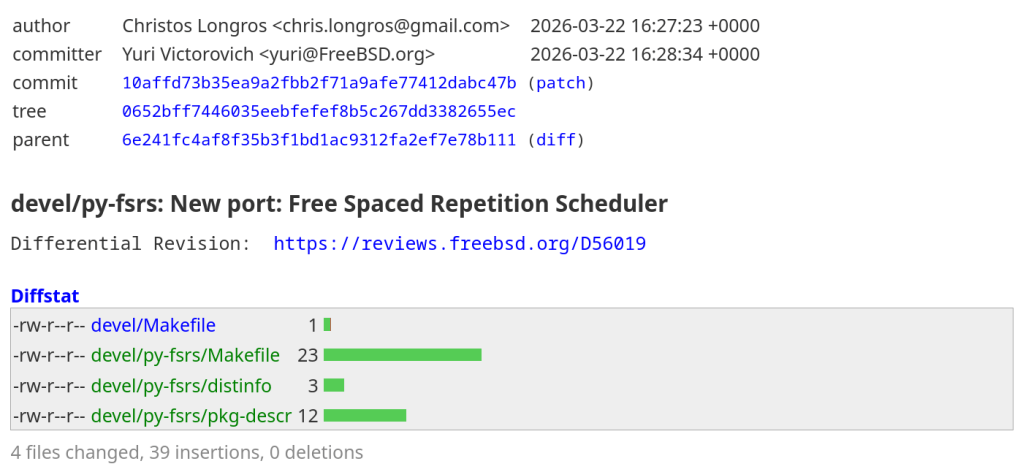
python-fsrs 6.3.0
The FSRS (Free Spaced Repetition Scheduler) algorithm represents the cutting edge of spaced repetition research. Version 6.x brought significant API changes, including renaming the main FSRS class to Scheduler.
genanki allows developers to create Anki decks programmatically—perfect for generating flashcards from databases, APIs, or other structured data sources.
FreeBSD’s ports system is more formal than the AUR, with stricter guidelines and a review process. Ports are submitted via Bugzilla and reviewed by committers before inclusion in the official ports tree.
py-genanki Port
Creating a FreeBSD port required several steps:
Setting up the port skeleton – Creating the Makefile, pkg-descr, and distinfo files
Handling dependencies – Mapping Python dependencies to existing FreeBSD ports
Patching setup.py – Removing the pytest-runner build dependency which doesn’t exist in FreeBSD ports
Testing the build – Running make and make install in a FreeBSD environment
One challenge was that genanki’s setup.py required pytest-runner as a build dependency, which doesn’t exist in FreeBSD ports. The solution was to create a patch file that removes this requirement:
One of the biggest challenges in packaging is mapping upstream dependencies to existing packages in the target ecosystem. For FreeBSD, this meant:
Searching /usr/ports for existing Python packages
Understanding the @${PY_FLAVOR} suffix for Python version flexibility
Discovering hidden dependencies (like chevron) that weren’t immediately obvious from the package metadata
Build System Quirks
Python packaging has evolved significantly, with projects using various combinations of:
setup.py with setuptools
pyproject.toml with various backends (setuptools, flit, hatch, poetry)
Legacy setup_requires patterns that don’t translate well to system packaging
Creating patches to work around these issues is a normal part of the porting process.
Testing Across Platforms
Running a FreeBSD VM (via VirtualBox) proved essential for testing ports before submission. The build process can reveal missing dependencies, incorrect paths, and other issues that only appear in the actual target environment.
Summary
Package
Version
AUR
FreeBSD
python-fsrs / py-fsrs
6.3.0
✅ Published
📝 Submitted
python-genanki / py-genanki
0.13.1
✅ Published
📝 Submitted
python-ankipandas
0.3.15
✅ Published
🔜 Planned
Get Involved
If you use these tools on Arch Linux or FreeBSD, I’d love to hear your feedback. And if you’re interested in contributing to open-source packaging: