




Tag: docker
-
A kernel-to-userspace patch that replaces a vague
zpool createerror with one that names the exact device and pool causing the problem. Here’s how it works, from the ioctl layer to the formatted error message.The problem
If you’ve managed ZFS pools with more than a handful of disks, you’ve almost certainly hit this error:
bash$ sudo zpool create tank mirror /dev/sda /dev/sdb /dev/sdc /dev/sdd
cannot create 'tank': one or more vdevs refer to the same device,
or one of the devices is part of an active md or lvm device
Which device? What pool? The error gives you nothing. In a 12-disk server you’re left checking each device one by one until you find the culprit.
I’d been working on a previous PR (#18184) improving
zpool createerror messages when Brian Behlendorf suggested a follow-up: pass device-specific error information from the kernel back to userspace, following the existingZPOOL_CONFIG_LOAD_INFOpattern thatzpool importalready uses.So I built it. The result is PR #18213:
Error message Before cannot create 'tank': one or more vdevs refer to the same deviceAfter cannot create 'tank': device '/dev/sdb1' is part of active pool 'rpool'Why this is harder than it looks
The obvious approach would be: when
zpool createfails, walk the vdev tree, find the device with the error, and report it. But there’s a timing problem in the kernel that makes this impossible.When
spa_create()fails, the error cleanup path callsvdev_close()on all vdevs. This function unconditionally resetsvd->vdev_stat.vs_auxtoVDEV_AUX_NONEon every device in the tree. By the time the error code reaches the ioctl handler, all evidence of which device failed and why has been wiped clean.Key Insight The error information must be captured at the exact moment of failure, insidevdev_label_init(), before the cleanup path destroys it. And it must be stored somewhere that survives the cleanup — thespa_tstruct, which represents the pool itself.The only
errnothat travels back through the ioctl is an integer likeEBUSY. No context about which device, no pool name, nothing. The entire design challenge is getting two strings (a device path and a pool name) from a kernel function that runs during vdev initialization all the way back to the userspacezpoolcommand.Architecture: the data flow
The solution follows the same mechanism that
zpool importalready uses to return rich error information: an nvlist (ZFS’s key-value dictionary, like a JSON object) packed into the ioctl output buffer under a well-known key.vdev_label_init()
detect conflict,
read label→spa→errlist
vdev + pool name→spa_create()
hand off errlist→ioc_pool_create()
wrap → put_nvlist→ioctl
kernel → user→zpool_create()
unpack → formatFour touch points, each doing one small thing. Let’s walk through them.
Implementation
1. Capture the error at the moment of failure
This is the heart of the change. Inside
vdev_label_init(), whenvdev_inuse()returns true, we build an nvlist with the device path, then read the on-disk label to extract the pool name:module/zfs/vdev_label.c/* * Determine if the vdev is in use. */ if (reason != VDEV_LABEL_REMOVE && reason != VDEV_LABEL_SPLIT && vdev_inuse(vd, crtxg, reason, &spare_guid, &l2cache_guid)) { if (spa->spa_create_errlist == NULL) { nvlist_t *nv = fnvlist_alloc(); nvlist_t *cfg; if (vd->vdev_path != NULL) fnvlist_add_string(nv, ZPOOL_CREATE_INFO_VDEV, vd->vdev_path); cfg = vdev_label_read_config(vd, -1ULL); if (cfg != NULL) { const char *pname; if (nvlist_lookup_string(cfg, ZPOOL_CONFIG_POOL_NAME, &pname) == 0) fnvlist_add_string(nv, ZPOOL_CREATE_INFO_POOL, pname); nvlist_free(cfg); } spa->spa_create_errlist = nv; } return (SET_ERROR(EBUSY)); }The
NULLcheck onspa_create_errlistensures we only record the first failing device. If there are multiple conflicts, the first one is what you need to fix anyway.fnvlist_alloc()andfnvlist_add_string()are the “fatal” nvlist functions that panic on allocation failure — appropriate here since we’re in a code path where memory should be available.2. Hand the errlist to the caller
On error,
spa_create()transfers ownership of the errlist via the newerrinfooutput parameter:module/zfs/spa.cif (error != 0) { if (errinfo != NULL) { *errinfo = spa->spa_create_errlist; spa->spa_create_errlist = NULL; } spa_unload(spa); spa_deactivate(spa); spa_remove(spa); ...Setting
spa_create_errlisttoNULLafter the handoff preventsspa_deactivate()from freeing it — ownership transfers to the caller.3. Wrap and pack into the ioctl output
The ioctl handler wraps the errlist under a
ZPOOL_CONFIG_CREATE_INFOkey, mirroring howzpool importusesZPOOL_CONFIG_LOAD_INFO:module/zfs/zfs_ioctl.cerror = spa_create(zc->zc_name, config, props, zplprops, dcp, &errinfo); if (errinfo != NULL) { nvlist_t *outnv = fnvlist_alloc(); fnvlist_add_nvlist(outnv, ZPOOL_CONFIG_CREATE_INFO, errinfo); (void) put_nvlist(zc, outnv); nvlist_free(outnv); nvlist_free(errinfo); }put_nvlist()serializes the nvlist intozc->zc_nvlist_dst, which is a shared buffer between kernel and userspace.4. Unpack and format in userspace
In libzfs, after the ioctl fails, we unpack the buffer, extract the device and pool name, and format the error:
lib/libzfs/libzfs_pool.cnvlist_t *outnv = NULL;
if (zc.zc_nvlist_dst_size > 0 &&
    nvlist_unpack((void *)(uintptr_t)zc.zc_nvlist_dst,
    zc.zc_nvlist_dst_size, &outnv, 0) == 0 &&
    outnv != NULL) {
        nvlist_t *errinfo = NULL;
        if (nvlist_lookup_nvlist(outnv,
            ZPOOL_CONFIG_CREATE_INFO, &errinfo) == 0) {
                const char *vdev = NULL;
                const char *pname = NULL;
                (void) nvlist_lookup_string(errinfo,
                    ZPOOL_CREATE_INFO_VDEV, &vdev);
                (void) nvlist_lookup_string(errinfo,
                    ZPOOL_CREATE_INFO_POOL, &pname);
                if (vdev != NULL) {
                        if (pname != NULL)
                                zfs_error_aux(hdl,
                                    dgettext(TEXT_DOMAIN,
                                    "device '%s' is part of "
                                    "active pool '%s'"),
                                    vdev, pname);
                        else
                                zfs_error_aux(hdl,
                                    dgettext(TEXT_DOMAIN,
                                    "device '%s' is in use"),
                                    vdev);
                        ...
                }
        }
}
If both values are available, you get: device ‘/dev/sdb1’ is part of active pool ‘rpool’. If only the path is available (label can’t be read), you get: device ‘/dev/sdb1’ is in use. If no errinfo came back at all, the existing generic error handling kicks in unchanged.
What changed
File + − module/zfs/vdev_label.c+23 -1 lib/libzfs/libzfs_pool.c+41 module/zfs/zfs_ioctl.c+12 -1 module/zfs/spa.c+10 -1 cmd/ztest.c+5 -5 include/sys/fs/zfs.h+3 include/sys/spa.h+1 -1 include/sys/spa_impl.h+1 tests/.../zpool_create_errinfo_001_neg.ksh+99 11 files total +195 -10 93 lines of feature code across 8 C files, plus a 99-line ZTS test. The
cmd/ztest.cchanges are mechanical — just adding aNULLparameter to eachspa_create()call to match the new signature.Testing
I tested on an Arch Linux VM running kernel 6.18.9-arch1-2 with ZFS built from source. The test environment used loopback devices, which is the standard approach in the ZFS Test Suite — the kernel code path is identical regardless of the underlying block device.
Duplicate device — device-specific error
bash$ truncate -s 128M /tmp/vdev1
$ sudo losetup /dev/loop10 /tmp/vdev1
$ sudo losetup /dev/loop12 /tmp/vdev1   # same backing file
$ sudo zpool create testpool1 mirror /dev/loop10 /dev/loop12
cannot create 'testpool1': device '/dev/loop12' is part of active pool 'testpool1'
Normal creation — no regression
bash$ truncate -s 128M /tmp/vdev1 /tmp/vdev2
$ sudo zpool create testpool1 mirror /tmp/vdev1 /tmp/vdev2
$ sudo zpool status testpool1
  pool: testpool1
 state: ONLINE
config:

        NAME            STATE     READ WRITE CKSUM
        testpool1       ONLINE       0     0     0
          mirror-0      ONLINE       0     0     0
            /tmp/vdev1  ONLINE       0     0     0
            /tmp/vdev2  ONLINE       0     0     0
ZTS test
A new negative test (
zpool_create_errinfo_001_neg) creates two loopback devices backed by the same file and attempts a mirror pool creation. It verifies three things: the command fails, the error names the specific device, and the error mentions the active pool.ZTS$ zfs-tests.sh -vx -t cli_root/zpool_create/zpool_create_errinfo_001_neg Test: zpool_create_errinfo_001_neg (run as root) [00:00] [PASS] Results Summary PASS 1 Running Time: 00:00:00 Percent passed: 100.0%CI
checkstylepasses on all platforms (Ubuntu 22/24, Debian 12/13, CentOS Stream 9, AlmaLinux 8/10, FreeBSD 14). Clean build with no compiler warnings.Design trade-offs
Only the first failing device is recorded. If multiple vdevs conflict, only the first one goes into
spa_create_errlist. You need to fix the first problem before you can see the next one anyway, and it keeps the implementation simple.The label is read twice.
vdev_inuse()already reads the on-disk label and frees it before returning. We read it again withvdev_label_read_config()to extract the pool name. Modifyingvdev_inuse()to optionally return the label would avoid this, but changing that function signature affects many callers — a much larger change for a follow-up.The errlist field lives on
spa_tpermanently. It’s only used duringspa_create(), but the field exists on every pool in memory. This costs 8 bytes per pool (one pointer, alwaysNULLduring normal operation) — negligible.Only one error path is covered. The mechanism only fires for the
vdev_inuse()EBUSY case insidevdev_label_init(). Other failures (open errors, size mismatches) still produce generic messages. Thespa_create_errlistinfrastructure is there for future extension.What’s next
This is a focused first step. The
spa_create_errlistmechanism could be extended to cover more error paths —vdev_open()failures, size mismatches, GUID conflicts. The infrastructure is in place; it just needs more callsites.The PR is at openzfs/zfs #18213. Feedback welcome.
-
After years of using Anki for medical school, I finally got tired of relying on AnkiWeb for syncing. Privacy concerns, sync limits, and the occasional downtime pushed me to self-host. The problem? The official Anki project provides source code but no pre-built Docker image. Building from source every time there’s an update? No thanks.
So I built Anki Sync Server Enhanced — a production-ready Docker image with all the features self-hosters actually need.
Why Self-Host Your Anki Sync?
- Privacy — Your flashcards stay on your server
- No limits — Sync as much as you want
- Speed — Local network sync is instant
- Control — Backups, monitoring, your rules
What Makes This Image Different?
I looked at existing solutions and found them lacking. Most require you to build from source or offer minimal features. Here’s what this image provides out of the box:
Feature Build from Source This Image Pre-built Docker image No Yes Auto-updates Manual Daily builds via GitHub Actions Multi-architecture Manual setup amd64 + arm64 Automated backups No Yes, with retention policy S3 backup upload No Yes (AWS, MinIO, Garage) Prometheus metrics No Yes Web dashboard No Yes Notifications No Discord, Telegram, Slack, Email Quick Start
Getting started takes less than a minute:
docker run -d \--name anki-sync \-p 8080:8080 \-e SYNC_USER1=myuser:mypassword \-v anki_data:/data \chrislongros/anki-sync-server-enhancedThat’s it. Your sync server is running.
Docker Compose (Recommended)
For a more complete setup with backups and monitoring:
services:anki-sync-server:image: chrislongros/anki-sync-server-enhanced:latestcontainer_name: anki-sync-serverports:- "8080:8080" # Sync server- "8081:8081" # Dashboard- "9090:9090" # Metricsenvironment:- SYNC_USER1=alice:password1- SYNC_USER2=bob:password2- TZ=Europe/Berlin- BACKUP_ENABLED=true- BACKUP_SCHEDULE=0 3 * * *- METRICS_ENABLED=true- DASHBOARD_ENABLED=truevolumes:- anki_data:/data- anki_backups:/backupsrestart: unless-stoppedvolumes:anki_data:anki_backups:The Dashboard
One feature I’m particularly proud of is the built-in web dashboard. Enable it with
DASHBOARD_ENABLED=trueand access it on port 8081.It shows:
- Server status and uptime
- Active users
- Data size
- Backup status
- Authentication statistics
- Feature toggles
No more SSH-ing into your server just to check if everything is running.
Configuring Your Anki Clients
Desktop (Windows/Mac/Linux)
- Open Anki
- Go to Tools → Preferences → Syncing
- Set the sync server to:
http://your-server:8080/ - Sync and enter your credentials
AnkiDroid
- Open Settings → Sync
- Set Custom sync server to:
http://your-server:8080/ - Set Media sync URL to:
http://your-server:8080/msync/
AnkiMobile (iOS)
- Settings → Sync → Custom server
- Enter:
http://your-server:8080/
Backup to S3
If you want offsite backups, the image supports S3-compatible storage (AWS S3, MinIO, Garage, Backblaze B2):
environment:- BACKUP_ENABLED=true- S3_BACKUP_ENABLED=true- S3_ENDPOINT=https://s3.example.com- S3_BUCKET=anki-backups- S3_ACCESS_KEY=your-access-key- S3_SECRET_KEY=your-secret-keyNotifications
Get notified when the server starts, stops, or completes a backup:
# Discord- NOTIFY_ENABLED=true- NOTIFY_TYPE=discord- NOTIFY_WEBHOOK_URL=https://discord.com/api/webhooks/...# Or Telegram, Slack, ntfy, generic webhookNAS Support
The image works great on NAS systems:
- TrueNAS SCALE — Install via Custom App with YAML
- Unraid — Template available in the repository
- Synology/QNAP — Standard Docker installation
CLI Tools Included
The image comes with helpful management scripts:
# User managementdocker exec anki-sync user-manager.sh listdocker exec anki-sync user-manager.sh add johndocker exec anki-sync user-manager.sh reset john newpassword# Backup managementdocker exec anki-sync backup.shdocker exec anki-sync restore.sh --listdocker exec anki-sync restore.sh backup_file.tar.gzLinks
- GitHub: github.com/chrislongros/anki-sync-server-enhanced
- Docker Hub: hub.docker.com/r/chrislongros/anki-sync-server-enhanced
Conclusion
If you’re using Anki seriously — for medical school, language learning, or any knowledge work — self-hosting your sync server gives you complete control over your data. This image makes it as simple as a single Docker command.
Questions or feature requests? Open an issue on GitHub or leave a comment below.
Happy studying!
-
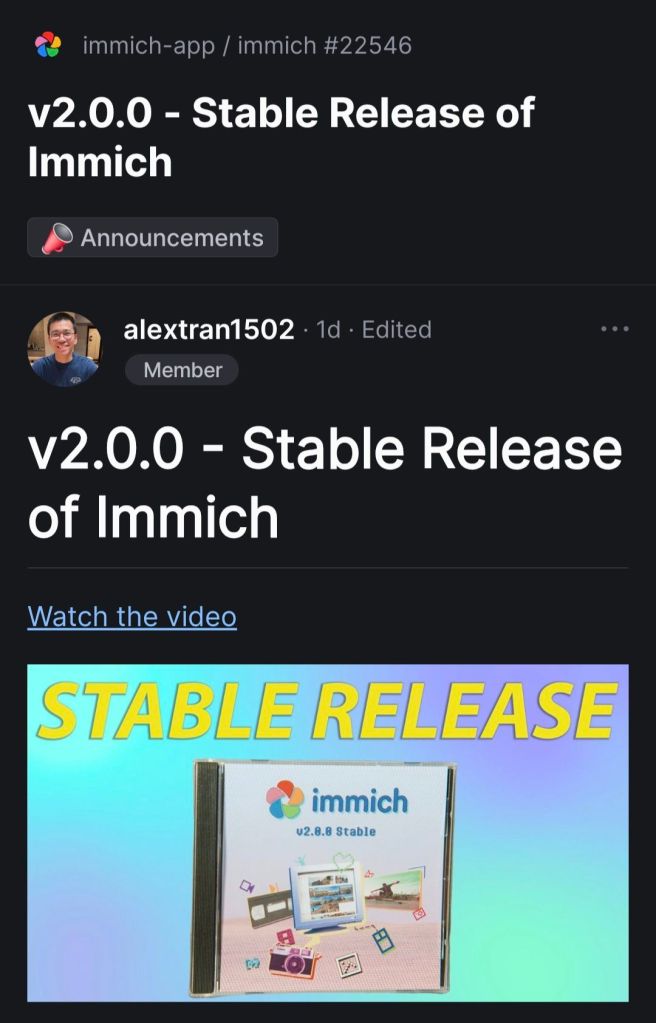
First time immich becomes stable.

-
changes and updates relevant to users of binary FreeBSD releases:
Changes to this file should not be MFCed.
cd240957d7ba
Making a connection to INADDR_ANY (i.e., using INADDR_ANY as an alias
for localhost) is now disabled by default. This functionality can be
re-enabled by setting the net.inet.ip.connect_inaddr_wild sysctl to 1.b61850c4e6f6
The bridge(4) sysctl net.link.bridge.member_ifaddrs now defaults to 0,
meaning that interfaces added to a bridge may not have IP addresses
assigned. Refer to bridge(4) for more information.44e5a0150835, 9a37f1024ceb:
A new utility sndctl(8) has been added to concentrate the various
interfaces for viewing and manipulating audio device settings (sysctls,
/dev/sndstat), into a single utility with a similar control-driven
interface to that of mixer(8).93a94ce731a8:
ps(1)’s options ‘-a’ and ‘-A’, when combined with any other one
affecting the selection of processes except for ‘-X’ and ‘-x’, would
have no effect, in contradiction with the rule that one process is
listed as soon as any of the specified options selects it (inclusive
OR), which is both mandated by POSIX and arguably a natural expectation.
This bug has been fixed.As a practical consequence, specifying '-a'/'-A' now causes all processes to be listed regardless of other selection options (except for '-X' and '-x', which still apply). In particular, to list only processes from specific jails, one must not use '-a' with '-J'. Option '-J', contrary to its apparent initial intent, never worked as a filter in practice (except by accident with '-a' due to the bug), but instead as any other selection options (e.g., '-U', '-p', '-G', etc.) subject to the "inclusive OR" rule.
995b690d1398:
ps(1)’s ‘-U’ option has been changed to select processes by their real
user IDs instead of their effective one, in accordance with POSIX and
the use case of wanting to list processes launched by some user, which
is expected to be more frequent than listing processes having the rights
of some user. This only affects the selection of processes whose real
and effective user IDs differ. After this change, ps(1)’s ‘-U’ flag
behaves differently then in other BSDs but identically to that of
Linux’s procps and illumos.1aabbb25c9f9:
ps(1)’s default list of processes now comes from matching its effective
user ID instead of its real user ID with the effective user ID of all
processes, in accordance with POSIX. As ps(1) itself is not installed
setuid, this only affects processes having different real and effective
user IDs that launch ps(1) processes.f0600c41e754-de701f9bdbe0, bc201841d139:
mac_do(4) is now considered production-ready and its functionality has
been considerably extended at the price of breaking credentials
transition rules’ backwards compatibility. All that could be specified
with old rules can also be with new rules. Migrating old rules is just
a matter of adding “uid=” in front of the target part, substituting
commas (“,”) with semi-colons (“;”) and colons (“:”) with greater-than
signs (“>”). Please consult the mac_do(4) manual page for the new rules
grammar.02d4eeabfd73:
hw.snd.maxautovchans has been retired. The commit introduced a
hw.snd.vchans_enable sysctl, which along with
dev.pcm.X.{play|rec}.vchans, from now on work as tunables to only
enable/disable vchans, as opposed to setting their number and/or
(de-)allocating vchans. Since these sysctls do not trigger any
(de-)allocations anymore, their effect is instantaneous, whereas before
we could have frozen the machine (when trying to allocate new vchans)
when setting dev.pcm.X.{play|rec}.vchans to a very large value.7e7f88001d7d:
The definition of pf’s struct pfr_tstats and struct pfr_astats has
changed, breaking ABI compatibility for 32-bit powerpc (including
powerpcspe) and armv7. Users of these platforms should ensure kernel
and userspace are updated together.5dc99e9bb985, 08e638c089a, 4009a98fe80:
The net.inet.{tcp,udp,raw}.bind_all_fibs tunables have been added.
They modify socket behavior such that packets not originating from the
same FIB as the socket are ignored. TCP and UDP sockets belonging to
different FIBs may also be bound to the same address. The default
behavior is unmodified.f87bb5967670, e51036fbf3f8:
Support for vinum volumes has been removed.8ae6247aa966, cf0ede720391d, 205659c43d87bd, 1ccbdf561f417, 4db1b113b151:
The layout of NFS file handles for the tarfs, tmpfs, cd9660, and ext2fs
file systems has changed. An NFS server that exports any of these file
systems will need its clients to unmount and remount the exports.1111a44301da:
Defer the January 19, 2038 date limit in UFS1 filesystems to
February 7, 2106. This affects only UFS1 format filesystems.
See the commit message for details.07cd69e272da:
Add a new -a command line option to mountd(8).
If this command line option is specified, when
a line in exports(5) has the -alldirs export option,
the directory must be a server file system mount point.0e8a36a2ab12:
Add a new NFS mount option called “mountport” that may be used
to specify the port# for the NFS server’s Mount protocol.
This permits a NFSv3 mount to be done without running rpcbind(8).b2f7c53430c3:
Kernel TLS is now enabled by default in kernels including KTLS
support. KTLS is included in GENERIC kernels for aarch64,
amd64, powerpc64, and powerpc64le.f57efe95cc25:
New mididump(1) utility which dumps MIDI 1.0 events in real time.ddfc6f84f242:
Update unicode to 16.0.0 and CLDR to 45.0.0.b22be3bbb2de:
Basic Cloudinit images no longer generate RSA host keys by default for
SSH.000000000000:
RSA host keys for SSH are deprecated and will no longer be generated
by default in FreeBSD 16.0aabcd75dbc2:
EC2 AMIs no longer generate RSA host keys by default for SSH. RSA
host key generation can be re-enabled by setting sshd_rsa_enable=”YES”
in /etc/rc.conf if it is necessary to support very old SSH clients.a1da7dc1cdad:
The SO_SPLICE socket option was added. It allows TCP connections to
be spliced together, enabling proxy-like functionality without the
need to copy data in and out of user memory.fc12c191c087:
grep(1) no longer follows symbolic links by default for
recursive searches. This matches the documented behavior in
the manual page.e962b37bf0ff:
When running bhyve(8) guests with a boot ROM, i.e., bhyveload(8) is not
used, bhyve now assumes that the boot ROM will enable PCI BAR decoding.
This is incompatible with some boot ROMs, particularly outdated builds
of edk2-bhyve. To restore the old behavior, add
“pci.enable_bars=’true’” to your bhyve configuration.Note in particular that the uefi-edk2-bhyve package has been renamed to edk2-bhyve.
43caa2e805c2:
amd64 bhyve(8)’s “lpc.bootrom” and “lpc.bootvars” options are
deprecated. Use the top-level “bootrom” and “bootvars” options
instead.822ca3276345:
byacc was updated to 20240109.21817992b331:
ncurses was updated to 6.5.1687d77197c0:
Filesystem manual pages have been moved to section four.
Please check ports you are maintaining for crossreferences.8aac90f18aef:
new MAC/do policy and mdo(1) utility which enables a user to
become another user without the requirement of setuid root.7398d1ece5cf:
hw.snd.version is removed.a15f7c96a276,a8089ea5aee5:
NVMe over Fabrics controller. The nvmft(4) kernel module adds
a new frontend to the CAM target layer which exports ctl(4)
LUNs as NVMe namespaces to remote hosts. The nvmfd(8) daemon
is responsible for accepting incoming connection requests and
handing off connected queue pairs to nvmft(4).a1eda74167b5,1058c12197ab:
NVMe over Fabrics host. New commands added to nvmecontrol(8)
to establish connections to remote controllers. Once
connections are established they are handed off to the nvmf(4)
kernel module which creates nvmeX devices and exports remote
namespaces as nda(4) disks.25723d66369f:
As a side-effect of retiring the unit.* code in sound(4), the
hw.snd.maxunit loader(8) tunable is also retired.eeb04a736cb9:
date(1) now supports nanoseconds. For example:date -Insprints “2024-04-22T12:20:28,763742224+02:00” anddate +%Nprints “415050400”.6d5ce2bb6344:
The default value of the nfs_reserved_port_only rc.conf(5) setting has
changed. The FreeBSD NFS server now requires the source port of
requests to be in the privileged port range (i.e., <= 1023), which
generally requires the client to have elevated privileges on their local
system. The previous behavior can be restored by setting
nfs_reserved_port_only=NO in rc.conf.aea973501b19:
ktrace(2) will now record detailed information about capability mode
violations. The kdump(1) utility has been updated to display such
information.f32a6403d346:
One True Awk updated to 2nd Edition. See https://awk.dev for details
on the additions. Unicode and CSVs (Comma Separated Values) are now
supported.fe86d923f83f:
usbconfig(8) now reads the descriptions of the usb vendor and products
from usb.ids when available, similarly to what pciconf(8) does.4347ef60501f:
The powerd(8) utility is now enabled in /etc/rc.conf by default on
images for the arm64 Raspberry Pi’s (arm64-aarch64-RPI img files).
This prevents the CPU clock from running slow all the time.0b49e504a32d:
rc.d/jail now supports the legacy variable jail_${jailname}zfs_dataset to allow unmaintained jail managers like ezjail to make use of this feature (simply rename jail${jailname}zfs_datasets in the ezjail config to jail${jailname}_zfs_dataset.e0dfe185cbca:
jail(8) now support zfs.dataset to add a list of ZFS datasets to a
jail.61174ad88e33:
newsyslog(8) now supports specifying a global compression method directly
at the beginning of the newsyslog.conf file, which will make newsyslog(8)
to behave like the corresponding option was passed to the newly added
‘-c’ option. For example:<compress> none
906748d208d3:
newsyslog(8) now accepts a new option, ‘-c’ which overrides all historical
compression flags by treating their meaning as “treat the file as compressible”
rather than “compress the file with that specific method.”The following choices are available: * none: Do not compress, regardless of flag. * legacy: Historical behavior (J=bzip2, X=xz, Y=zstd, Z=gzip). * bzip2, xz, zstd, gzip: apply the specified compression method. We plan to change the default to 'none' in FreeBSD 15.0.
1a878807006c:
This commit added some statistics collection to the NFS-over-TLS
code in the NFS server so that sysadmins can moditor usage.
The statistics are available via the kern.rpc.tls.* sysctls.7c5146da1286:
Mountd has been modified to use strunvis(3) to decode directory
names in exports(5) file(s). This allows special characters,
such as blanks, to be embedded in the directory name(s).
“vis -M” may be used to encode such directory name(s).c5359e2af5ab:
bhyve(8) has a new network backend, “slirp”, which makes use of the
libslirp package to provide a userspace network stack. This backend
makes it possible to access the guest network from the host without
requiring any extra network configuration on the host.bb830e346bd5:
Set the IUTF8 flag by default in tty(4).128f63cedc14 and 9e589b093857 added proper UTF-8 backspacing handling in the tty(4) driver, which is enabled by setting the new IUTF8 flag through stty(1). Since the default locale is UTF-8, enable IUTF8 by default.
ff01d71e48d4:
dialog(1) has been replaced by bsddialog(1)41582f28ddf7:
FreeBSD 15.0 will not include support for 32-bit platforms.
However, 64-bit systems will still be able to run older 32-bit
binaries.Support for executing 32-bit binaries on 64-bit platforms via COMPAT_FREEBSD32 will remain supported for at least the stable/15 and stable/16 branches. Support for compiling individual 32-bit applications via `cc -m32` will also be supported for at least the stable/15 branch which includes suitable headers in /usr/include and libraries in /usr/lib32. Support for 32-bit platforms in ports for 15.0 and later releases is also deprecated, and these future releases may not include binary packages for 32-bit platforms or support for building 32-bit applications from ports. stable/14 and earlier branches will retain existing 32-bit kernel and world support. Ports will retain existing support for building ports and packages for 32-bit systems on stable/14 and earlier branches as long as those branches are supported by the ports system. However, all 32-bit platforms are Tier-2 or Tier-3 and support for individual ports should be expected to degrade as upstreams deprecate 32-bit platforms. With the current support schedule, stable/14 will be EOLed 5 years after the release of 14.0. The EOL of stable/14 would mark the end of support for 32-bit platforms including source releases, pre-built packages, and support for building applications from ports. Given an estimated release date of October 2023 for 14.0, support for 32-bit platforms would end in October 2028. The project may choose to alter this approach when 15.0 is released by extending some level of 32-bit support for one or more platforms in 15.0 or later. Users should use the stable/14 branch to migrate off of 32-bit platforms.
-
“Portainer is an open source tool for managing containerized applications. It works with kubernetes, docker, docker swarm and azure ACI.”
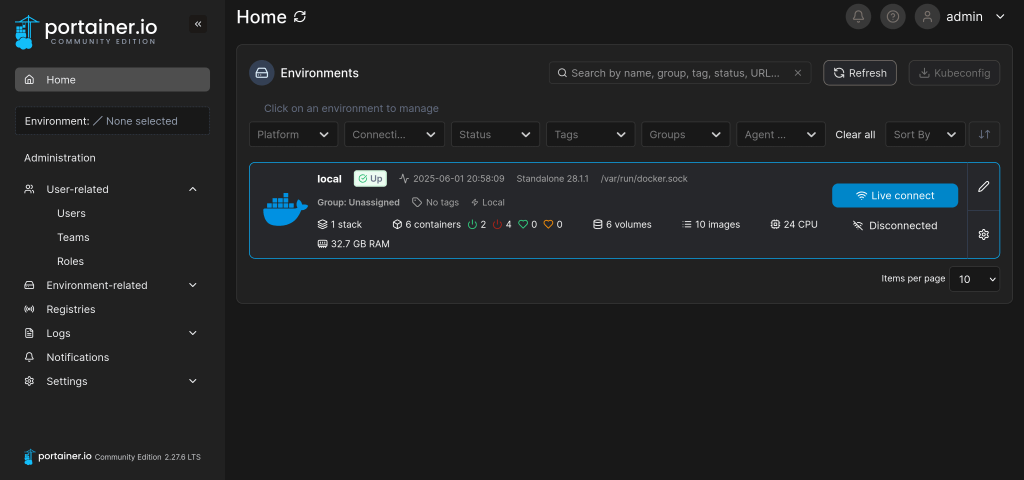
I can access the main page under https://localhost:9443/
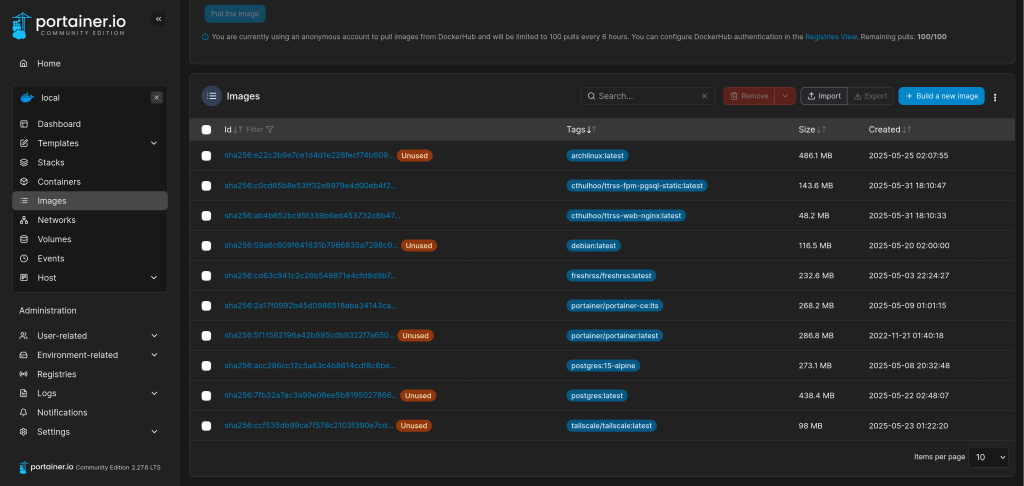
My docker images are those for archlinux, debian, fresh rss etc.
My containers include freshrss, portainer and ttrss docker instances.

-
Anki provides the option the self host your own sync server. It is an advanced feature for experienced users.
SYNC_USER1=user:pass anki –syncserver from the command line starts the sync server. If you use a firewall such as ufw you have to adjust the rules to allow IP addresses from 192.168.0.xxx or 192.168.1.xxx with:
ufw allow from 192.168.0.0/24
or
ufw allow from 192.128.1.0/24
Then you get a message like this, indicating a functioning sync server:
Anki starting…
2024-11-16T18:31:41.598515Z INFO listening addr=0.0.0.0:8080
In order to sync your Anki clients towards this server you have to set a URL link to the server’s IP address (in my case 192.168.1.195 => http://192.168.1.195:8080). The server listens to port 8080 as default.

Another option to set a sync server is using a docker container. You can find a sample Dockerfile under the /docs/syncserver path of the git repository: https://github.com/ankitects/anki/tree/main/docs/syncserver
The first step is building the image using:
sudo docker buildx build docs/syncserver/<Dockerfile> –no-cache –build-arg ANKI_VERSION=<version> -t anki-sync-server .
(Please use the <> brackets !!! as well an version available in https://github.com/ankitects/anki/releases, because the script searches through release tags !!!
You should execute this command from the Dockerfile PATH
The build command is deprecated !!! Use buildx)
The command at the end should look like this:
sudo docker build ~/syncserver/<Dockerfile> –no-cache –build-arg ANKI_VERSION=24.06.3 -t anki-sync-server
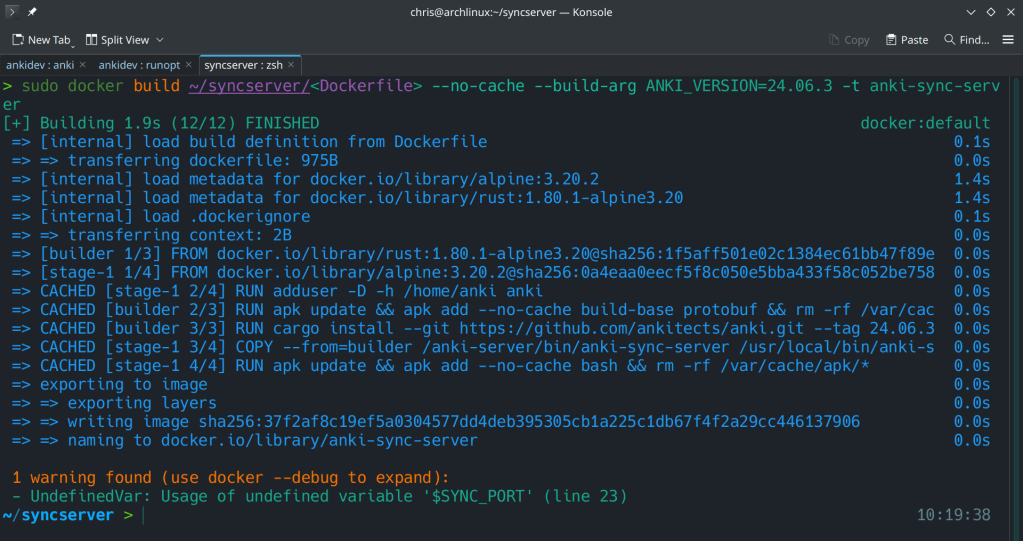
The second step is to run the docker container with:
docker run -d -e “SYNC_USER1=admin:admin” -p 8080:8080 –name anki-sync-server anki-sync-server
You can check the container’s status with sudo docker ps -a


 /root
/root 