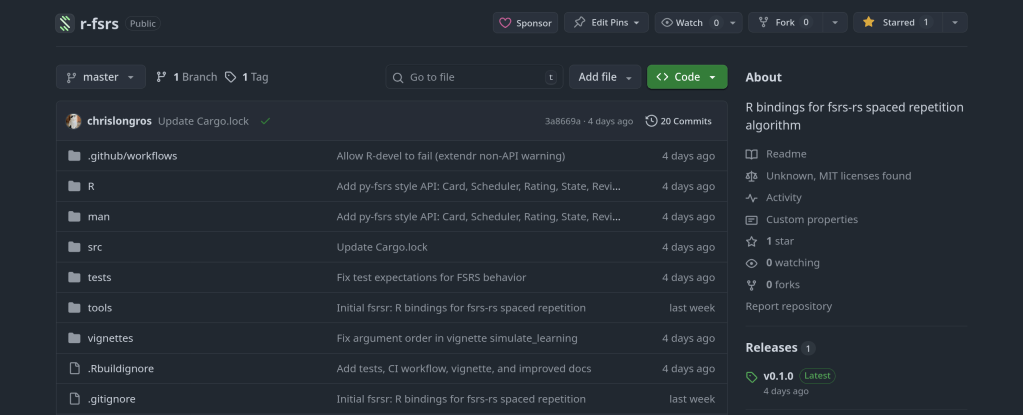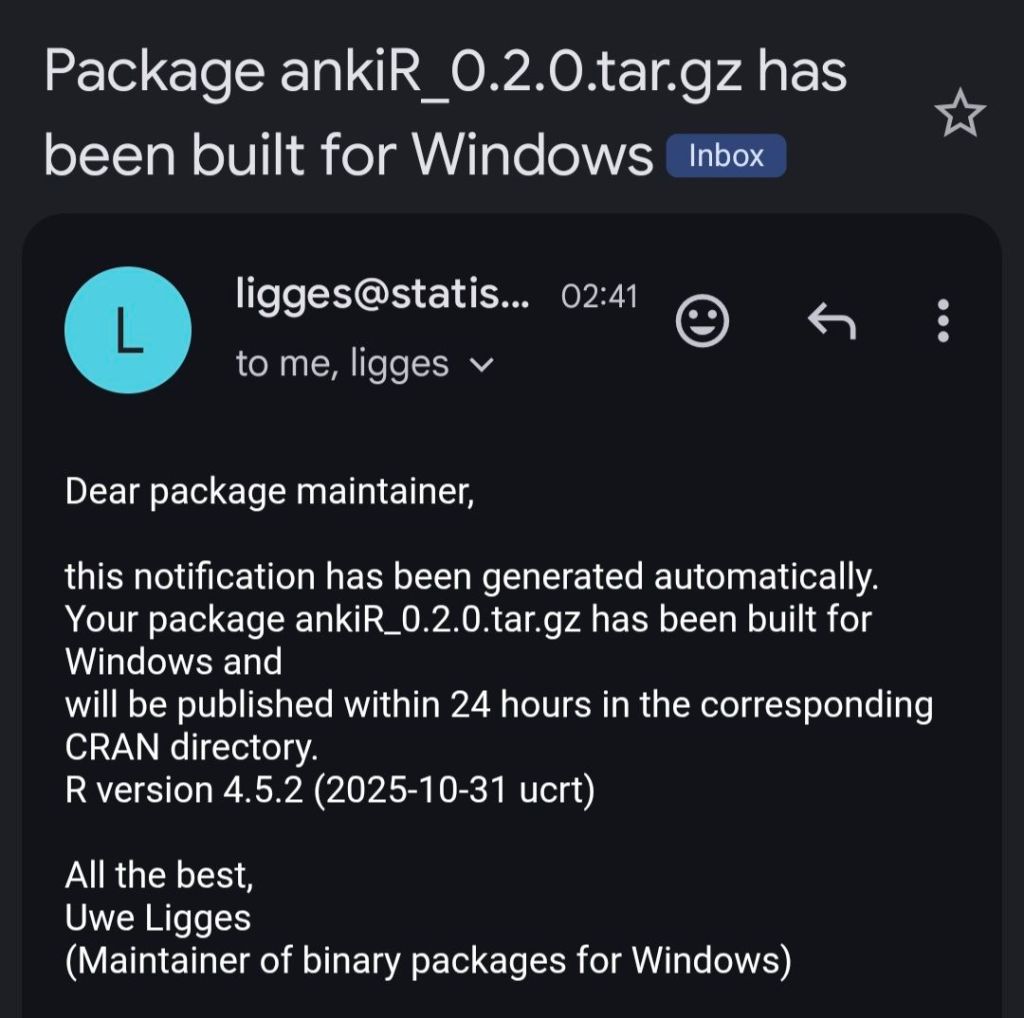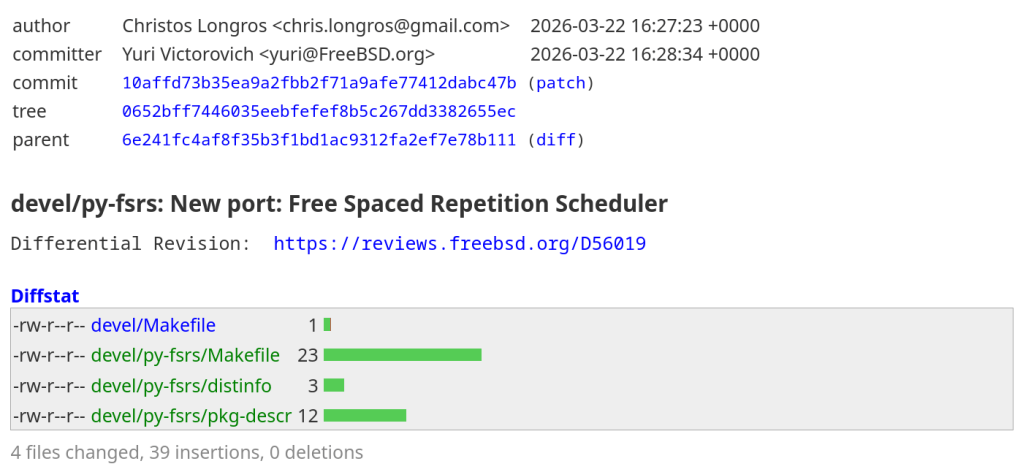
https://cgit.freebsd.org/ports/commit/?id=10affd73b35ea9a2fbb2f71a9afe77412dabc47b
Using AI to generate Anki flashcards has evolved rapidly over the past couple of years. Here’s a look at how it started and where we are in 2026.
The first to provide an Anki flashcard-generating ChatGPT prompt was Jarret Lee in this Anki forums post: Casting a Spell on ChatGPT: Let it Write Anki Cards for You. The idea was simple — give ChatGPT a structured prompt and it returns properly formatted flashcards you can import.
Shortly after, the AnkiBrain add-on was developed, integrating AI directly into Anki’s interface. This made it possible to generate cards without leaving the application.
The ecosystem has exploded. Here are the main tools available today:
I still prefer writing my own cards for deep learning, but AI-generated cards are great for:
The key is to always review AI-generated cards before adding them to your collection. Bad cards lead to bad learning.
There’s an Anki addon called anki-mcp-server that exposes your Anki collection over MCP (Model Context Protocol). If you haven’t come across MCP yet — it’s basically a standardized way for AI assistants to interact with external tools. Connect this addon and suddenly Claude (or whatever you’re using) can search your cards, create notes, browse your decks, etc.
Pretty cool, but there was a big gap: zero FSRS support. The assistant could see your cards but had no idea how they were being scheduled. It couldn’t read your FSRS parameters, couldn’t check a card’s memory state, couldn’t run the optimizer. For anyone who’s moved past SM-2 (which should be everyone at this point), that’s a significant blind spot.
So I wrote a PR that adds four tools and a resource to fill that gap.
get_fsrs_params reads the FSRS weights, desired retention, and max interval — either for all presets at once or filtered to a specific deck. get_card_memory_state pulls the per-card memory state (stability, difficulty, retrievability) for a given card ID. set_fsrs_params lets you update retention or weights on a preset. And optimize_fsrs_params runs Anki’s built-in optimizer — with a dry-run mode so you can preview the optimized weights before committing.
There’s also an anki://fsrs/config resource that gives a quick overview of your FSRS setup without needing a tool call.
The annoying part was version compatibility. FSRS has been through several iterations and Anki stores the parameters under different protobuf field names depending on which version you’re on. I ended up writing a fallback chain that tries fsrsParams6 first, then fsrsParams5, then fsrsParams4, and finally the old fsrsWeights field. The optimizer tool also needs to adjust its kwargs depending on the Anki point version (25.02 and 25.07 changed the interface). All of that version-detection logic lives in a shared _fsrs_helpers.py so the individual tools stay clean.
One gotcha that took me a bit to track down: per-deck desired retention overrides are stored as 0–100 on the deck config dictionary, but the preset stores them as 0–1. Easy to miss, and you’d get nonsensical results if you didn’t normalize between the two.
What I’m most excited about is what this enables in practice. You can now ask an AI assistant things like “run the optimizer on my medical deck in dry-run mode and tell me how the new weights compare” or “which of my presets has the lowest desired retention?” — and it can actually do it, pulling real data from your collection instead of just guessing. For someone who spends a lot of time tweaking FSRS settings across different decks, having that accessible through natural language is a nice quality-of-life improvement.
The PR was recently merged. I tested everything locally — built the .ankiaddon, installed it in Anki, ran through all the tools against a live collection. If you’re into the Anki + AI workflow, take a look and let me know what you think.
Two major releases of rfsrs are now available, bringing custom parameter support, SM-2 migration tools, and — the big one — parameter optimization. You can now train personalized FSRS parameters directly from your Anki review history using R.
Version 0.1.0 had a critical bug: custom parameters were silently ignored. The Scheduler stored your parameters but all Rust calls used the defaults. This is now fixed — your custom parameters actually work.
fsrs_repeat() returns all four rating outcomes (Again/Hard/Good/Easy) in a single call, matching the py-fsrs API:
# See all outcomes at onceoutcomes <- fsrs_repeat( stability = 10, difficulty = 5, elapsed_days = 5, desired_retention = 0.9)outcomes$good$stability # 15.2outcomes$good$interval # 12 daysoutcomes$again$stability # 3.1
Migrating from Anki’s default algorithm? fsrs_from_sm2() converts your existing ease factors and intervals to FSRS memory states:
# Convert SM-2 state to FSRSstate <- fsrs_from_sm2( ease_factor = 2.5, interval = 30, sm2_retention = 0.9)state$stability # ~30 daysstate$difficulty # ~5
fsrs_memory_state() replays a sequence of reviews to compute the current memory state:
# Replay review historystate <- fsrs_memory_state( ratings = c(3, 3, 4, 3), # Good, Good, Easy, Good delta_ts = c(0, 1, 3, 7) # Days since previous review)state$stabilitystate$difficulty
fsrs_retrievability_vec() efficiently calculates recall probability for large datasets:
# Calculate retrievability for 10,000 cardsretrievability <- fsrs_retrievability_vec( stability = cards$stability, elapsed_days = cards$days_since_review)
Scheduler$preview_card() — see all outcomes without modifying the cardCard$clone_card() — deep copy a card for simulationsfsrs_simulate() — convenience function for learning simulationsThe most requested feature: train your own FSRS parameters from your review history.
FSRS uses 21 parameters to predict when you’ll forget a card. The defaults work well for most people, but training custom parameters on your review history can improve scheduling accuracy by 10-30%.
fsrs_optimize() — Train custom parameters from your review historyfsrs_evaluate() — Measure how well parameters predict your memoryfsrs_anki_to_reviews() — Convert Anki’s revlog format for optimizationHere’s how to train parameters using your Anki collection:
library(rfsrs)library(ankiR)# Get your review historyrevlog <- anki_revlog()# Convert to FSRS formatreviews <- fsrs_anki_to_reviews(revlog, min_reviews = 3)# Train your parameters (~1 minute)result <- fsrs_optimize(reviews)# Your personalized 21 parametersprint(result$parameters)# Use them with the Schedulerscheduler <- Scheduler$new( parameters = result$parameters, desired_retention = 0.9)
The optimizer uses machine learning (via the burn framework in Rust) to find parameters that best predict your actual recall patterns. It analyzes your review history to learn:
I tested it on my own collection with ~116,000 reviews across 5,800 cards — optimization took about 60 seconds.
Evaluate how well different parameters predict your memory:
# Compare default vs optimizeddefault_metrics <- fsrs_evaluate(reviews, NULL)custom_metrics <- fsrs_evaluate(reviews, result$parameters)cat("Default RMSE:", default_metrics$rmse_bins, "\n")cat("Custom RMSE:", custom_metrics$rmse_bins, "\n")
Lower RMSE means better predictions.
Fixed an issue where cards with only same-day reviews (all delta_t = 0) could cause the optimizer to fail. These are now correctly filtered out.
# From r-universe (recommended)install.packages("rfsrs", repos = "https://chrislongros.r-universe.dev")# Or from GitHubremotes::install_github("open-spaced-repetition/r-fsrs")
Note: First build of v0.3.0 takes ~2 minutes due to compiling the ML framework. Subsequent builds are cached.
| Function | Description | Version |
|---|---|---|
fsrs_optimize() | Train custom parameters | 0.3.0 |
fsrs_evaluate() | Evaluate parameter accuracy | 0.3.0 |
fsrs_anki_to_reviews() | Convert Anki revlog | 0.3.0 |
fsrs_repeat() | All 4 rating outcomes at once | 0.2.0 |
fsrs_from_sm2() | Convert from SM-2/Anki default | 0.2.0 |
fsrs_memory_state() | Compute state from review history | 0.2.0 |
fsrs_retrievability_vec() | Vectorized retrievability | 0.2.0 |
Scheduler$preview_card() | Preview outcomes without modifying | 0.2.0 |
Card$clone_card() | Deep copy a card | 0.2.0 |
Feedback and contributions welcome!
After years of using Anki for medical school, I finally got tired of relying on AnkiWeb for syncing. Privacy concerns, sync limits, and the occasional downtime pushed me to self-host. The problem? The official Anki project provides source code but no pre-built Docker image. Building from source every time there’s an update? No thanks.
So I built Anki Sync Server Enhanced — a production-ready Docker image with all the features self-hosters actually need.
I looked at existing solutions and found them lacking. Most require you to build from source or offer minimal features. Here’s what this image provides out of the box:
| Feature | Build from Source | This Image |
|---|---|---|
| Pre-built Docker image | No | Yes |
| Auto-updates | Manual | Daily builds via GitHub Actions |
| Multi-architecture | Manual setup | amd64 + arm64 |
| Automated backups | No | Yes, with retention policy |
| S3 backup upload | No | Yes (AWS, MinIO, Garage) |
| Prometheus metrics | No | Yes |
| Web dashboard | No | Yes |
| Notifications | No | Discord, Telegram, Slack, Email |
Getting started takes less than a minute:
docker run -d \ --name anki-sync \ -p 8080:8080 \ -e SYNC_USER1=myuser:mypassword \ -v anki_data:/data \ chrislongros/anki-sync-server-enhanced
That’s it. Your sync server is running.
For a more complete setup with backups and monitoring:
services: anki-sync-server: image: chrislongros/anki-sync-server-enhanced:latest container_name: anki-sync-server ports: - "8080:8080" # Sync server - "8081:8081" # Dashboard - "9090:9090" # Metrics environment: - SYNC_USER1=alice:password1 - SYNC_USER2=bob:password2 - TZ=Europe/Berlin - BACKUP_ENABLED=true - BACKUP_SCHEDULE=0 3 * * * - METRICS_ENABLED=true - DASHBOARD_ENABLED=true volumes: - anki_data:/data - anki_backups:/backups restart: unless-stoppedvolumes: anki_data: anki_backups:
One feature I’m particularly proud of is the built-in web dashboard. Enable it with DASHBOARD_ENABLED=true and access it on port 8081.
It shows:
No more SSH-ing into your server just to check if everything is running.
http://your-server:8080/http://your-server:8080/http://your-server:8080/msync/http://your-server:8080/If you want offsite backups, the image supports S3-compatible storage (AWS S3, MinIO, Garage, Backblaze B2):
environment: - BACKUP_ENABLED=true - S3_BACKUP_ENABLED=true - S3_ENDPOINT=https://s3.example.com - S3_BUCKET=anki-backups - S3_ACCESS_KEY=your-access-key - S3_SECRET_KEY=your-secret-key
Get notified when the server starts, stops, or completes a backup:
# Discord- NOTIFY_ENABLED=true- NOTIFY_TYPE=discord- NOTIFY_WEBHOOK_URL=https://discord.com/api/webhooks/...# Or Telegram, Slack, ntfy, generic webhook
The image works great on NAS systems:
The image comes with helpful management scripts:
# User managementdocker exec anki-sync user-manager.sh listdocker exec anki-sync user-manager.sh add johndocker exec anki-sync user-manager.sh reset john newpassword# Backup management docker exec anki-sync backup.shdocker exec anki-sync restore.sh --listdocker exec anki-sync restore.sh backup_file.tar.gz
If you’re using Anki seriously — for medical school, language learning, or any knowledge work — self-hosting your sync server gives you complete control over your data. This image makes it as simple as a single Docker command.
Questions or feature requests? Open an issue on GitHub or leave a comment below.
Happy studying!
I’m excited to announce the release of ankiR Stats, a new Anki addon that brings advanced statistical analysis to your flashcard reviews. If you’ve ever wondered about the patterns hidden in your study data, this addon is for you.
There are several statistics addons for Anki already – Review Heatmap, More Overview Stats, True Retention. They’re great for basic numbers. But none of them answer questions like:
ankiR Stats answers all of these using the same statistical techniques data scientists use.
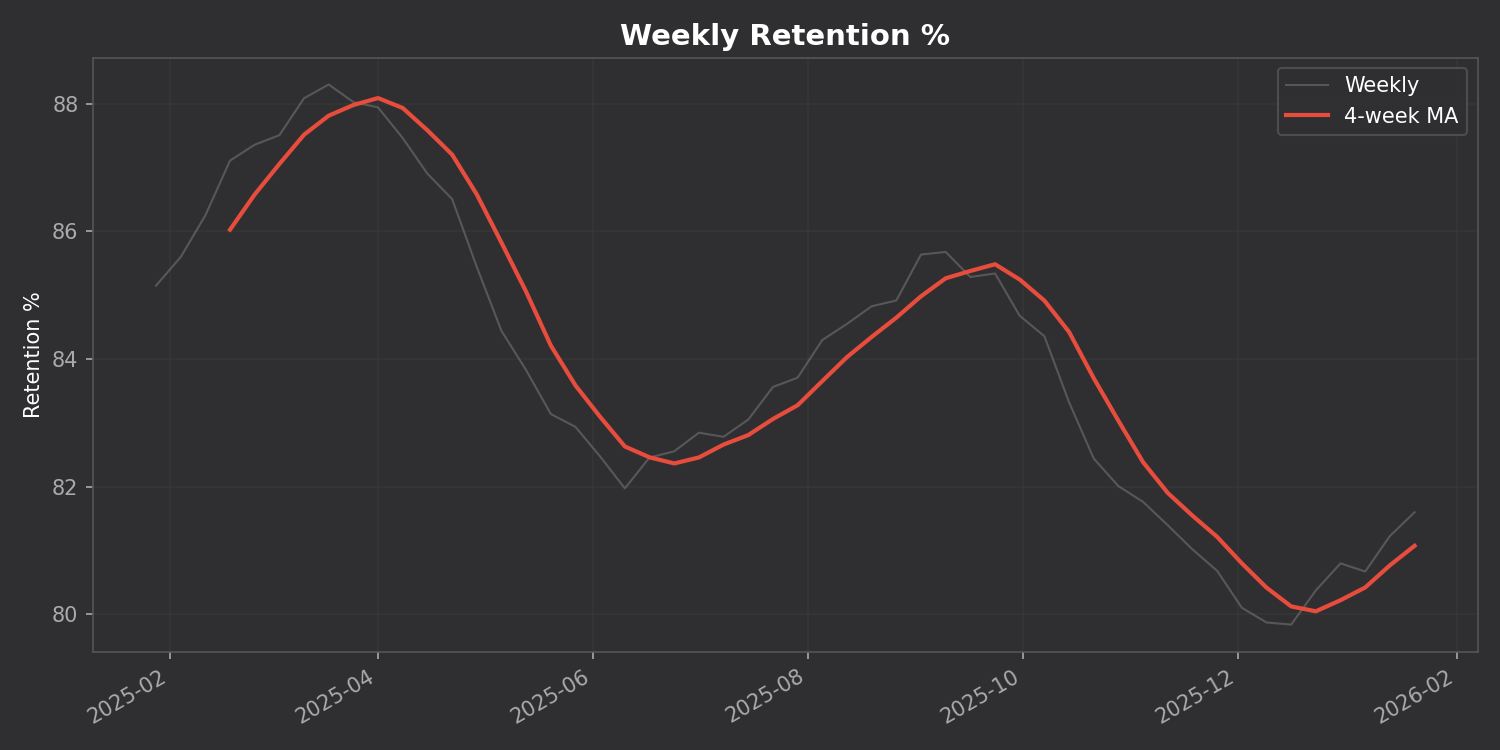
Track your retention, reviews, and intervals over time with a 4-week moving average to smooth out the noise:
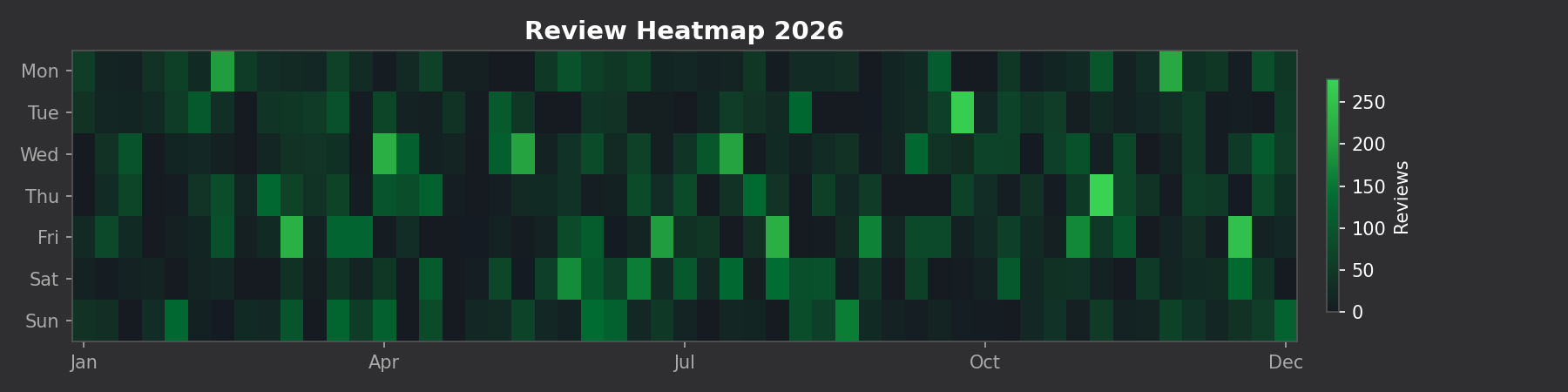
See your entire year of reviews at a glance:
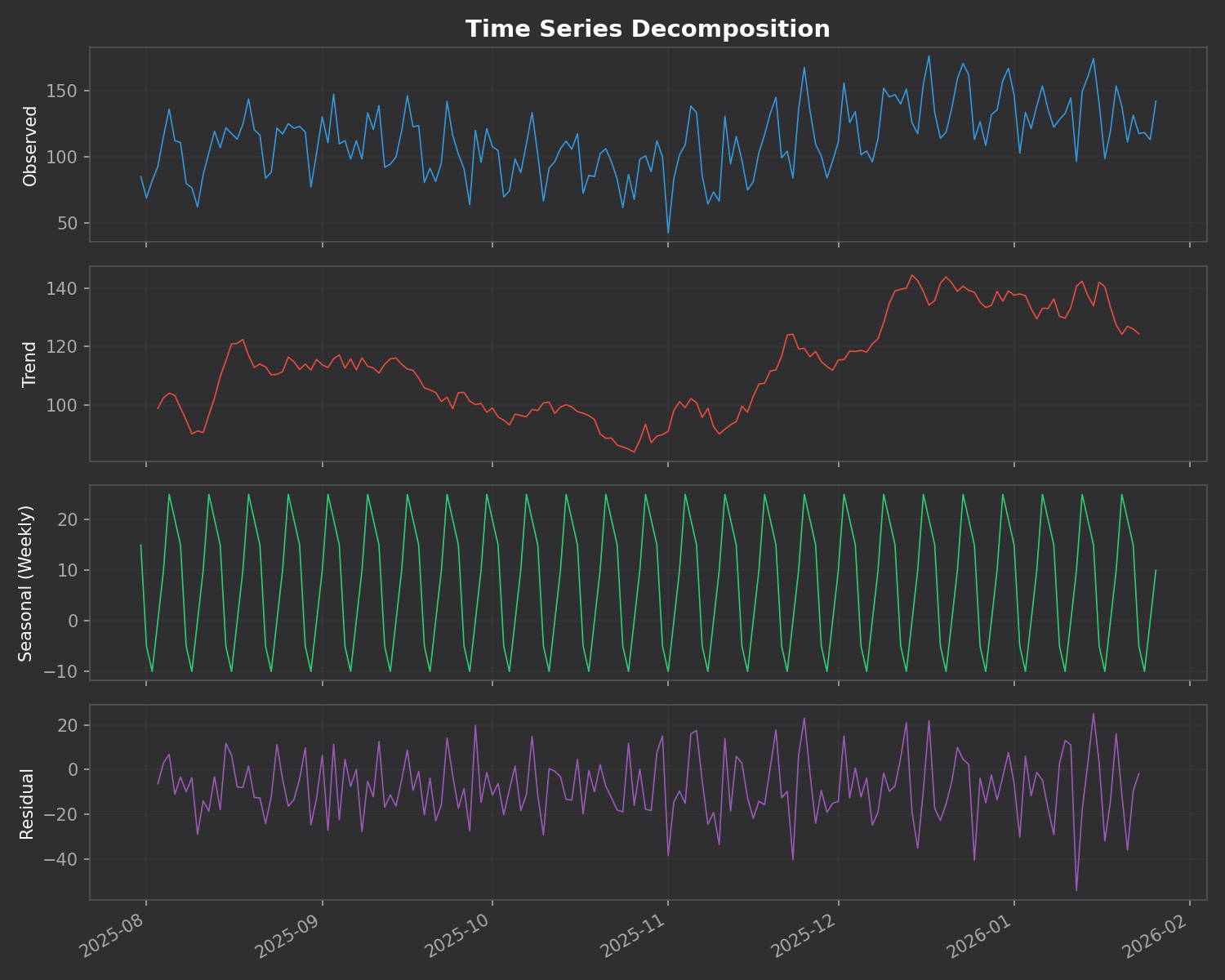
This is the killer feature. The addon breaks down your daily reviews into three components:
The addon automatically finds unusual study days using z-score analysis. Days where you studied way more (or less) than normal are flagged with their statistical significance.
Unlike many addons that require you to install Python packages, ankiR Stats uses web-based charts (Chart.js). It works out of the box on Windows, Mac, and Linux.
419954163This addon is a Python port of key features from ankiR, an R package I developed for comprehensive Anki analytics. The R package has 91 functions including forecasting, autocorrelation analysis, and FSRS integration – if you want even deeper analysis, check it out.
The addon is open source and available on GitHub. Issues and contributions welcome!
Let me know what you think in the comments!
Unlock insights from your spaced repetition learning journey
If you’re serious about learning, chances are you’ve encountered Anki—the powerful, open-source flashcard application that uses spaced repetition to help you remember anything. Whether you’re studying medicine, languages, programming, or any other subject, Anki has likely become an indispensable part of your learning toolkit.
But have you ever wondered what stories your flashcard data could tell? How your review patterns have evolved over time? Which decks demand the most cognitive effort? That’s exactly why I created ankiR.
ankiR is an R package that lets you read, analyze, and visualize your Anki collection data directly in R. Under the hood, Anki stores all your notes, cards, review history, and settings in a SQLite database. ankiR provides a clean, user-friendly interface to access this treasure trove of learning data.
ankiR is available on CRAN and R-universe, making installation straightforward:
install.packages("ankiR")
# Enable the r-universe repositoryoptions(repos = c( chrislongros = "https://chrislongros.r-universe.dev", CRAN = "https://cloud.r-project.org"))# Install ankiRinstall.packages("ankiR")
Here’s how easy it is to start exploring your Anki data:
library(ankiR)# Connect to your Anki collection# (Find it at ~/.local/share/Anki2/User 1/collection.anki2 on Linux)conn <- read_anki("path/to/collection.anki2")# Get your review historyreviews <- get_revlog(conn)# Analyze review patternslibrary(ggplot2)ggplot(reviews, aes(x = as.Date(as.POSIXct(id/1000, origin = "1970-01-01")))) + geom_histogram(binwidth = 1) + labs(title = "Daily Review Activity", x = "Date", y = "Number of Reviews")# Don't forget to close the connectionclose_anki(conn)
Understanding your learning patterns can help you:
For those curious about what’s under the hood, Anki stores data in several tables:
ankiR abstracts away the complexity of parsing JSON-encoded columns and timestamp conversions, giving you clean data frames ready for analysis.
If you’re interested in spaced repetition and R, you might also want to check out:
Your Anki reviews represent countless hours of deliberate practice. With ankiR, you can finally extract meaningful insights from that data. Whether you’re a medical student tracking board exam prep, a language learner monitoring vocabulary acquisition, or a researcher studying memory, ankiR gives you the tools to understand your learning at a deeper level.
Give it a try, and let me know what insights you discover in your own data!
ankiR is open source and contributions are welcome. Happy learning!
As someone who uses Anki extensively for medical studies, I’ve always been fascinated by the algorithms that power spaced repetition. When the FSRS (Free Spaced Repetition Scheduler) algorithm emerged as a more accurate alternative to Anki’s traditional SM-2, I wanted to bring its power to the R ecosystem for research and analysis.
The result is rfsrs — R bindings for the fsrs-rs Rust library, now available on r-universe.
install.packages("rfsrs", repos = "https://chrislongros.r-universe.dev")
FSRS is a modern spaced repetition algorithm developed by Jarrett Ye that models memory more accurately than traditional algorithms. It’s based on the DSR (Difficulty, Stability, Retrievability) model of memory:
FSRS-6, the latest version, uses 21 optimizable parameters that can be trained on your personal review history to predict optimal review intervals with remarkable accuracy.
FSRS uses a simple 4-point rating scale after each review:
The reference implementation of FSRS is written in Rust (fsrs-rs), which provides excellent performance and memory safety. Rather than rewriting the algorithm in R, I used rextendr to create native R bindings to the Rust library.
This approach offers several advantages:
Here’s how rfsrs connects R to the Rust library:
library(rfsrs)

# Get the 21 default FSRS-6 parameters
params <- fsrs_default_parameters()

# Create initial memory state (rating: Good)
state <- fsrs_initial_state(rating = 3)
# $stability: 2.3065
# $difficulty: 2.118104# How well will you remember?
for (days in c(1, 7, 30, 90)) {
r <- fsrs_retrievability(state$stability, days)
cat(sprintf("Day %2d: %.1f%%\n", days, r * 100))
}
# Day 1: 95.3%
# Day 7: 76.4%
# Day 30: 49.7%
# Day 90: 26.5%The rextendr workflow:
usethis::create_package()rextendr::use_extendr()#[extendr] macrosrextendr::document()Future plans include parameter optimization (training on your review history), batch processing, and tighter ankiR integration.
If you’re interested in spaced repetition or memory research, give rfsrs a try. Feedback welcome!
I’ve released anki-snapshot, a tool that brings proper version control to your Anki flashcard collection. Every change to your notes is tracked in git, giving you full history, searchable diffs, and the ability to see exactly what changed and when.
Anki’s built-in backup system saves complete snapshots of your database, but it doesn’t tell you what changed. If you accidentally delete a note, modify a card incorrectly, or want to see how your deck evolved over time, you’re stuck comparing opaque database files.
anki-snapshot exports your Anki collection to human-readable text files and commits them to a git repository. This means you get:
The tool reads your Anki SQLite database and exports notes and cards to pipe-delimited text files. These files are tracked in git, so each time you run anki-snapshot, any changes are committed with a timestamp.
~/anki-snapshot/
├── .git/
├── notes.txt      # All notes: id|model|fields...
├── cards.txt      # All cards: id|note_id|deck|type|queue|due|ivl...
└── decks.txt      # Deck information
| Command | Description |
|---|---|
anki-snapshot | Export current state and commit to git |
anki-diff | Show changes since last snapshot |
anki-log | Show commit history with stats |
anki-search "term" | Search current notes for a term |
anki-search "term" --history | Search through all git history |
anki-restore <commit> <note_id> | Restore a specific note from history |
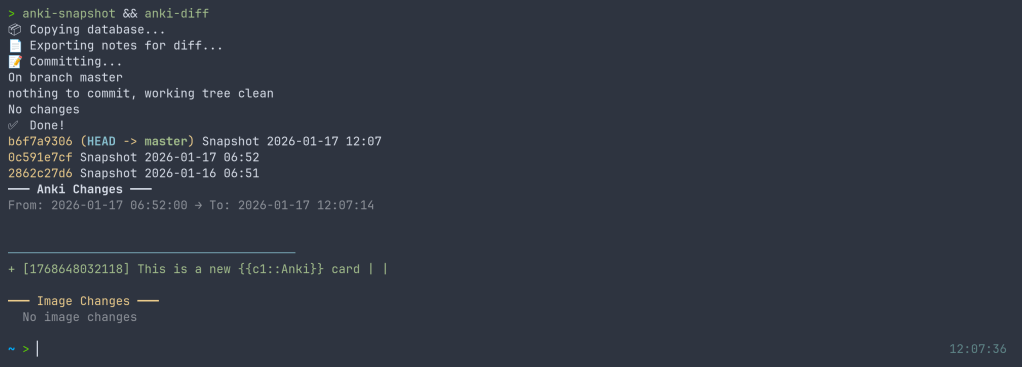
After editing some cards in Anki, run the snapshot and see what changed:
$ anki-snapshot
[main a3f2b1c] Snapshot 2026-01-14 21:30:45
 1 file changed, 3 insertions(+), 1 deletion(-)

$ anki-diff
━━━ Changes since last snapshot ━━━

Modified notes: 2
+ [1462223862805] Which antibodies are associated with Hashimoto...
− [1462223862805] Which antibodies are associated with Hashimoto...

New notes: 1
+ [1767170915030] Germline polymorphisms of the ATPase 6 gene...
Find when “mitochondria” was added or modified across your entire collection history:
$ anki-search "mitochondria" --history

commit e183cea7b3e36ad8b8faf7ca9d5eb8ca44d5bb5e
Date:   Tue Jan 13 22:43:47 2026 +0100
+ [1469146863262] If a disease has a mitochondrial inheritance pattern...
+ [1469146878242] Mitochondrial diseases often demonstrate variable expression...

commit 41c25a53471fc72a520d2683bd3defd6c0d92a88
Date:   Tue Jan 13 22:34:48 2026 +0100
− [1469146863262] If a disease has a mitochondrial inheritance pattern...
For seamless integration, you can hook the snapshot into your Anki workflow. I use a wrapper script that runs the snapshot automatically when closing Anki:
$ anki-wrapper # Opens Anki, snapshots on close
Or add it to your shell aliases to run before building/syncing your deck.
The tool is available on the AUR for Arch Linux users:
yay -S anki-snapshot
Or install manually:
git clone https://github.com/chrislongros/anki-snapshot-tool
cd anki-snapshot-tool
./install.sh
Requires: bash, git, sqlite3
Anki’s backups are great for disaster recovery, but they’re binary blobs. You can’t:
With git-based snapshots, your entire editing history becomes searchable, diffable, and recoverable.
Screenshot:
I’ve just released fsrsr, an R package that provides bindings to fsrs-rs, the Rust implementation of the Free Spaced Repetition Scheduler (FSRS) algorithm. This means you can now use the state-of-the-art spaced repetition algorithm directly in R without the maintenance burden of a native implementation.
FSRS is a modern spaced repetition algorithm that outperforms traditional algorithms like SM-2 (used in Anki’s default scheduler). It uses a model based on the DSR (Difficulty, Stability, Retrievability) framework to predict memory states and optimize review intervals for long-term retention.
Writing and maintaining a native R implementation of FSRS would be challenging:
By using extendr to create Rust bindings, we get:
You’ll need Rust installed (rustup.rs), then:
remotes::install_github("chrislongros/fsrsr")
Here’s a simple example showing the core workflow:
library(fsrsr)

# Initialize a new card with a "Good" rating (3)
state <- fsrs_initial_state(3)
# $stability: 3.17
# $difficulty: 5.28

# After reviewing 3 days later with "Good" rating
new_state <- fsrs_next_state(
  stability = state$stability,
  difficulty = state$difficulty,
  elapsed_days = 3,
  rating = 3
)

# Calculate next interval for 90% target retention
interval <- fsrs_next_interval(new_state$stability, 0.9)
# Returns: days until next review

# Check recall probability after 5 days
prob <- fsrs_retrievability(new_state$stability, 5)
# Returns: 0.946 (94.6% chance of recall)
| Function | Description |
|---|---|
fsrs_default_parameters() | Get the 21 default FSRS parameters |
fsrs_initial_state(rating) | Initialize memory state for a new card |
fsrs_next_state(S, D, days, rating) | Calculate next memory state after review |
fsrs_next_interval(S, retention) | Get optimal interval for target retention |
fsrs_retrievability(S, days) | Calculate probability of recall |
Ratings follow Anki’s convention: 1 = Again, 2 = Hard, 3 = Good, 4 = Easy.
The package uses extendr to generate R bindings from Rust code. The actual FSRS calculations happen in Rust via the fsrs-rs library (v2.0.4), with results passed back to R as native types.
Source code: github.com/chrislongros/fsrsr
A journey through packaging Python libraries for spaced repetition and Anki deck generation across multiple platforms.
As someone passionate about both medical education tools and open-source software, I recently embarked on a project to make several useful Python libraries available as native packages for FreeBSD and Arch Linux. This post documents the process and shares what I learned along the way.
Spaced repetition software like Anki has become indispensable for medical students and lifelong learners. However, the ecosystem of tools around Anki—libraries for generating decks programmatically, analyzing study data, and implementing scheduling algorithms—often requires manual installation via pip. This creates friction for users and doesn’t integrate well with system package managers.
My goal was to package three key Python libraries:
The AUR is a community-driven repository for Arch Linux users. Creating packages here involves writing a PKGBUILD file that describes how to fetch, build, and install the software.
The FSRS (Free Spaced Repetition Scheduler) algorithm represents the cutting edge of spaced repetition research. Version 6.x brought significant API changes, including renaming the main FSRS class to Scheduler.
# PKGBUILD for python-fsrs
pkgname=python-fsrs
pkgver=6.3.0
pkgrel=1
pkgdesc="Free Spaced Repetition Scheduler algorithm"
arch=('any')
url="https://github.com/open-spaced-repetition/py-fsrs"
license=('MIT')
depends=('python' 'python-typing_extensions')
makedepends=('python-build' 'python-installer' 'python-wheel' 'python-setuptools')
source=("https://files.pythonhosted.org/packages/source/f/fsrs/fsrs-${pkgver}.tar.gz")
sha256sums=('3abbafd66469ebf58d35a5d5bb693a492e1db44232e09aa8e4d731bf047cd0ae')

build() {
    cd "fsrs-$pkgver"
    python -m build --wheel --no-isolation
}

package() {
    cd "fsrs-$pkgver"
    python -m installer --destdir="$pkgdir" dist/*.whl
    install -Dm644 LICENSE "$pkgdir/usr/share/licenses/$pkgname/LICENSE"
}
The package is now available at: aur.archlinux.org/packages/python-fsrs
genanki allows developers to create Anki decks programmatically—perfect for generating flashcards from databases, APIs, or other structured data sources.
Package available at: aur.archlinux.org/packages/python-genanki
ankipandas provides a pandas-based interface for reading and analyzing Anki collection databases, enabling data science workflows on your study data.
Package available at: aur.archlinux.org/packages/python-ankipandas
FreeBSD’s ports system is more formal than the AUR, with stricter guidelines and a review process. Ports are submitted via Bugzilla and reviewed by committers before inclusion in the official ports tree.
Creating a FreeBSD port required several steps:
pytest-runner build dependency which doesn’t exist in FreeBSD portsmake and make install in a FreeBSD environmentThe final Makefile:
PORTNAME=       genanki
PORTVERSION=    0.13.1
CATEGORIES=     devel python
MASTER_SITES=   PYPI
PKGNAMEPREFIX=  ${PYTHON_PKGNAMEPREFIX}

MAINTAINER=     chris.longros@gmail.com
COMMENT=        Library for generating Anki decks
WWW=            https://github.com/kerrickstaley/genanki

LICENSE=        MIT
LICENSE_FILE=   ${WRKSRC}/LICENSE.txt

RUN_DEPENDS=    ${PYTHON_PKGNAMEPREFIX}cached-property>0:devel/py-cached-property@${PY_FLAVOR} \
                ${PYTHON_PKGNAMEPREFIX}chevron>0:textproc/py-chevron@${PY_FLAVOR} \
                ${PYTHON_PKGNAMEPREFIX}frozendict>0:devel/py-frozendict@${PY_FLAVOR} \
                ${PYTHON_PKGNAMEPREFIX}pystache>0:textproc/py-pystache@${PY_FLAVOR} \
                ${PYTHON_PKGNAMEPREFIX}pyyaml>0:devel/py-pyyaml@${PY_FLAVOR}

USES=           python
USE_PYTHON=     autoplist distutils

.include <bsd.port.mk>
One challenge was that genanki’s setup.py required pytest-runner as a build dependency, which doesn’t exist in FreeBSD ports. The solution was to create a patch file that removes this requirement:
--- setup.py.orig       2026-01-11 15:32:48.887894000 +0100
+++ setup.py    2026-01-11 15:32:51.336128000 +0100
@@ -27,9 +27,6 @@
         'chevron',
         'pyyaml',
       ],
-      setup_requires=[
-          'pytest-runner',
-      ],
       tests_require=[
           'pytest>=6.0.2',
       ],
The FSRS port followed a similar pattern, with its own set of dependencies to map to FreeBSD ports.
Both ports are available in my GitHub repository and have been submitted to FreeBSD Bugzilla for review:
One of the biggest challenges in packaging is mapping upstream dependencies to existing packages in the target ecosystem. For FreeBSD, this meant:
/usr/ports for existing Python packages@${PY_FLAVOR} suffix for Python version flexibilitychevron) that weren’t immediately obvious from the package metadataPython packaging has evolved significantly, with projects using various combinations of:
setup.py with setuptoolspyproject.toml with various backends (setuptools, flit, hatch, poetry)setup_requires patterns that don’t translate well to system packagingCreating patches to work around these issues is a normal part of the porting process.
Running a FreeBSD VM (via VirtualBox) proved essential for testing ports before submission. The build process can reveal missing dependencies, incorrect paths, and other issues that only appear in the actual target environment.
| Package | Version | AUR | FreeBSD |
|---|---|---|---|
| python-fsrs / py-fsrs | 6.3.0 | ✅ Published | 📝 Submitted |
| python-genanki / py-genanki | 0.13.1 | ✅ Published | 📝 Submitted |
| python-ankipandas | 0.3.15 | ✅ Published | 🔜 Planned |
If you use these tools on Arch Linux or FreeBSD, I’d love to hear your feedback. And if you’re interested in contributing to open-source packaging:
pkg query -e %m=ports@FreeBSD.org %o to find unmaintained ports you have installedEvery package maintained is one less barrier to entry for users who want to use great software without fighting with dependency management.
Published: January 2026
Repository: github.com/chrislongros/freebsd-ports
If you use Anki for spaced repetition learning, you’ve probably wondered about your study patterns. How many cards have you reviewed? What’s your retention like? Which cards are giving you trouble?
I built ankiR to make this easy in R.
Anki stores everything in a SQLite database, but accessing it requires writing raw SQL queries. Python users have ankipandas, but R users had nothing—until now.
# From GitHub
remotes::install_github("chrislongros/ankiR")

# Arch Linux (AUR)
yay -S r-ankir
ankiR auto-detects your Anki profile and provides a tidy interface:
library(ankiR)

# See available profiles
anki_profiles()

# Load your data as tibbles
notes <- anki_notes()
cards <- anki_cards()
reviews <- anki_revlog()

# Quick stats
nrow(notes)    # Total notes
nrow(cards)    # Total cards
nrow(reviews)  # Total reviews
The killer feature: ankiR extracts FSRS parameters directly from your collection.
FSRS (Free Spaced Repetition Scheduler) is the modern scheduling algorithm in Anki that calculates optimal review intervals based on your memory patterns.
fsrs_cards <- anki_cards_fsrs()
This gives you:
library(ankiR)
library(dplyr)
library(ggplot2)

anki_cards_fsrs() |>
  filter(!is.na(difficulty)) |>
  ggplot(aes(difficulty)) +
  geom_histogram(bins = 20, fill = "steelblue") +
  labs(
    title = "Card Difficulty Distribution",
    x = "Difficulty (1-10)",
    y = "Count"
  ) +
  theme_minimal()
anki_cards_fsrs() |>
  filter(!is.na(stability)) |>
  ggplot(aes(difficulty, stability)) +
  geom_point(alpha = 0.3, color = "steelblue") +
  scale_y_log10() +
  labs(
    title = "Memory Stability vs Card Difficulty",
    x = "Difficulty",
    y = "Stability (days, log scale)"
  ) +
  theme_minimal()
anki_revlog() |>
  count(review_date) |>
  ggplot(aes(review_date, n)) +
  geom_line(color = "steelblue") +
  geom_smooth(method = "loess", se = FALSE, color = "red") +
  labs(
    title = "Daily Review History",
    x = "Date",
    y = "Reviews"
  ) +
  theme_minimal()
You can also calculate the probability of recalling a card after N days:
# What's my retention after 7 days for a card with 30-day stability?
fsrs_retrievability(stability = 30, days_since_review = 7)
# Returns ~0.93 (93% chance of recall)
I built this because I wanted to analyze my USMLE study data in R. If you find it useful, let me know!