




Category: Uncategorized
-
Happy to contribute not only to TrueNAS but also to OpenZFS upstream !!
The official announcement from iXsystems: https://www.truenas.com/blog/blog-truenas-26-beta1-release/
https://www.phoronix.com/news/TrueNAS-26-Beta
Download the BETA iso from here: https://download.truenas.com/TrueNAS-26-BETA/26.0.0-BETA.1/TrueNAS-26.0.0-BETA.1.iso
The .update file version is available here: https://update-public.sys.truenas.net/TrueNAS-26-BETA/TrueNAS-26.0.0-BETA.1.update
-
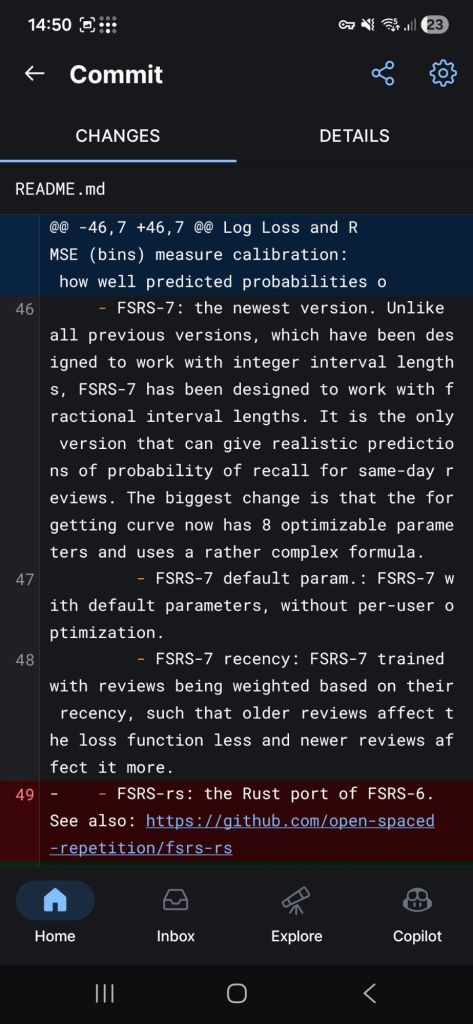
Supports fractional intervals lengths for same day review prediction of probability !!
-
Officially an OpenZFS contributor 🙂
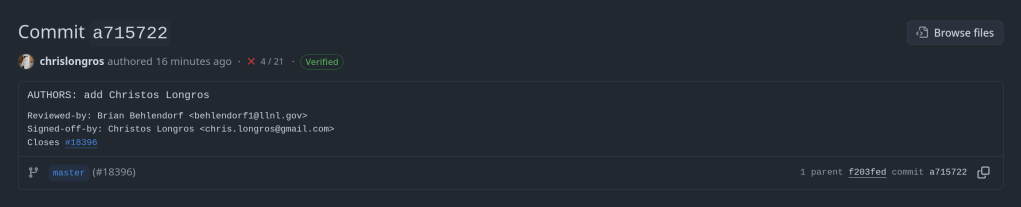
https://github.com/openzfs/zfs/commit/a7157221db1d3a7c3517dee98f5124c13a515053
-
TL;DR: Many professional societies run Zoom-based webinar series where you need to attend a minimum percentage of sessions to earn a certificate. I used Claude to audit my attendance history directly from Gmail, then automated the whole process with a Google Apps Script that detects new Zoom registration emails and adds calendar events — so you never miss a session again.
The Problem: Tracking Attendance for Certificate Programmes
Many professional associations now run structured online education programmes through Zoom, where attendance is tracked and a certificate is awarded to participants who reach a certain threshold — typically 70% of live sessions. The problem is that life gets in the way: you register for a session, forget about it, and only realise you missed it when the “sorry you couldn’t make it” email arrives. Over a multi-month programme, these misses add up quietly.
The good news is that Zoom’s post-event emails are remarkably consistent and machine-readable. This makes the whole problem automatable.
Step 1: Reconstructing Your Attendance History from Gmail
Zoom always sends one of two emails after a webinar ends:
- “Thank you for attending…” — you were present
- “We’re sorry you were not able to attend…” — you registered but missed it
This means your full attendance history is sitting in your Gmail inbox, waiting to be counted. To find it, search Gmail using a query like:
from:no-reply@zoom.us ("thank you for attending" OR "sorry that you were not able") [your-series-keyword]Replace
[your-series-keyword]with something specific to your programme — the organiser’s domain, the series name, or any unique phrase that appears in your webinar emails. The results give you a complete attended/missed breakdown to calculate your current attendance rate.Step 2: Automating Calendar Events with Google Apps Script
Google Apps Script is a free JavaScript runtime that runs inside your Google account with direct access to Gmail and Google Calendar. No server, no third-party service, no cost.
The script does the following every hour:
- Searches Gmail for new Zoom registration confirmation emails matching your programme’s keywords
- Parses the webinar title and date/time from the email body
- Maps Zoom’s city-based timezone strings to proper IANA timezones
- Checks for duplicate calendar events before creating anything
- Creates a Google Calendar event with a 1-day email reminder and a 1-hour popup reminder
- Labels the processed email so it is never processed twice
Parsing the Zoom Email Format
The trickiest part was reliably extracting the date and time. Zoom confirmation emails always contain a line like:
Date & Time Oct 23, 2025 06:00 PM Amsterdam, Berlin, Rome, Stockholm, Vienna
The key insight is to anchor the regex on
Date & Timerather than trying to detect a date anywhere in the body — robust across different webinar topics and templates:const anchored = /Date\s*&\s*Time\s+(\w{3}\.?\s+\d{1,2},?\s+\d{4})\s+(\d{1,2}:\d{2}\s*[AP]M)(.*)/i; const m = text.match(anchored); // m[1] = "Oct 23 2025" m[2] = "06:00 PM" m[3] = "Amsterdam, Berlin, ..."Zoom expresses timezones as a city list rather than an IANA string. A mapping function handles the conversion:
function mapTimezone(raw) {
  const s = (raw || "").toLowerCase();
  if (/amsterdam|berlin|rome|vienna|stockholm/.test(s)) return "Europe/Berlin";
  if (/london|dublin|bst|gmt/.test(s))               return "Europe/London";
  if (/eastern|new york|toronto/.test(s))             return "America/New_York";
  // ... other timezones ...
  return "Europe/Berlin"; // default
}
Deduplication
The script checks the calendar for an existing event with a matching title near the same date, and applies a Gmail label (
Webinar-Added) to every processed thread — excluding it from future queries. Safe to re-run as many times as needed.Setup: 2 Minutes
- Go to script.google.com → New project
- Paste the full script, replacing all default content
- Update the
CONFIGblock — specifically thekeywordsarray - Select
createProcessedLabel→ click ▶ Run - Select
installTrigger→ click ▶ Run - Optionally run
backfillHistoricalWebinarsonce for past emails
Google will show a warning: “Google hasn’t verified this app.” This is normal for personal Apps Scripts — click Advanced → Go to [project name] (unsafe) and grant permissions. You are the developer and sole user.
Adapting for Your Own Programme
Everything lives in one
CONFIGobject at the top:const CONFIG = { processedLabel: "Webinar-Added", calendarId: "primary", defaultDurationMins: 90, emailReminderMins: 24 * 60, // 1 day before popupReminderMins: 60, // 1 hour before // Change these to match your programme keywords: [ "your-society-name", "your-series-name", "other-keyword", ], };Replace the
keywordsvalues with terms unique to your series — the rest works unchanged for any Zoom-hosted webinar programme.What This Doesn’t Do
- It doesn’t register you. The script only acts after you register — it creates the calendar reminder from the confirmation email.
- It doesn’t track actual attendance. Events are created from registration confirmations, not post-event emails. Your official record is with the organiser.
- It requires a consistent email address. Most programmes track attendance by email. Register with the same address every time.
Full Script
The complete script is available on my GitHub. MIT licensed — adapt freely.
Tags: Google Apps Script, Zoom, Webinar, Automation, Gmail, Google Calendar, CME, Medical Education, Professional Development
-
Note: 1.96.0 and 1.96.1 were release candidates intended for testing only.
All Platforms
tailscale dns query|statuscommand supports--jsonflag to return JSON output.tailscale wait [flags]command waits for Tailscale resources to become available for binding.tailscale ipcommand supports--assert=<specific-ip-address>flag to assert that one or more of the node’s IP addresses matches the specified IP address.tailscale version --trackandtailscale update --tracksupportrelease-candidateflag to check for and update to release candidate builds.- Tailscale Peer Relays advertise addresses discovered via Amazon EC2 Instance Metadata Service.
tailscaled_peer_relay_endpoints gaugeuser metrics are available for Tailscale Peer Relays.- The
AuthKeysystem policy applies only when a user is not in a logged in state. - UPnP routes as expected during long lived port mapping sessions scenarios, including hard NAT.
Linux
- Launch the
systrayapplication on startup using autostart file with thetailscale configure systray --enable-startup=freedesktopcommand. - Scaling of Tailscale Peer Relays UDP sockets is gated by container-aware GOMAXPROCS defaults.
- Firewall rules created on Linux platforms correctly mark their traffic, avoiding reverse path filtering dropping connections and producing health warnings and risk prompts.
- OpenWrt versions 25.12.0 or later using apk as a package manager supports Tailscale updates.
macOS
- Windowed UI mode for macOS is generally available.
- Double click an account in the Accounts section to switch to that account.
- A progress dialog indicates Tailscale is waiting on the browser to complete reauthentication.
- The open source variant of Tailscale on macOS sets the
node:osVersionattribute. - The Taildrop Send File action and shortcut do not transmit empty files on macOS Tahoe (version 26) or later.
- Tailscale data directories for the macOS standalone version are excluded from Time Machine backups.
- An issue that required a machine reboot after installing a Tailscale update is resolved.
iOS
- iOS bug report ID displays in its entirety instead of being truncated.
- The Taildrop Send File action and shortcut do not transmit empty files on iOS version 26 or later.
-
A couple of weeks ago I opened two more pull requests to the OpenZFS project — PR #18303 and PR #18300. One adds a man page for a long-undocumented tool; the other removes stale flags from a core command that should never have been there in the first place.
Background
My earlier OpenZFS contributions were on the C side: error handling improvements for
zpool create(PRs #18184, #18213, and #18268 — ENXIO handling, device-specific error reporting, and an EDOM error handler). These new PRs continue in the same spirit of cleaning up rough edges, though from different angles.PR #18303 — Documenting zilstat
zilstathas existed in OpenZFS for some time, but it was effectively undocumented — no man page, nothing in the official documentation. The tool gives you per-pool ZIL (ZFS Intent Log) statistics: commit counts, write sizes broken down by type, and itx classifications across indirect, copied, and needcopy writes.If you are trying to understand whether a SLOG device is actually doing useful work, or why synchronous write latency is higher than expected,
zilstatis exactly the right tool. The lack of a man page meant most users did not know it existed, and those who found it had to reverse-engineer its output from the source.PR #18303 adds a proper man page covering the synopsis, description, output fields, and usage examples — so the tool is now actually discoverable and usable by anyone consulting the documentation.
PR #18300 — Removing stale rewind flags from zpool clear
This one is a code change, and a satisfying one.
zpool clearhad been quietly accepting three flags —-F,-n, and-X— that it had no business accepting. These are rewind flags inherited from OpenSolaris, where they make sense in the context ofzpool import: when importing a pool that is not yet loaded, you can select a specific transaction group to rewind to.But
zpool clearis a completely different situation. It operates on an already-imported pool whose in-memory state is ahead of what is on disk. Rewinding transactions there would require force-exporting the pool first — it simply cannot work. The flags were vestigial, undocumented, and misleading to anyone who stumbled across them in the usage string.PR #18300 removes
-F,-n, and-Xfromzpool clearentirely. The rewind policy passed tozpool_clear()is now alwaysZPOOL_NO_REWIND. The usage string is cleaned up to match. This closes issue #13825, which had been open since 2022. The commit was reviewed by Alexander Motin (TrueNAS) and Brian Behlendorf (LLNL), and tested on FreeBSD 16.0-CURRENT.On cleaning things up
Both of these PRs are about the same underlying problem: a gap between what the codebase does and what users can reliably know or rely on. An undocumented tool and a command silently accepting flags that do nothing are both forms of technical debt that erode trust in the tooling over time. Removing the wrong thing is just as valuable as adding the right thing.
I will keep working through the OpenZFS codebase where I find similar rough edges. If you have spotted something undocumented or suspect a flag that does not do what it claims, opening an issue — or better yet, a PR — is the way to move it forward.