




Category: Uncategorized
-
I get the following error when trying to execute kdesrc-build or kde-builder.
> kdesrc-build –install-distro-packages-perl –install-distro-packages
=== install-distro-packages-perl ===
– Installing system packages for arch…
Installing packages for arch/unknown
Using installer for arch
* All dependencies are already installed. No need to run installer. 🙂
* Looks like the necessary packages were successfully installed!
=== install-distro-packages ===
Cloning sysadmin-repo-metadata
* Failed to make initial clone of sysadmin-repo-metadata
~/anki/ankidev main >P.S: This solved the problem !
git config –global –add url.http://invent.kde.org/.insteadOf kde:
git config –global –add url.ssh://git@invent.kde.org/.pushInsteadOf kde: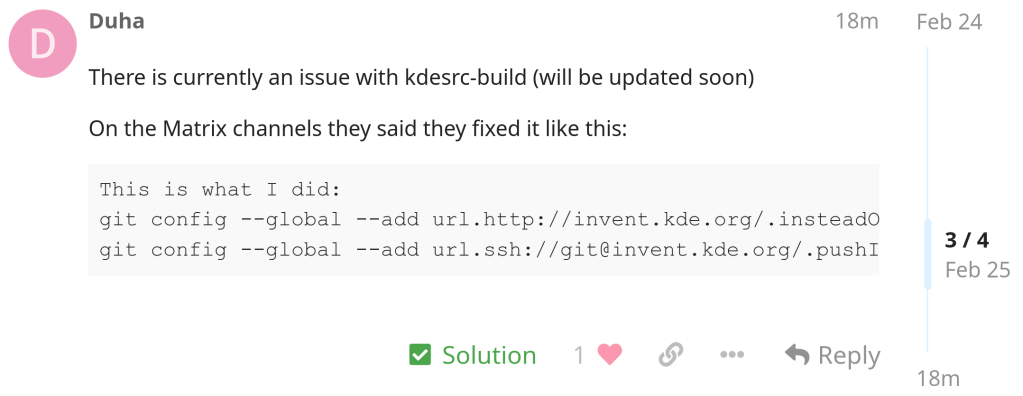
https://tech.sadaalomma.com/git/the-process-usr-bin-git-failed-with-exit-code-128
-

vs today:

-
After almost 3 years of development, 958 changes from 26 contributors since 2.16 version and 1972 translators.


The release is currently not available on Play Store but I installed it from source using the .apk file provided in the following GitHub link by the main developer.


https://github.com/ankidroid/Anki-Android/releases/tag/v2.17.0
https://ankidroid.org/docs/changelog.html#_version_2_17_0_20240223
-
Contains many improvements including faster rebasing etc.

-

Linux kernel has a Rust version policy:
“The kernel documents the minimal requirements to compile it. In the case of Rust, currently only a single version is supported (i.e. rather than a minimum)”
-
update
:: Synchronizing package databases…
kde-unstable is up to date
core is up to date
extra is up to date
error: failed retrieving file ‘kde-unstable.db’ from pkg.fef.moe : SSL certificate problem: certificate has expired
error: failed retrieving file ‘core.db’ from pkg.fef.moe : SSL certificate problem: certificate has expired
error: failed retrieving file ‘extra.db’ from pkg.fef.moe : SSL certificate problem: certificate has expired
warning: too many errors from pkg.fef.moe, skipping for the remainder of this transaction
:: Starting full system upgrade…
there is nothing to do
:: Synchronizing package databases…
kde-unstable is up to date
core is up to date
extra is up to date
error: failed retrieving file ‘kde-unstable.db’ from pkg.fef.moe : SSL certificate problem: certificate has expired
error: failed retrieving file ‘core.db’ from pkg.fef.moe : SSL certificate problem: certificate has expired
error: failed retrieving file ‘extra.db’ from pkg.fef.moe : SSL certificate problem: certificate has expired
warning: too many errors from pkg.fef.moe, skipping for the remainder of this transaction
:: Searching AUR for updates…
:: Searching databases for updates…
there is nothing to doInstalling reflector and updating my mirror by download rate just solved the issue completely:
reflector –verbose -l 5 –sort rate –save /etc/pacman.d/mirrorlist
-
First video is the computation of Fibonacci (42) and seconds the prime numbers < 250.001





 /root
/root 