“For reference, Google Chrome ended support for 32-bit Linux in 2016. So in 2026, Mozilla will have supported 32-bit Linux for ten years longer than Chrome did.”
🔑 Timeline of Support Changes
October 14, 2025
Release of Firefox 144, last version supporting 32-bit Linux.
Same day as Windows 10 end of life.
October 2025 onward
Firefox 145 and newer: 64-bit only.
September 2026
End of Firefox ESR 140 support for 32-bit Linux (last security updates).
June 30, 2028
End of Debian 12 LTS, the last Debian release supporting 32-bit.
Vertical Tabs: You can now keep more — or fewer — pinned tabs in view for quicker access to important windows. Just drag the divider to resize your pinned tabs section.
Custom Search Engines: Firefox now supports adding even more search engines. To add a custom engine, right-click a search field of a supported website and select “Add Search Engine”, or go to Settings > Search > Add (below the search shortcuts table) to manually enter a search URL.
Firefox Extensions: Customize your toolbar with the option to remove the extensions shortcut, giving you more control over your browser. When the button is hidden, you can access the extensions panel again at any time from the Firefox menu by clicking the Extensions menu item.
You can now unload tabs by right-clicking on a tab (or multiple selected tabs) and selecting “Unload Tab”. This can speed up performance by reducing Firefox’s memory and CPU usage.
Full-Page Translations now prioritizes translating only the content near your current view, improving speed and responsiveness. Content outside your view is skipped unless you scroll to it, reducing unnecessary resource usage.
Firefox builds in Arabic now come with a built-in Arabic dictionary for the Firefox spellchecker.
Address autofill enabled for users in Italy, Poland, and Austria.
“The autocorrect global attribute is an enumerated attribute that controls whether autocorrection of editable text is enabled for spelling and/or punctuation errors.”
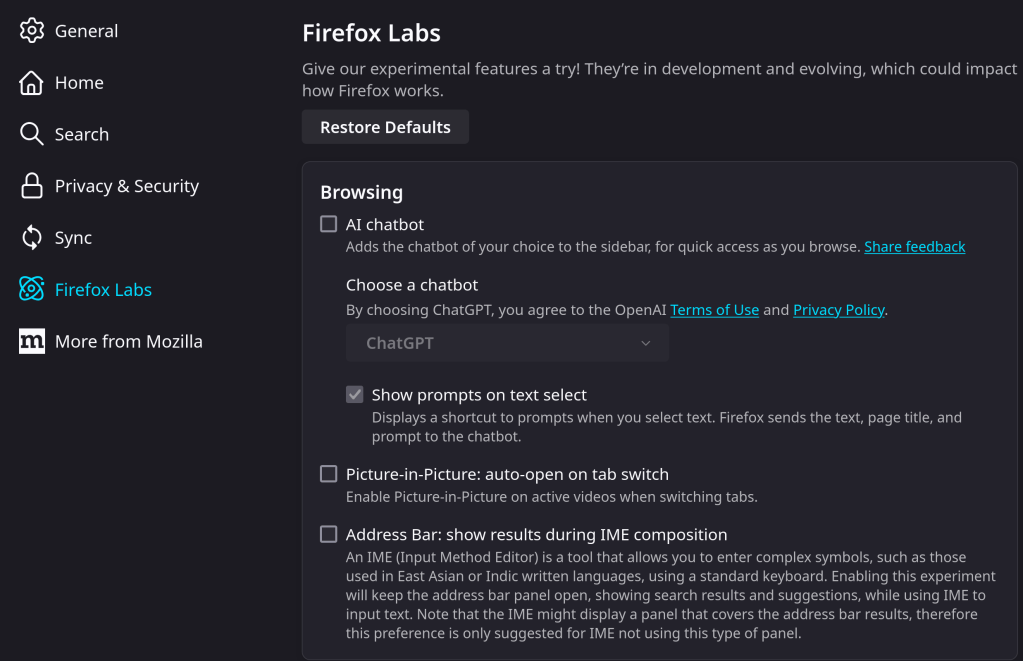
“Firefox Labs currently lets you enable an AI chatbot, an auto-open on tab switch feature for Picture-in-Picture, support for Service Workers in the Debugger panel, and an address bar feature that shows results during IME (Input Method Editor) composition.”
“Includes an updated screenshots feature that now lets you take screenshots of various :about: pages, as well as of file certain types like SVG, XML, and others, along with improved performance of capturing of large screenshots and improved accessibility through new keyboard shortcuts, theme compatibility, and High Contrast Mode (HCM) support.”










 /root
/root 