Using AI to generate Anki flashcards has evolved rapidly over the past couple of years. Here’s a look at how it started and where we are in 2026.
The Beginning: ChatGPT Prompts (2023)
The first to provide an Anki flashcard-generating ChatGPT prompt was Jarret Lee in this Anki forums post: Casting a Spell on ChatGPT: Let it Write Anki Cards for You. The idea was simple — give ChatGPT a structured prompt and it returns properly formatted flashcards you can import.
AnkiBrain Add-on
Shortly after, the AnkiBrain add-on was developed, integrating AI directly into Anki’s interface. This made it possible to generate cards without leaving the application.
Current Landscape (2026)
The ecosystem has exploded. Here are the main tools available today:
AnkiDecks AI — upload PDFs, PowerPoints, Word docs, or even YouTube links and get flashcards generated instantly
Ankify — turns notes, PDFs, and slides into export-ready Anki decks with card preview and editing before export
NovaCards — uses LLMs to generate cards from class notes, with a companion Anki plugin for in-app generation
AnkiAIUtils — AI-powered tools to enhance existing cards with explanations, mnemonics, and illustrations
Agentic AI approaches — tools like Claude Code can now generate batches of contextualised cards by describing the pattern you want
MCP interfaces — AI models can now interact directly with your Anki collection through MCP connectors
My Approach
I still prefer writing my own cards for deep learning, but AI-generated cards are great for:
Quickly converting lecture notes or documentation into reviewable material
Generating vocabulary cards in bulk
Creating first-pass cards that you then refine manually
The key is to always review AI-generated cards before adding them to your collection. Bad cards lead to bad learning.
There’s an Anki addon called anki-mcp-server that exposes your Anki collection over MCP (Model Context Protocol). If you haven’t come across MCP yet — it’s basically a standardized way for AI assistants to interact with external tools. Connect this addon and suddenly Claude (or whatever you’re using) can search your cards, create notes, browse your decks, etc.
Pretty cool, but there was a big gap: zero FSRS support. The assistant could see your cards but had no idea how they were being scheduled. It couldn’t read your FSRS parameters, couldn’t check a card’s memory state, couldn’t run the optimizer. For anyone who’s moved past SM-2 (which should be everyone at this point), that’s a significant blind spot.
So I wrote a PR that adds four tools and a resource to fill that gap.
get_fsrs_params reads the FSRS weights, desired retention, and max interval — either for all presets at once or filtered to a specific deck. get_card_memory_state pulls the per-card memory state (stability, difficulty, retrievability) for a given card ID. set_fsrs_params lets you update retention or weights on a preset. And optimize_fsrs_params runs Anki’s built-in optimizer — with a dry-run mode so you can preview the optimized weights before committing.
There’s also an anki://fsrs/config resource that gives a quick overview of your FSRS setup without needing a tool call.
The annoying part was version compatibility. FSRS has been through several iterations and Anki stores the parameters under different protobuf field names depending on which version you’re on. I ended up writing a fallback chain that tries fsrsParams6 first, then fsrsParams5, then fsrsParams4, and finally the old fsrsWeights field. The optimizer tool also needs to adjust its kwargs depending on the Anki point version (25.02 and 25.07 changed the interface). All of that version-detection logic lives in a shared _fsrs_helpers.py so the individual tools stay clean.
One gotcha that took me a bit to track down: per-deck desired retention overrides are stored as 0–100 on the deck config dictionary, but the preset stores them as 0–1. Easy to miss, and you’d get nonsensical results if you didn’t normalize between the two.
What I’m most excited about is what this enables in practice. You can now ask an AI assistant things like “run the optimizer on my medical deck in dry-run mode and tell me how the new weights compare” or “which of my presets has the lowest desired retention?” — and it can actually do it, pulling real data from your collection instead of just guessing. For someone who spends a lot of time tweaking FSRS settings across different decks, having that accessible through natural language is a nice quality-of-life improvement.
The PR was recently merged. I tested everything locally — built the .ankiaddon, installed it in Anki, ran through all the tools against a live collection. If you’re into the Anki + AI workflow, take a look and let me know what you think.
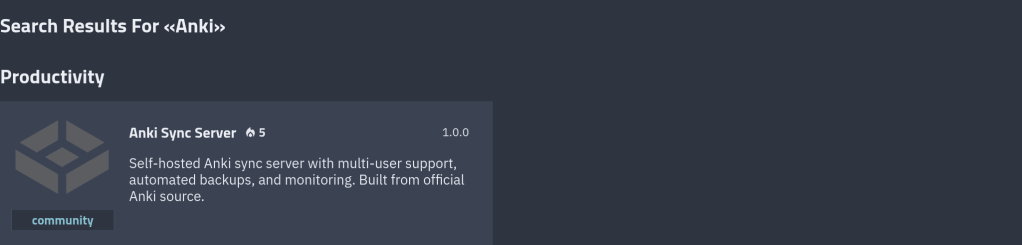
Take full control of your Anki flashcard syncing. A self-hosted sync server with user management, TLS, backups, and metrics — packaged for one-click install on TrueNAS.
Why Self-Host Your Anki Sync?
Anki is the gold standard for spaced repetition learning — used by medical students, language learners, and lifelong learners worldwide. By default, Anki syncs through AnkiWeb, Anki’s official cloud service. But there are good reasons to run your own sync server: full ownership of your data, no upload limits, the ability to share a server with a study group, and the peace of mind that comes with keeping everything on your own hardware.
Anki Sync Server Enhanced wraps the official Anki sync binary in a production-ready Docker image with features you’d expect from a proper self-hosted service — and it’s now submitted to the TrueNAS Community App Catalog for one-click deployment.
What’s Included
🔐
User Management
Create sync accounts via environment variables. No database setup required.
🔒
Optional TLS
Built-in Caddy reverse proxy for automatic HTTPS with Let’s Encrypt or custom certs.
💾
Automated Backups
Scheduled backups with configurable retention and S3-compatible storage support.
📊
Metrics & Dashboard
Prometheus-compatible metrics endpoint and optional web dashboard for monitoring.
🐳
Docker Native
Lightweight Debian-based image. Runs as non-root. Healthcheck included.
⚡
TrueNAS Ready
Submitted to the Community App Catalog. Persistent storage, configurable ports, resource limits.
How It Works
Anki Desktop / Mobile→Anki Sync Server Enhanced→TrueNAS Storage
Your Anki clients sync directly to your TrueNAS server over your local network or via Tailscale/WireGuard.
The server runs the official anki-sync-server Rust binary — the same code that powers AnkiWeb — inside a hardened container. Point your Anki desktop or mobile app at your server’s URL, and syncing works exactly like it does with AnkiWeb, just on your own infrastructure.
TrueNAS Installation
Once the app is accepted into the Community train, installation is straightforward from the TrueNAS UI. In the meantime, you can deploy it as a Custom App using the Docker image directly.
PR Status: The app has been submitted to the TrueNAS Community App Catalog via PR #4282 and is awaiting review. Track progress on the app request issue #4281.
To deploy as a Custom App right now, use these settings:
Setting
Value
Image
chrislongros/anki-sync-server-enhanced
Tag
25.09.2-1
Port
8080 (or any available port)
Environment: SYNC_USER1
yourname:yourpassword
Environment: SYNC_PORT
Must match your chosen port
Storage: /data
Host path or dataset for persistent data
Connecting Your Anki Client
After the server is running, configure your Anki client to use it. In Anki Desktop, go to Tools → Preferences → Syncing and set the custom sync URL to your server address, for example http://your-truenas-ip:8080. On AnkiDroid, the setting is under Settings → Sync → Custom sync server. On AnkiMobile (iOS), look under Settings → Syncing → Custom Server.
Then simply sync as usual — your Anki client will talk to your self-hosted server instead of AnkiWeb.
Building It: Lessons from TrueNAS App Development
Packaging a Docker image as a TrueNAS app turned out to involve a few surprises worth sharing for anyone considering contributing to the catalog.
TrueNAS apps use a Jinja2 templating system backed by a Python rendering library — not raw docker-compose files. Your template calls methods like Render(values), c1.add_port(), and c1.healthcheck.set_test() which generate a validated compose file at deploy time. This means you get built-in support for permissions init containers, resource limits, and security hardening for free.
One gotcha: TrueNAS runs containers as UID/GID 568 (the apps user), not root. If your entrypoint writes to files owned by a different user, it will fail silently or crash. We hit this with a start_time.txt write and had to make it non-fatal. Another: the Anki sync server returns a 404 on / (it has no landing page), so the default curl --fail healthcheck marks the container as unhealthy. Switching to a TCP healthcheck solved it cleanly.
The TrueNAS CI tooling is solid — a single ci.py script renders your template, validates the compose output, spins up containers, and checks health status. If the healthcheck fails, it dumps full container logs and inspect data, making debugging fast.
Get Involved
Ready to Self-Host Your Anki Sync?
Deploy it on TrueNAS today or star the project on GitHub to follow development.
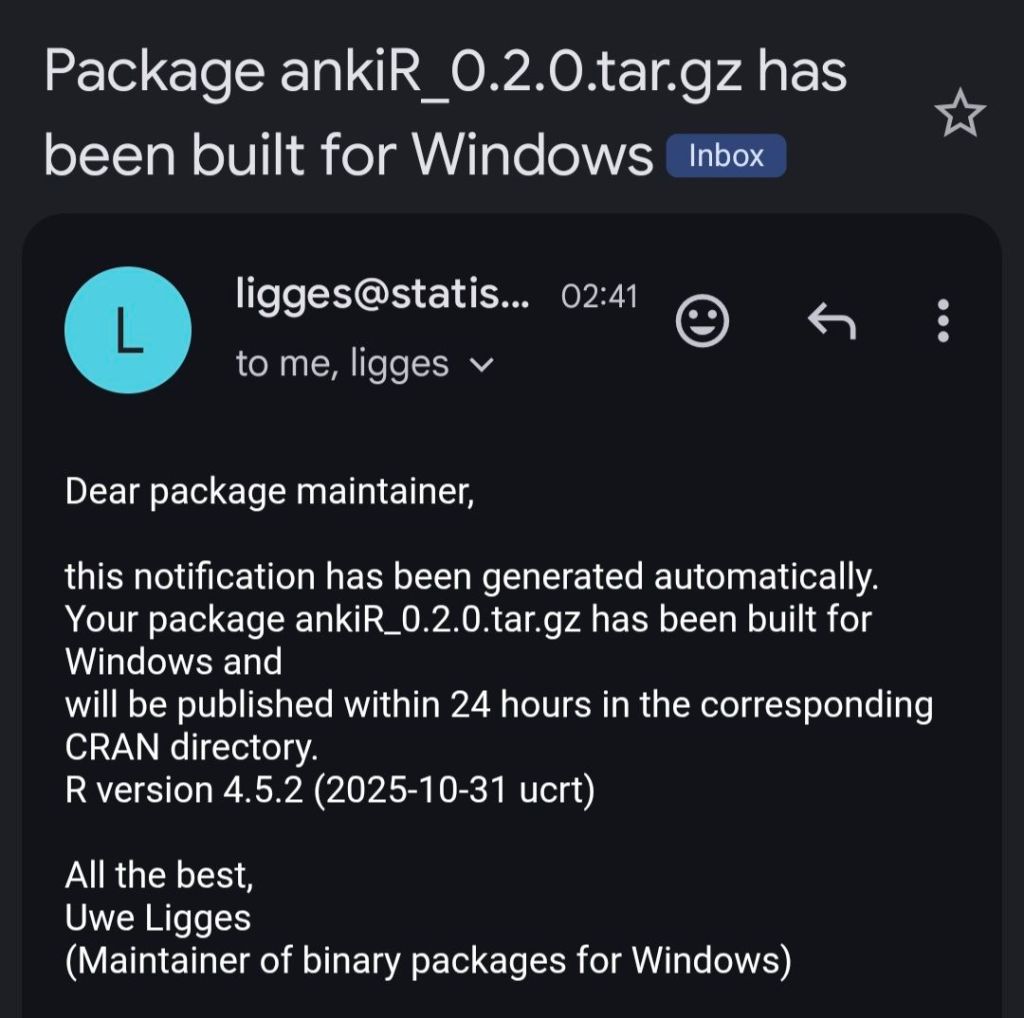
Two major releases of rfsrs are now available, bringing custom parameter support, SM-2 migration tools, and — the big one — parameter optimization. You can now train personalized FSRS parameters directly from your Anki review history using R.
Version 0.2.0: Custom Parameters & SM-2 Migration
Critical Bug Fix
Version 0.1.0 had a critical bug: custom parameters were silently ignored. The Scheduler stored your parameters but all Rust calls used the defaults. This is now fixed — your custom parameters actually work.
New Features in 0.2.0
Preview All Rating Outcomes
fsrs_repeat() returns all four rating outcomes (Again/Hard/Good/Easy) in a single call, matching the py-fsrs API:
# See all outcomes at once
outcomes <- fsrs_repeat(
stability = 10,
difficulty = 5,
elapsed_days = 5,
desired_retention = 0.9
)
outcomes$good$stability # 15.2
outcomes$good$interval # 12 days
outcomes$again$stability # 3.1
SM-2 Migration
Migrating from Anki’s default algorithm? fsrs_from_sm2() converts your existing ease factors and intervals to FSRS memory states:
# Convert SM-2 state to FSRS
state <- fsrs_from_sm2(
ease_factor = 2.5,
interval = 30,
sm2_retention = 0.9
)
state$stability # ~30 days
state$difficulty # ~5
Compute State from Review History
fsrs_memory_state() replays a sequence of reviews to compute the current memory state:
# Replay review history
state <- fsrs_memory_state(
ratings = c(3, 3, 4, 3), # Good, Good, Easy, Good
delta_ts = c(0, 1, 3, 7) # Days since previous review
)
state$stability
state$difficulty
Vectorized Operations
fsrs_retrievability_vec() efficiently calculates recall probability for large datasets:
# Calculate retrievability for 10,000 cards
retrievability <- fsrs_retrievability_vec(
stability = cards$stability,
elapsed_days = cards$days_since_review
)
Scheduler Improvements
Scheduler$preview_card() — see all outcomes without modifying the card
Card$clone_card() — deep copy a card for simulations
fsrs_simulate() — convenience function for learning simulations
State transitions now correctly match py-fsrs/rs-fsrs behavior
Version 0.3.0: Parameter Optimizer
The most requested feature: train your own FSRS parameters from your review history.
Why Optimize?
FSRS uses 21 parameters to predict when you’ll forget a card. The defaults work well for most people, but training custom parameters on your review history can improve scheduling accuracy by 10-30%.
New Functions in 0.3.0
fsrs_optimize() — Train custom parameters from your review history
fsrs_evaluate() — Measure how well parameters predict your memory
fsrs_anki_to_reviews() — Convert Anki’s revlog format for optimization
Optimize Your Parameters
Here’s how to train parameters using your Anki collection:
The optimizer uses machine learning (via the burn framework in Rust) to find parameters that best predict your actual recall patterns. It analyzes your review history to learn:
How quickly you initially learn new cards
How your memory decays over time
How different ratings (Again/Hard/Good/Easy) affect retention
I tested it on my own collection with ~116,000 reviews across 5,800 cards — optimization took about 60 seconds.
Compare Parameters
Evaluate how well different parameters predict your memory:
Damien Elmes says he’s stepping back from being Anki’s bottleneck—without saying goodbye.
Anki’s creator, Damien Elmes (often known as “dae”), shared a major update about the future of Anki: after nearly two decades of largely solo stewardship, he intends to gradually transition business operations and open-source stewardship to the team behind AnkiHub.
The headline reassurance is clear: Anki is intended to remain open source, and the transition is framed as a way to make development more sustainable, reduce single-person risk, and accelerate improvements—especially long-requested quality-of-life and UI polish.
Why this change is happening
Damien described a familiar pattern for long-running open-source projects: as Anki grew in popularity, demands on his time increased dramatically. Over time, the work shifted away from “deep work” (solving interesting technical problems) toward reactive support, constant interruptions, and the stress of feeling responsible for millions of users.
Time pressure and stress: Unsustainably long hours began affecting well-being and relationships.
Delegation limits: Paying prolific contributors helped, but many responsibilities remained hard to delegate.
Bottleneck risk: Relying on one person puts the entire ecosystem at risk if they become unavailable.
Why AnkiHub?
According to the announcement, AnkiHub approached Damien about closer collaboration to improve Anki’s development pace. Through those conversations, Damien concluded that AnkiHub is better positioned to help Anki “take the next level,” in part because they’ve already built a team and operational capacity.
Crucially, Damien also emphasized that he has historically rejected buyout or investment offers due to fears of “enshittification” and misaligned incentives. This new transition is presented as different: it aims to preserve Anki’s values and open-source nature, while removing the single-person bottleneck.
“This is a step back for me rather than a goodbye — I will still be involved with the project, albeit at a more sustainable level.”
What AnkiHub says they believe
In their reply, AnkiHub emphasized that Anki is “bigger than any one person or organization” and belongs to the community. They echoed the principles associated with Anki’s development: respect for user agency, avoiding manipulative design patterns, and focusing on building genuinely useful tools rather than engagement traps.
Commitments and reassurances
Open source: Anki’s core code is intended to remain open source.
No investors: They state there are no outside investors influencing decisions.
No pricing changes planned: They explicitly say no changes to Anki pricing are planned.
Not a financial rescue: They say Anki is not in financial trouble; this is about improving capacity and resilience.
Mobile apps continue: They say mobile apps will remain supported and maintained.
AnkiDroid remains independent: They state there are no plans/agreements changing AnkiDroid’s self-governance.
What might improve (and why users should care)
If the transition works as intended, users may see benefits in areas that are hard to prioritize under constant time pressure:
Faster development: More people can work without everything bottlenecking through one person.
UI/UX polish: Professional design support to make Anki more approachable without losing power.
Better onboarding: Improved first-run experience and fewer rough edges for beginners.
Lower “bus factor”: Reduced risk if any one contributor disappears.
Open questions
AnkiHub also acknowledged that many details are still undecided and invited community input. Areas still being worked out include:
Governance: How decisions are made, who has final say, and how community feedback is incorporated.
Roadmap: What gets built when, and how priorities are balanced.
Transition mechanics: How support scales up without breaking what already works.
FAQ
Will Anki remain open source?
Yes. Both Damien and AnkiHub explicitly frame the transition around keeping Anki’s core open source and aligned with the principles the project has followed for years.
Is this a sale or VC takeover?
The announcement positions this as a stewardship transition, not a typical investor-led acquisition. AnkiHub states there are no outside investors involved.
Are pricing changes coming?
AnkiHub says no pricing changes are planned and emphasizes affordability and accessibility.
What about mobile and AnkiDroid?
They say mobile apps will remain supported. AnkiDroid is described as continuing as an independent, self-governed open-source project.
Bottom line
Damien isn’t leaving—he’s stepping back to a more sustainable role. The goal is to remove a long-standing bottleneck, reduce ecosystem risk, and speed up improvements without compromising what makes Anki special.
If you’ve wanted faster progress, better UI polish, and a more resilient future for Anki—this transition is designed to make that possible, while keeping the project open source and community-oriented.
Published: February 2, 2026 • Category: Announcements • Tags: Anki, Open Source, AnkiHub, Study Tools
Introducing ankiR Stats: The Only Anki Addon with Time Series Analytics
I’m excited to announce the release of ankiR Stats, a new Anki addon that brings advanced statistical analysis to your flashcard reviews. If you’ve ever wondered about the patterns hidden in your study data, this addon is for you.
Why Another Stats Addon?
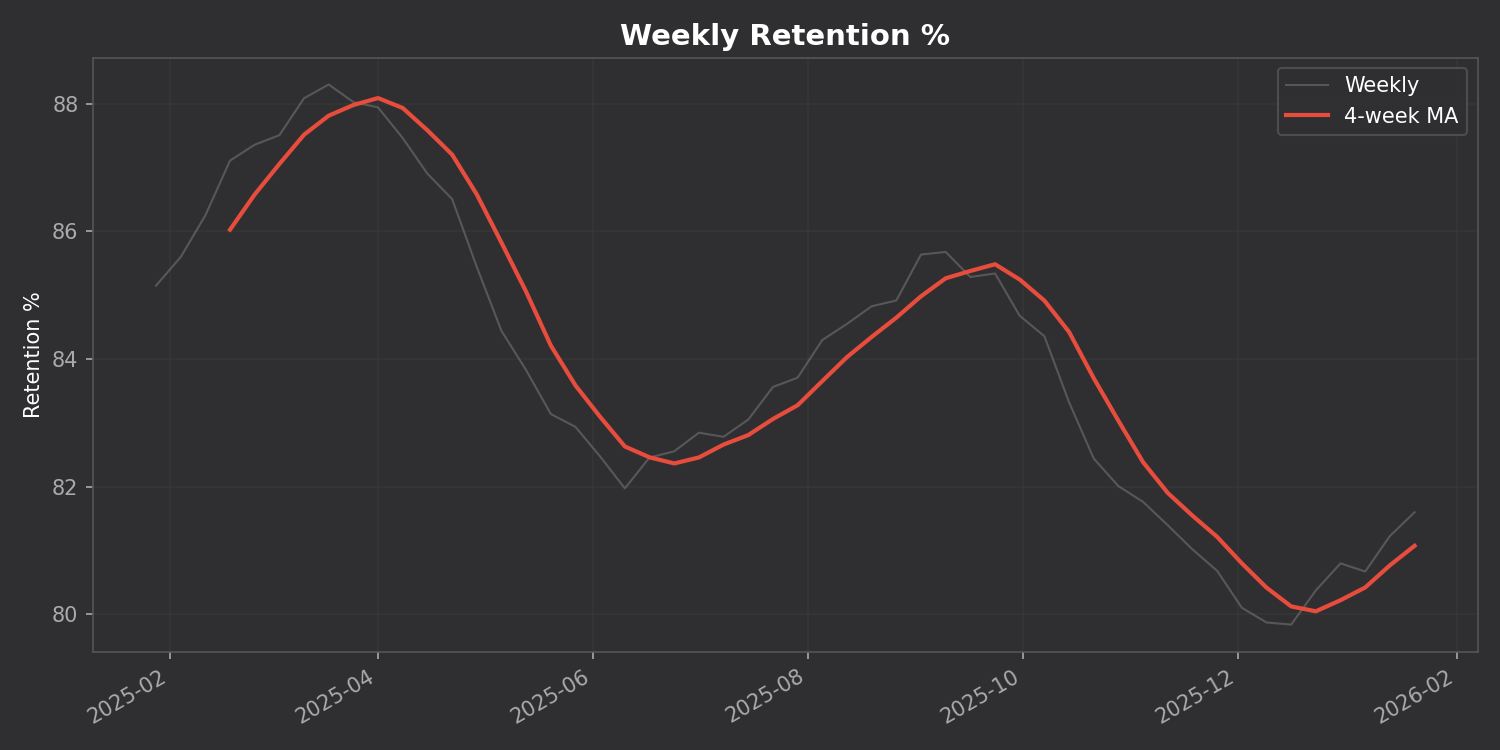
There are several statistics addons for Anki already – Review Heatmap, More Overview Stats, True Retention. They’re great for basic numbers. But none of them answer questions like:
Is my retention trending up or down over time?
What’s my weekly study pattern? Do I study more on weekends?
Which days were unusually productive (or lazy)?
How are my card intervals growing over months?
ankiR Stats answers all of these using the same statistical techniques data scientists use.
Features
📊 Time Series Charts
Track your retention, reviews, and intervals over time with a 4-week moving average to smooth out the noise:
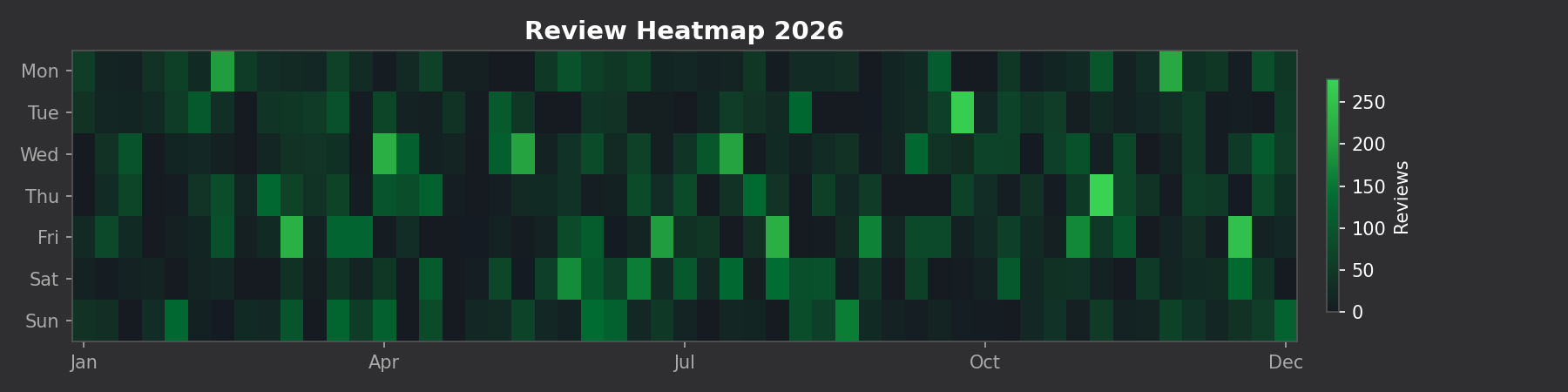
🗓️ GitHub-style Heatmap
See your entire year of reviews at a glance:
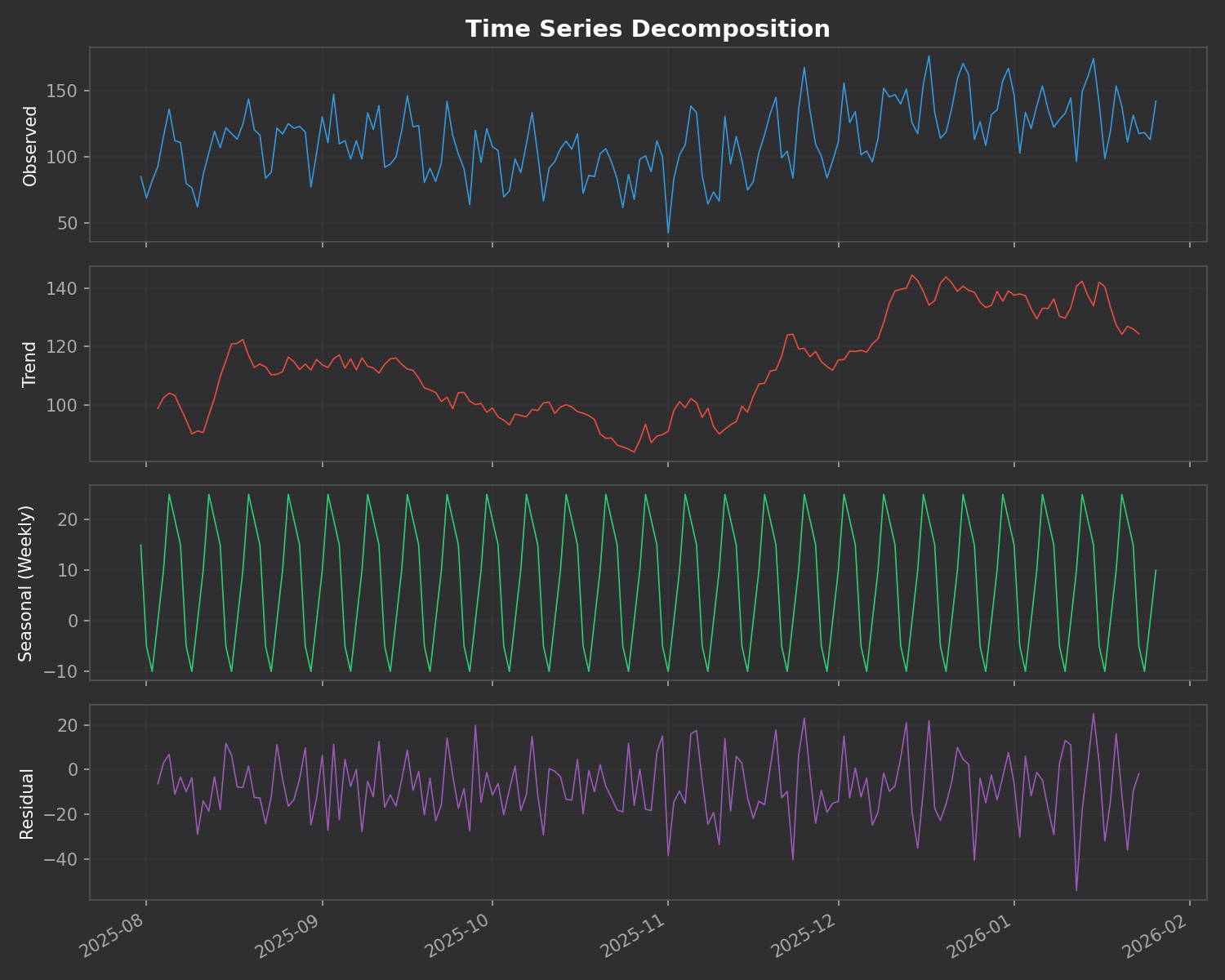
🔬 Time Series Decomposition
This is the killer feature. The addon breaks down your daily reviews into three components:
Trend – Are you studying more or less over time?
Seasonal – Your weekly pattern (which days you study most)
Residual – Random variation that doesn’t fit the pattern
⚠️ Anomaly Detection
The addon automatically finds unusual study days using z-score analysis. Days where you studied way more (or less) than normal are flagged with their statistical significance.
No Dependencies
Unlike many addons that require you to install Python packages, ankiR Stats uses web-based charts (Chart.js). It works out of the box on Windows, Mac, and Linux.
Installation
Open Anki
Go to Tools → Add-ons → Get Add-ons
Enter code: 419954163
Restart Anki
Access via Tools → ankiR Stats
Based on ankiR
This addon is a Python port of key features from ankiR, an R package I developed for comprehensive Anki analytics. The R package has 91 functions including forecasting, autocorrelation analysis, and FSRS integration – if you want even deeper analysis, check it out.
Open Source
The addon is open source and available on GitHub. Issues and contributions welcome!
Unlock insights from your spaced repetition learning journey
If you’re serious about learning, chances are you’ve encountered Anki—the powerful, open-source flashcard application that uses spaced repetition to help you remember anything. Whether you’re studying medicine, languages, programming, or any other subject, Anki has likely become an indispensable part of your learning toolkit.
But have you ever wondered what stories your flashcard data could tell? How your review patterns have evolved over time? Which decks demand the most cognitive effort? That’s exactly why I created ankiR.
What is ankiR?
ankiR is an R package that lets you read, analyze, and visualize your Anki collection data directly in R. Under the hood, Anki stores all your notes, cards, review history, and settings in a SQLite database. ankiR provides a clean, user-friendly interface to access this treasure trove of learning data.
Installation
ankiR is available on CRAN and R-universe, making installation straightforward:
Bug reports: Feel free to open issues on the package repository
Related Projects
If you’re interested in spaced repetition and R, you might also want to check out:
FSRS: The Free Spaced Repetition Scheduler algorithm, which Anki now supports natively
anki-snapshot: Git-based version control for Anki collections
Conclusion
Your Anki reviews represent countless hours of deliberate practice. With ankiR, you can finally extract meaningful insights from that data. Whether you’re a medical student tracking board exam prep, a language learner monitoring vocabulary acquisition, or a researcher studying memory, ankiR gives you the tools to understand your learning at a deeper level.
Give it a try, and let me know what insights you discover in your own data!
ankiR is open source and contributions are welcome. Happy learning!
As someone who uses Anki extensively for medical studies, I’ve always been fascinated by the algorithms that power spaced repetition. When the FSRS (Free Spaced Repetition Scheduler) algorithm emerged as a more accurate alternative to Anki’s traditional SM-2, I wanted to bring its power to the R ecosystem for research and analysis.
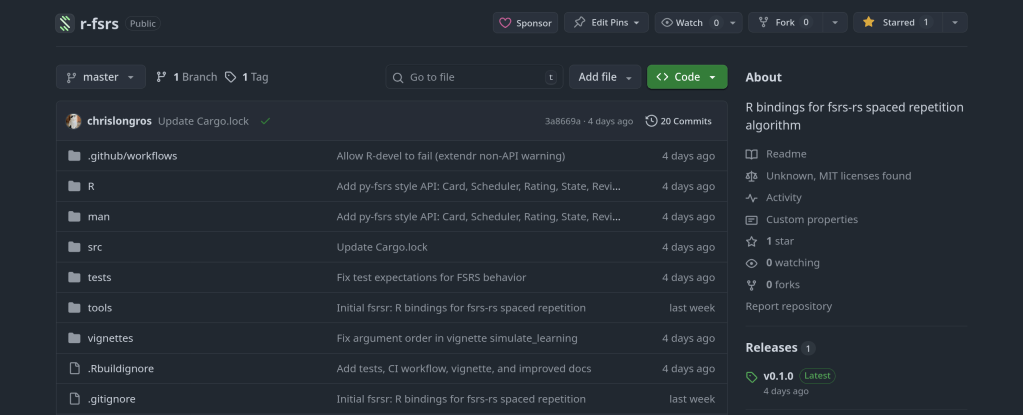
The result is rfsrs — R bindings for the fsrs-rs Rust library, now available on r-universe.
Install it now: install.packages("rfsrs", repos = "https://chrislongros.r-universe.dev")
What is FSRS?
FSRS is a modern spaced repetition algorithm developed by Jarrett Ye that models memory more accurately than traditional algorithms. It’s based on the DSR (Difficulty, Stability, Retrievability) model of memory:
Stability — How long a memory will last (in days) before dropping to 90% retrievability
Difficulty — How hard the material is to learn (affects stability growth)
Retrievability — The probability of recalling the memory at any given time
FSRS-6, the latest version, uses 21 optimizable parameters that can be trained on your personal review history to predict optimal review intervals with remarkable accuracy.
The Rating Scale
FSRS uses a simple 4-point rating scale after each review:
1
Again
Blackout
2
Hard
Struggled
3
Good
Correct
4
Easy
Effortless
Why Rust + R?
The reference implementation of FSRS is written in Rust (fsrs-rs), which provides excellent performance and memory safety. Rather than rewriting the algorithm in R, I used rextendr to create native R bindings to the Rust library.
This approach offers several advantages:
Performance — Native Rust speed for computationally intensive operations
Correctness — Uses the official, well-tested implementation
Maintainability — Updates to fsrs-rs can be easily incorporated
Type Safety — Rust’s compiler catches errors at build time
library(rfsrs)

# Get the 21 default FSRS-6 parameters
params <- fsrs_default_parameters()

# Create initial memory state (rating: Good)
state <- fsrs_initial_state(rating = 3)
# $stability: 2.3065
# $difficulty: 2.118104
Tracking Memory Decay
# How well will you remember?
for (days in c(1, 7, 30, 90)) {
  r <- fsrs_retrievability(state$stability, days)
  cat(sprintf("Day %2d: %.1f%%\n", days, r * 100))
}
# Day  1: 95.3%
# Day  7: 76.4%
# Day 30: 49.7%
# Day 90: 26.5%
Note: Stability of 2.3 days means memory drops to 90% retrievability after 2.3 days. This increases with each successful review.
Use Cases for R
Research — Analyze spaced repetition data with R’s statistical tools
Visualization — Plot memory decay curves with ggplot2
Integration with ankiR — Combine with ankiR to analyze your Anki collection
Custom schedulers — Build spaced repetition apps in R/Shiny
Building Rust + R Packages
The rextendr workflow:
Create package with usethis::create_package()
Run rextendr::use_extendr()
Write Rust with #[extendr] macros
Run rextendr::document()
Build and check
Windows builds: Cross-compiling Rust for Windows can be tricky. My r-universe builds work on Linux and macOS but fail on Windows. Windows users can install from source with Rust installed.
I’ve released anki-snapshot, a tool that brings proper version control to your Anki flashcard collection. Every change to your notes is tracked in git, giving you full history, searchable diffs, and the ability to see exactly what changed and when.
The Problem
Anki’s built-in backup system saves complete snapshots of your database, but it doesn’t tell you what changed. If you accidentally delete a note, modify a card incorrectly, or want to see how your deck evolved over time, you’re stuck comparing opaque database files.
The Solution
anki-snapshot exports your Anki collection to human-readable text files and commits them to a git repository. This means you get:
Full history: See every change ever made to your collection
Meaningful diffs: View exactly which notes were added, modified, or deleted
Search through time: Find when a specific term appeared or disappeared
Easy recovery: Restore individual notes from any point in history
How It Works
The tool reads your Anki SQLite database and exports notes and cards to pipe-delimited text files. These files are tracked in git, so each time you run anki-snapshot, any changes are committed with a timestamp.
~/anki-snapshot/
├── .git/
├── notes.txt      # All notes: id|model|fields...
├── cards.txt      # All cards: id|note_id|deck|type|queue|due|ivl...
└── decks.txt      # Deck information
Commands
Command
Description
anki-snapshot
Export current state and commit to git
anki-diff
Show changes since last snapshot
anki-log
Show commit history with stats
anki-search "term"
Search current notes for a term
anki-search "term" --history
Search through all git history
anki-restore <commit> <note_id>
Restore a specific note from history
Example: Tracking Changes
After editing some cards in Anki, run the snapshot and see what changed:
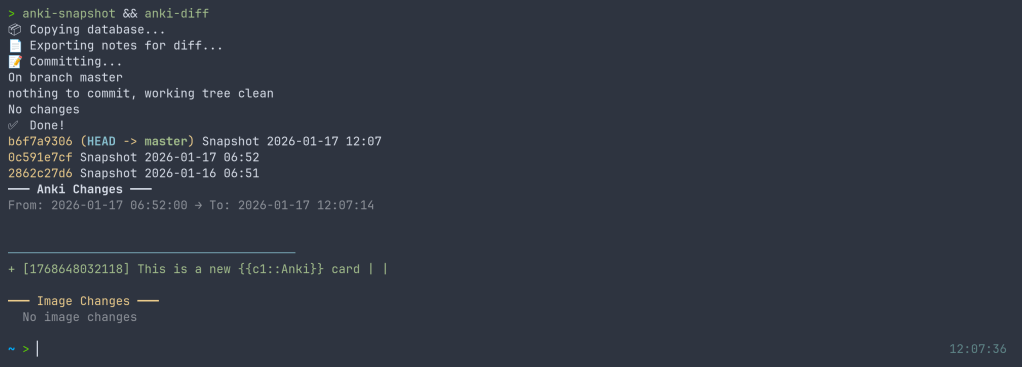
$ anki-snapshot
[main a3f2b1c] Snapshot 2026-01-14 21:30:45
 1 file changed, 3 insertions(+), 1 deletion(-)

$ anki-diff
━━━ Changes since last snapshot ━━━

Modified notes: 2
+ [1462223862805] Which antibodies are associated with Hashimoto...
− [1462223862805] Which antibodies are associated with Hashimoto...

New notes: 1
+ [1767170915030] Germline polymorphisms of the ATPase 6 gene...
Example: Searching History
Find when “mitochondria” was added or modified across your entire collection history:
$ anki-search "mitochondria" --history

commit e183cea7b3e36ad8b8faf7ca9d5eb8ca44d5bb5e
Date:   Tue Jan 13 22:43:47 2026 +0100
+ [1469146863262] If a disease has a mitochondrial inheritance pattern...
+ [1469146878242] Mitochondrial diseases often demonstrate variable expression...

commit 41c25a53471fc72a520d2683bd3defd6c0d92a88
Date:   Tue Jan 13 22:34:48 2026 +0100
− [1469146863262] If a disease has a mitochondrial inheritance pattern...
Integration with Anki
For seamless integration, you can hook the snapshot into your Anki workflow. I use a wrapper script that runs the snapshot automatically when closing Anki:
$ anki-wrapper # Opens Anki, snapshots on close
Or add it to your shell aliases to run before building/syncing your deck.
Installation
The tool is available on the AUR for Arch Linux users:
yay -S anki-snapshot
Or install manually:
git clone https://github.com/chrislongros/anki-snapshot-tool
cd anki-snapshot-tool
./install.sh
Requires: bash, git, sqlite3
Why Not Just Use Anki’s Backups?
Anki’s backups are great for disaster recovery, but they’re binary blobs. You can’t:
See what changed between two backups without restoring them
Search for when specific content was added
Selectively restore individual notes
Track your collection’s evolution over months or years
With git-based snapshots, your entire editing history becomes searchable, diffable, and recoverable.
I’ve just released fsrsr, an R package that provides bindings to fsrs-rs, the Rust implementation of the Free Spaced Repetition Scheduler (FSRS) algorithm. This means you can now use the state-of-the-art spaced repetition algorithm directly in R without the maintenance burden of a native implementation.
What is FSRS?
FSRS is a modern spaced repetition algorithm that outperforms traditional algorithms like SM-2 (used in Anki’s default scheduler). It uses a model based on the DSR (Difficulty, Stability, Retrievability) framework to predict memory states and optimize review intervals for long-term retention.
Why Bindings Instead of Native R?
Writing and maintaining a native R implementation of FSRS would be challenging:
The algorithm involves complex mathematical models that evolve with research
Performance matters when scheduling thousands of cards
Keeping pace with upstream changes requires ongoing effort
Here’s a simple example showing the core workflow:
library(fsrsr)

# Initialize a new card with a "Good" rating (3)
state <- fsrs_initial_state(3)
# $stability: 3.17
# $difficulty: 5.28

# After reviewing 3 days later with "Good" rating
new_state <- fsrs_next_state(
  stability = state$stability,
  difficulty = state$difficulty,
  elapsed_days = 3,
  rating = 3
)

# Calculate next interval for 90% target retention
interval <- fsrs_next_interval(new_state$stability, 0.9)
# Returns: days until next review

# Check recall probability after 5 days
prob <- fsrs_retrievability(new_state$stability, 5)
# Returns: 0.946 (94.6% chance of recall)
Research: Analyze spaced repetition data using R’s statistical tools
Custom SRS apps: Build R Shiny applications with proper scheduling
Simulation: Model learning outcomes under different review strategies
Data analysis: Process Anki export data with accurate FSRS calculations
Technical Details
The package uses extendr to generate R bindings from Rust code. The actual FSRS calculations happen in Rust via the fsrs-rs library (v2.0.4), with results passed back to R as native types.
A journey through packaging Python libraries for spaced repetition and Anki deck generation across multiple platforms.
As someone passionate about both medical education tools and open-source software, I recently embarked on a project to make several useful Python libraries available as native packages for FreeBSD and Arch Linux. This post documents the process and shares what I learned along the way.
The Motivation
Spaced repetition software like Anki has become indispensable for medical students and lifelong learners. However, the ecosystem of tools around Anki—libraries for generating decks programmatically, analyzing study data, and implementing scheduling algorithms—often requires manual installation via pip. This creates friction for users and doesn’t integrate well with system package managers.
My goal was to package three key Python libraries:
genanki – A library for programmatically generating Anki decks
fsrs – The Free Spaced Repetition Scheduler algorithm (used in Anki and other SRS apps)
ankipandas – A library for analyzing Anki collections using pandas DataFrames
Arch Linux User Repository (AUR)
The AUR is a community-driven repository for Arch Linux users. Creating packages here involves writing a PKGBUILD file that describes how to fetch, build, and install the software.
python-fsrs 6.3.0
The FSRS (Free Spaced Repetition Scheduler) algorithm represents the cutting edge of spaced repetition research. Version 6.x brought significant API changes, including renaming the main FSRS class to Scheduler.
genanki allows developers to create Anki decks programmatically—perfect for generating flashcards from databases, APIs, or other structured data sources.
FreeBSD’s ports system is more formal than the AUR, with stricter guidelines and a review process. Ports are submitted via Bugzilla and reviewed by committers before inclusion in the official ports tree.
py-genanki Port
Creating a FreeBSD port required several steps:
Setting up the port skeleton – Creating the Makefile, pkg-descr, and distinfo files
Handling dependencies – Mapping Python dependencies to existing FreeBSD ports
Patching setup.py – Removing the pytest-runner build dependency which doesn’t exist in FreeBSD ports
Testing the build – Running make and make install in a FreeBSD environment
One challenge was that genanki’s setup.py required pytest-runner as a build dependency, which doesn’t exist in FreeBSD ports. The solution was to create a patch file that removes this requirement:
One of the biggest challenges in packaging is mapping upstream dependencies to existing packages in the target ecosystem. For FreeBSD, this meant:
Searching /usr/ports for existing Python packages
Understanding the @${PY_FLAVOR} suffix for Python version flexibility
Discovering hidden dependencies (like chevron) that weren’t immediately obvious from the package metadata
Build System Quirks
Python packaging has evolved significantly, with projects using various combinations of:
setup.py with setuptools
pyproject.toml with various backends (setuptools, flit, hatch, poetry)
Legacy setup_requires patterns that don’t translate well to system packaging
Creating patches to work around these issues is a normal part of the porting process.
Testing Across Platforms
Running a FreeBSD VM (via VirtualBox) proved essential for testing ports before submission. The build process can reveal missing dependencies, incorrect paths, and other issues that only appear in the actual target environment.
Summary
Package
Version
AUR
FreeBSD
python-fsrs / py-fsrs
6.3.0
✅ Published
📝 Submitted
python-genanki / py-genanki
0.13.1
✅ Published
📝 Submitted
python-ankipandas
0.3.15
✅ Published
🔜 Planned
Get Involved
If you use these tools on Arch Linux or FreeBSD, I’d love to hear your feedback. And if you’re interested in contributing to open-source packaging:
If you use Anki for spaced repetition learning, you’ve probably wondered about your study patterns. How many cards have you reviewed? What’s your retention like? Which cards are giving you trouble?
I built ankiR to make this easy in R.
The Problem
Anki stores everything in a SQLite database, but accessing it requires writing raw SQL queries. Python users have ankipandas, but R users had nothing—until now.
Installation
# From GitHub
remotes::install_github("chrislongros/ankiR")

# Arch Linux (AUR)
yay -S r-ankir
Basic Usage
ankiR auto-detects your Anki profile and provides a tidy interface:
library(ankiR)

# See available profiles
anki_profiles()

# Load your data as tibbles
notes <- anki_notes()
cards <- anki_cards()
reviews <- anki_revlog()

# Quick stats
nrow(notes)    # Total notes
nrow(cards)    # Total cards
nrow(reviews)  # Total reviews
FSRS Support
The killer feature: ankiR extracts FSRS parameters directly from your collection.
stability – memory stability in days (how long until you forget)
difficulty – card difficulty on a 1-10 scale
retention – your target retention rate (typically 0.9 = 90%)
decay – the decay parameter used in calculations
Example: Visualize Your Card Difficulty
library(ankiR)
library(dplyr)
library(ggplot2)

anki_cards_fsrs() |>
  filter(!is.na(difficulty)) |>
  ggplot(aes(difficulty)) +
  geom_histogram(bins = 20, fill = "steelblue") +
  labs(
    title = "Card Difficulty Distribution",
    x = "Difficulty (1-10)",
    y = "Count"
  ) +
  theme_minimal()
Example: Stability vs Difficulty
anki_cards_fsrs() |>
  filter(!is.na(stability)) |>
  ggplot(aes(difficulty, stability)) +
  geom_point(alpha = 0.3, color = "steelblue") +
  scale_y_log10() +
  labs(
    title = "Memory Stability vs Card Difficulty",
    x = "Difficulty",
    y = "Stability (days, log scale)"
  ) +
  theme_minimal()
Example: Review History Over Time
anki_revlog() |>
  count(review_date) |>
  ggplot(aes(review_date, n)) +
  geom_line(color = "steelblue") +
  geom_smooth(method = "loess", se = FALSE, color = "red") +
  labs(
    title = "Daily Review History",
    x = "Date",
    y = "Reviews"
  ) +
  theme_minimal()
Calculate Retrievability
You can also calculate the probability of recalling a card after N days:
# What's my retention after 7 days for a card with 30-day stability?
fsrs_retrievability(stability = 30, days_since_review = 7)
# Returns ~0.93 (93% chance of recall)






 /root
/root 